www.it-connect.fr

SharePoint OTP Ends in 2026: What It Means for IT and External Sharing Alternatives
Starting in July 2026, your partners, contractors, and customers who access your SharePoint or OneDrive files with a simple code received by email may run into an "Access denied" message. The reason: Microsoft is removing one-time code authentication (called SharePoint One-Time Passcode, or SPO OTP) for external sharing, in favor of Microsoft Entra B2B guest accounts. What is the impact of this decision? What is Microsoft’s timeline? Is there a sovereign solution to meet this need? Let’s answer these questions.
This change is not a minor one; it is real and impactful. Think of everyday situations: an agency receiving large files sent by marketing, an external candidate submitting an application file, or a customer accessing your response to an RFP. All of these exchanges often rely on OTP because it is simpler. The problem is that they will stop if the recipient does not have a guest account in your Microsoft 365 tenant.
In this article, we will review exactly what Microsoft is changing, separate fact from marketing shorthand, detail the official timeline, and then examine migration options depending on your use cases: moving to Entra B2B for recurring collaboration, and using file transfer solutions controlled by IT for one-off exchanges. To help you, we will end with a checklist to follow during summer 2026.
This article includes commercial content for LockSelf.
OTP (One-Time Passcode) is an authentication mechanism Microsoft has offered for years to give access to a SharePoint or OneDrive file to someone who does not have a Microsoft account. This is the mechanism targeted by Microsoft’s decision.
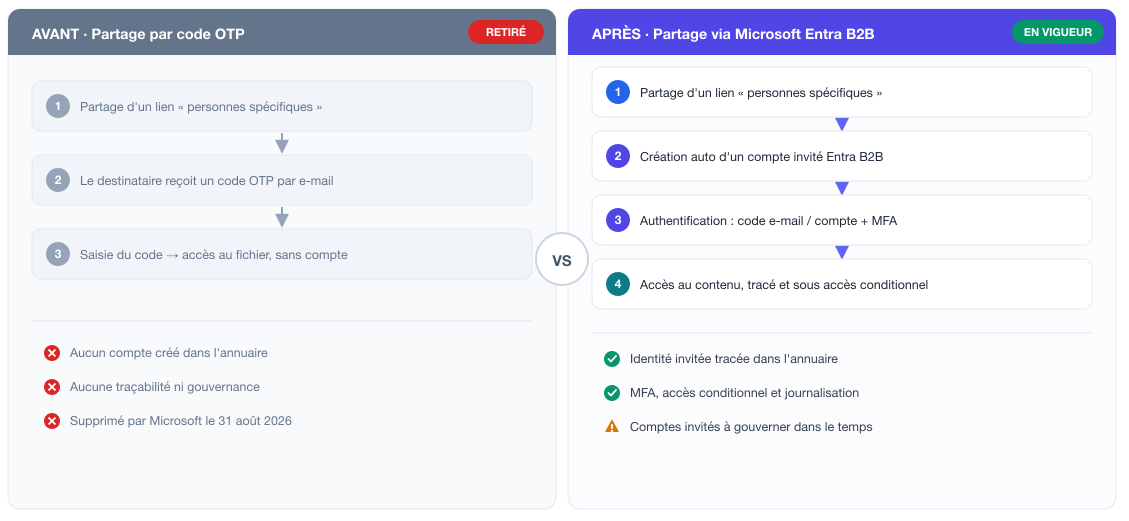
The principle is simple: an employee shares a "specific people" link, the external recipient receives a temporary code by email, enters it, and accesses the document for the duration of the session. No guest account is created in the directory, no invitation needs to be accepted, and no password needs to be remembered.
This simplicity made OTP successful! Many organizations used it to steer users away from consumer tools such as WeTransfer or Dropbox, thanks to a feature already built into Microsoft 365.
The downside is the lack of governance. Access granted through OTP does not appear as an identity in the directory. It is therefore difficult to know exactly who has access to what, since when, and to apply the same controls as those applied to internal users (conditional access policies, access reviews, centralized logging). That is precisely what Microsoft is pointing to and what justifies this decision.
Note: technically, Microsoft is not removing the notion of one-time codes itself. What is disappearing is OTP authentication at the SharePoint Online level (SPO OTP). Guest authentication now goes through Microsoft Entra B2B, which can also use a one-time code sent by email as the default method for guests. The difference has a real impact: with Entra B2B, the recipient exists as a guest identity in your directory, whereas SPO OTP created no object at all. That is the governance issue that changes everything.
The removal of SPO OTP is part of a roadmap that began several years ago. SharePoint and OneDrive integration with Entra B2B was offered as an opt-in in 2021, then enabled automatically for new tenants starting in 2023. In July 2025, SPO OTP had already been deprecated for tenants that had chosen to enable B2B integration. So by early 2026, only older tenants that had remained on the historical OTP model were still using it: which represented thousands of companies, since Microsoft 365 has been widely used for years.
Microsoft’s stated goal is to unify external collaboration around a single identity provider. By turning every external access into an Entra guest account. For those who want it, this makes it possible to apply to partners the same safeguards as internal accounts: conditional access, MFA requirements, Access Reviews, automatic expiration, B2B collaboration policies that allow or block certain domains, and logging in Entra logs.
Anyone who cares about security and governance knows this: a tracked and governed access is better than an anonymous OTP link with no audit trail.
This governance improvement comes with an operational cost, and it shifts to IT teams the burden of managing guest identities that did not previously exist (at least not in this context). For an organization that previously managed no guest accounts, the change is not neutral.
To summarize what is changing, the diagram below compares the old OTP code-based flow, now removed, with the new flow based on Microsoft Entra B2B.
The official timeline for the transition to Entra B2B
Microsoft documented this transition in notification MC1243549 in the Microsoft 365 Message Center. It gives a precise view of the upcoming milestones (and those already passed).
- July 2025: SPO OTP is deprecated for tenants that had already enabled Entra B2B integration. New sharing links for these tenants no longer use the historical OTP flow.
- Late April 2026: last window to manually enable Entra B2B integration before the automatic switch.
- May 2026: for all tenants, new external sharing invitations switch to Entra B2B. A guest account is automatically created via Invitation Manager when sharing. The
EnableAzureADB2BIntegrationsetting, which previously controlled this behavior, no longer has any effect, and the option to disable integration disappears. - July 2026: removal of SPO OTP begins. Old "specific people" links created through OTP begin returning access denied to recipients who do not have a matching Entra B2B guest account.
- August 31, 2026: removal is considered complete across all Microsoft 365 environments (commercial, government). Any external access then requires an Entra guest identity. There is no fallback to SPO OTP.
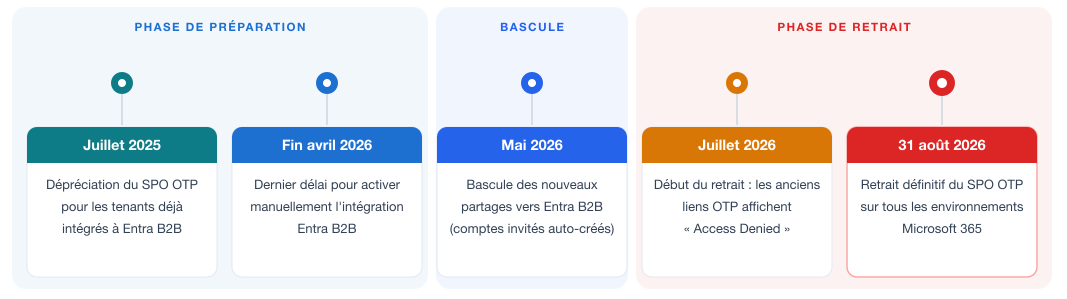
As Microsoft rolls out its roadmap, it is important to know that recipients who lose access receive no automatic notification, nor does the employee who originally shared the file. Some users will discover broken links only when they try to access a shared file.
What are the concrete impacts for your organization?
To understand these impacts, you need to visualize the new end-to-end sharing flow: what happens on the sender side, what the recipient experiences, and above all what the operation triggers in your tenant.
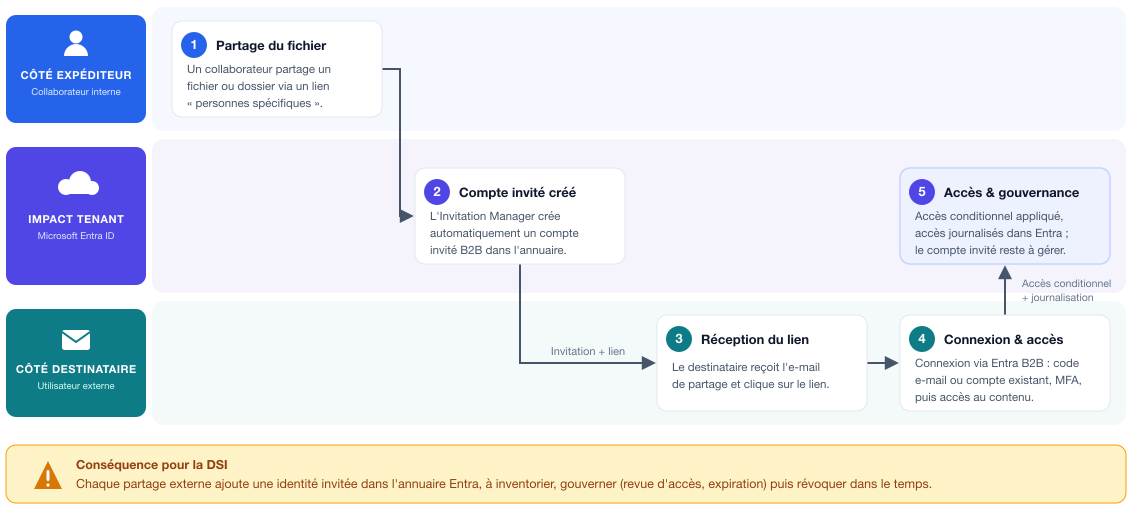
Note on the recipient experience:
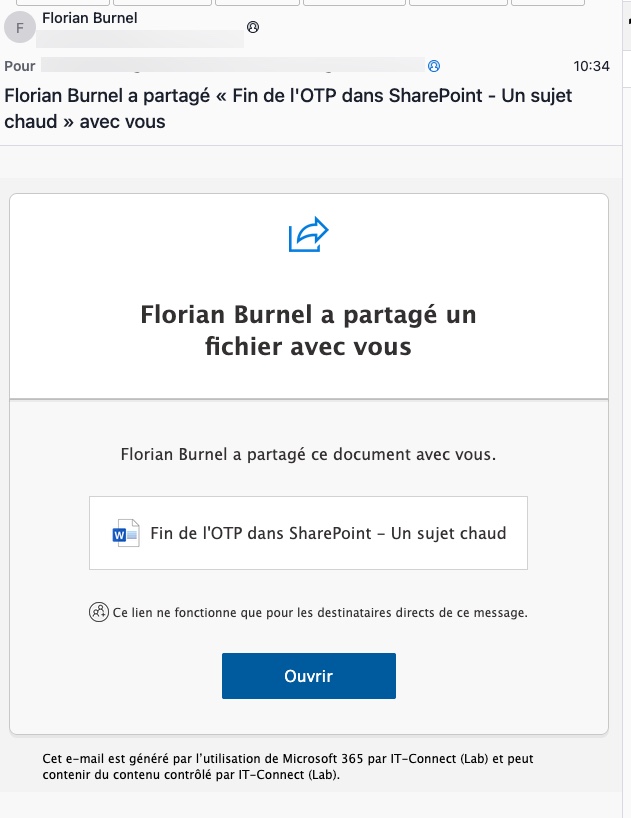
As soon as your user shares the file, the guest account is created in your directory. However, the invitation must first be accepted before access is granted. What happens next depends on your tenant configuration: if you do not enforce MFA for guests, a simple sign-in is enough, and one-time code authentication remains available in Entra for guests without a Microsoft account.
External access interruptions
The first effect is immediate: any workflow relying on an OTP link and whose recipient does not have a guest account stops working. To restore access, there are two options: proactively create a guest account for that recipient, or reshare the content (which triggers automatic account creation). You still need to have identified the affected links in advance.
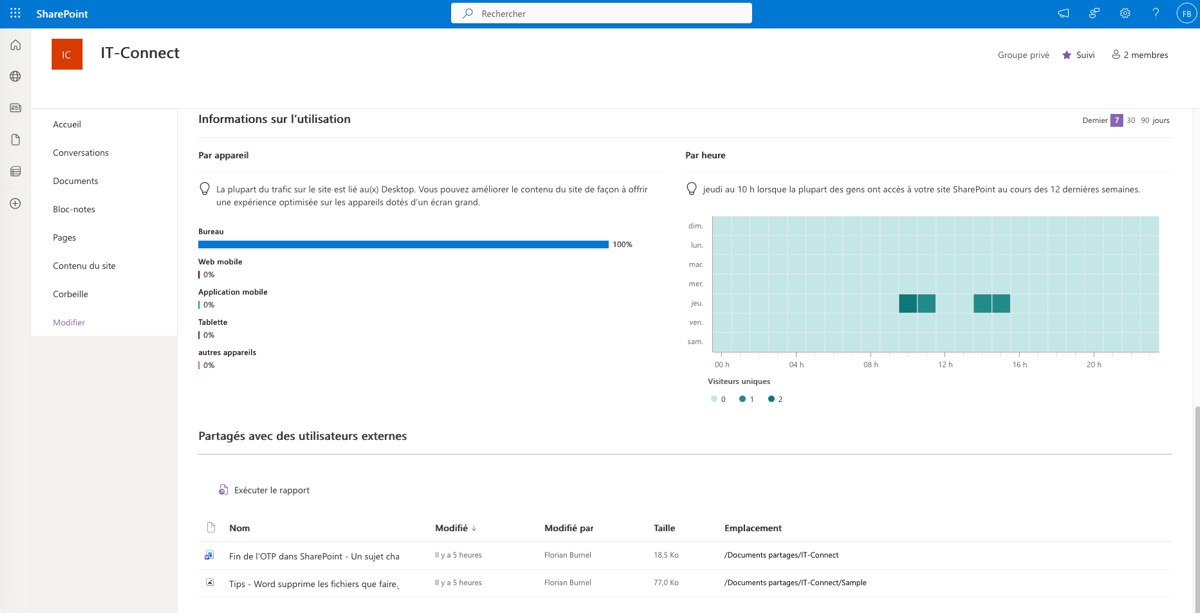
You can rely on SharePoint reports:
- Site report: Shared with external users (Open the relevant site > Settings menu > Site usage > Shared with external users section)
- Tenant reports "Data Access Governance" (Open the SharePoint admin center > Reports > Data Access Governance > Sharing links > Run the reports).
A proliferation of guest accounts to govern
Each one-off customer, each occasional contractor, each ad hoc contact now translates into a guest account in Entra ID. On paper, a routine file share is enough to create an identity. That needs to be kept in mind.
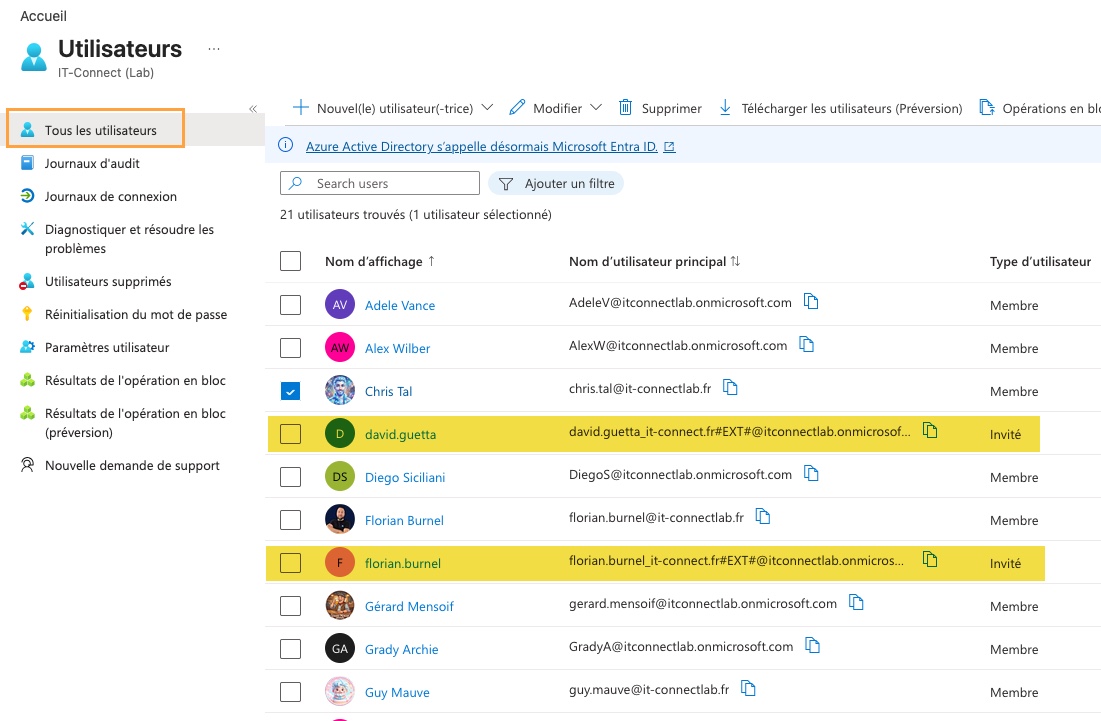
For organizations that exchange heavily with external parties, the volume can rise quickly. A tenant with more guest accounts than internal accounts? That is not impossible. And each guest account is an object that must be managed over time:
- Regular inventory of active guests and their access,
- Applying guest-specific conditional access policies,
- Restricting allowed domains through the B2B collaboration policy,
- Lifecycle management, supported by a site-level access expiration policy (how long access remains active, when to revoke it),
- Access reviews to clean up obsolete guests.
It is worth noting that the Entra External ID billing model includes 50,000 free monthly active guest users. Beyond that, external identities become billable. Not everyone will get there, but for very large organizations, that threshold is reachable. More importantly, Access Reviews rely on paid Entra licenses.
Otherwise, a more economical approach is to produce PowerShell reports to identify inactive guest accounts, or simply list them. I asked my colleague Claude to prepare a reporting script.
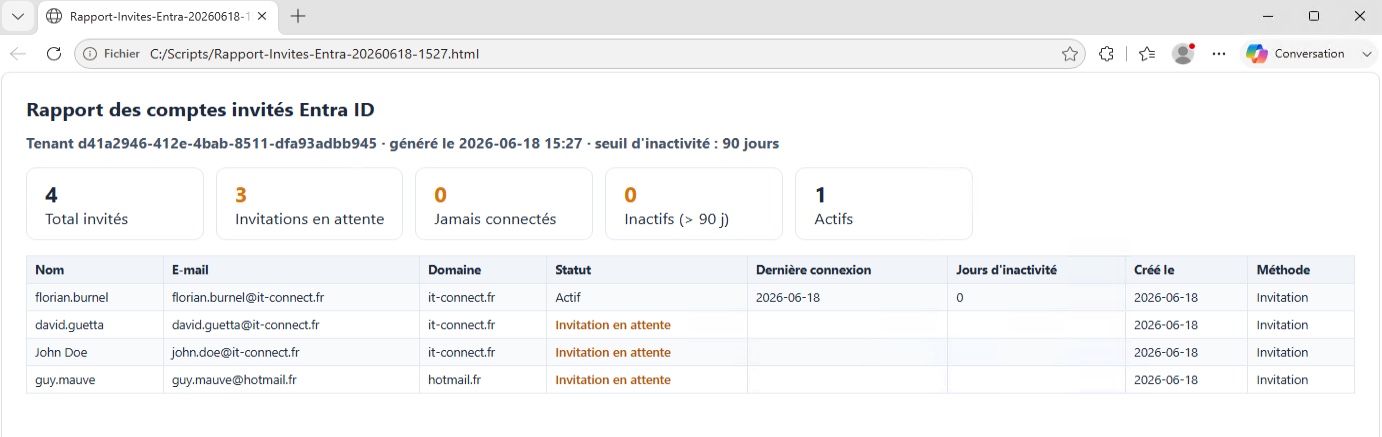
You will be able to download it from the GitHub repository and adapt it as needed (feel free to contribute directly to the repository).

The risk of shadow IT
The third effect is the most insidious. If your employees no longer have a simple way to share a file with an external contact, many will work around the issue on their own. The reflex is well known: WeTransfer, Google Drive, Dropbox. This shadow IT takes your data out of your controlled perimeter, without encryption suited to sensitive documents, without audit trail, and most often with hosting outside France.
The teams that spent time and energy fighting the "WeTransfer phenomenon" will have to be wary again. If nothing is planned, the removal of OTP can bring back exactly the same practices that were meant to be eliminated.
Microsoft Entra B2B: for your recurring partners
The move to Entra B2B should not be demonized, far from it. It is a good decision made by Microsoft, even if it comes with changes.
From now on, Entra B2B seems appropriate when collaboration is recurring and clearly identified: a partner you work with over time, a firm that regularly intervenes, a subsidiary or subcontractor integrated into your projects. In that case, the guest is meant to exist in the directory over the long term, and governance makes perfect sense.
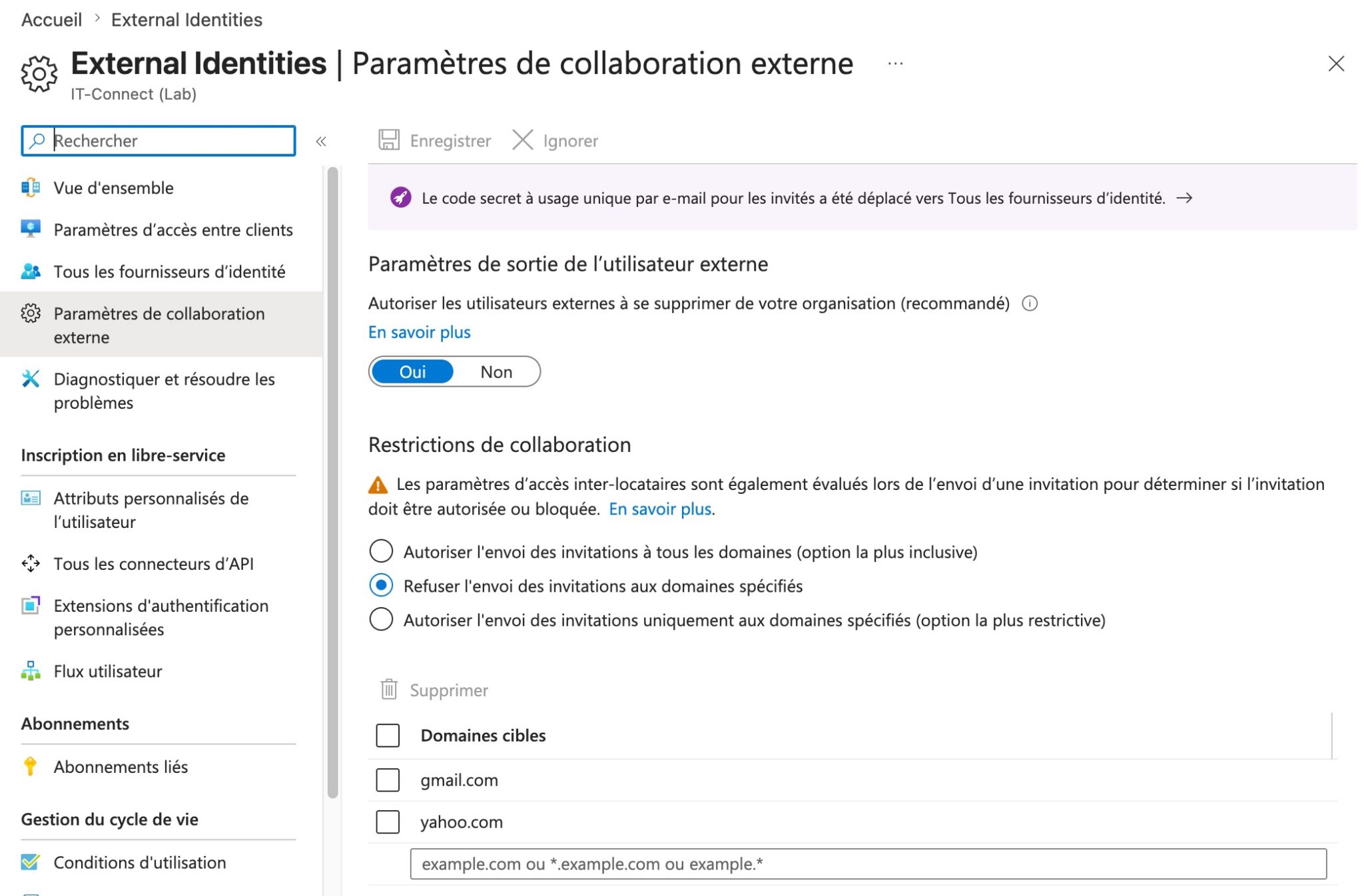
You could then configure external collaboration settings through Entra ID External Identities to restrict the domains allowed for guest accounts. If you choose this approach, you could allow only your partners’ email domains. This setting is also useful for limiting generic domains (gmail.com, yahoo.com, etc.) that are frequently used by attackers.
On the other hand, this Entra B2B-based approach has limits for anything occasional or short-lived: a one-time send to a recipient you will probably never see again, a few-day exchange in the context of an RFP, sharing a large file with a transient contact. Creating, governing, and then revoking a guest account for a one-shot exchange creates a disproportionate burden compared with the need. This is the kind of situation that is likely to add to the stock of dormant identities in your Entra ID directory.
For this second category of use case, a dedicated file transfer solution makes a lot of sense.
Alternatives for occasional external sharing
Consumer tools should be avoided for sensitive data
Before presenting a sovereign, professional-grade alternative, it is necessary to name the false good solutions. WeTransfer, Google Drive, or Dropbox will be the natural temptation for your employees: they know these tools, and they are the easy way to solve this problem without pain. But for sensitive or regulated documents, they raise several issues:
- Encryption that is absent or insufficient in free versions,
- The absence of proof of deposit and traceability that can truly be used for an audit,
- Hosting generally located outside France, and therefore not sovereign,
- The inability for IT to keep control over sharing policies: the perfect example of shadow IT.
In other words, these tools move the risk rather than address it. The challenge for IT is to offer a solution that is as easy to use as WeTransfer, but controlled by the organization itself.
LockTransfer: recreating the OTP experience in a controlled framework
LockTransfer is the secure file transfer solution from French vendor LockSelf, certified CSPN by ANSSI. Its value in the context of OTP’s end lies in a simple principle: allow any file to be sent to an external recipient without requiring them to create an account, whereas Entra B2B creates one automatically.
In other words, to keep it simple: you get back the experience that made SharePoint OTP strong, but in a solution that IT keeps under control. A few key facts about LockTransfer:
- Files are encrypted (AES-256 in CBC mode),
- Hosting is provided in France on Outscale and Scaleway infrastructure (with an On-Premise option if needed)
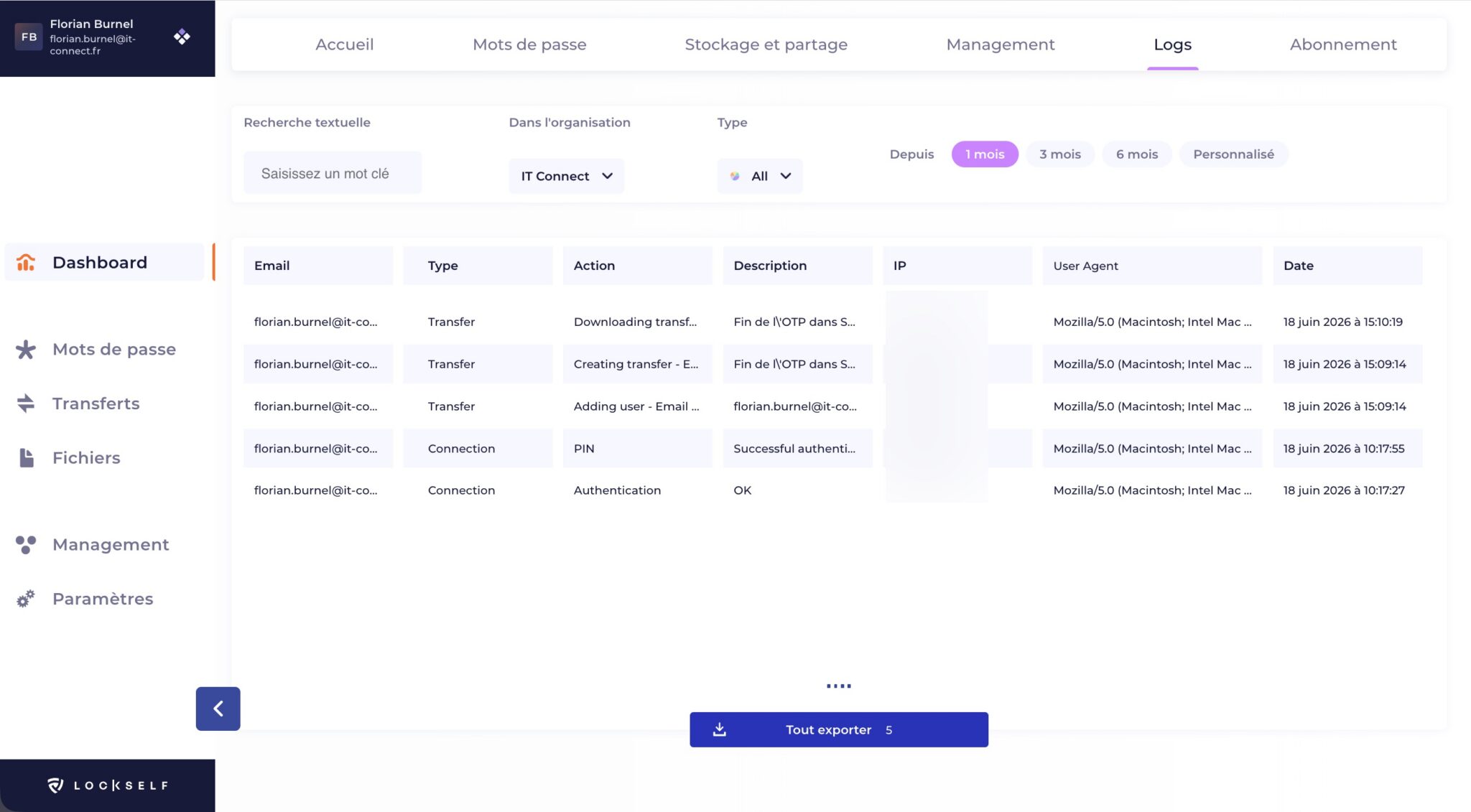
- Access traceability is preserved through logs and evidence generated by the tool (reports)
This is also worth mentioning in the context of current compliance topics: these are concrete arguments for NIS2 and DORA efforts. In particular, with features suited to business needs:
- Traceability and SIEM integration
LockTransfer also strengthens audit capabilities by giving security teams visibility into every exchange:
- Real-time notifications for every upload or download,
- A timestamped report for each transfer, serving as proof of deposit,
- An expiration date and a download quota configurable per transfer,
- Segmentation of deposits between recipients,
- Log forwarding to your SIEM, to centralize monitoring and trigger alerts with the rest of your IT environment.
The goal is not to replace Entra B2B, but to complement it: Entra for long-term, governed collaboration in the directory, and a dedicated transfer solution for one-off exchanges that you do not want to turn into guest accounts. This complementarity avoids both service disruption and external identity inflation.
LockSelf, okay. But what are the use cases?
- One-off sharing of large files
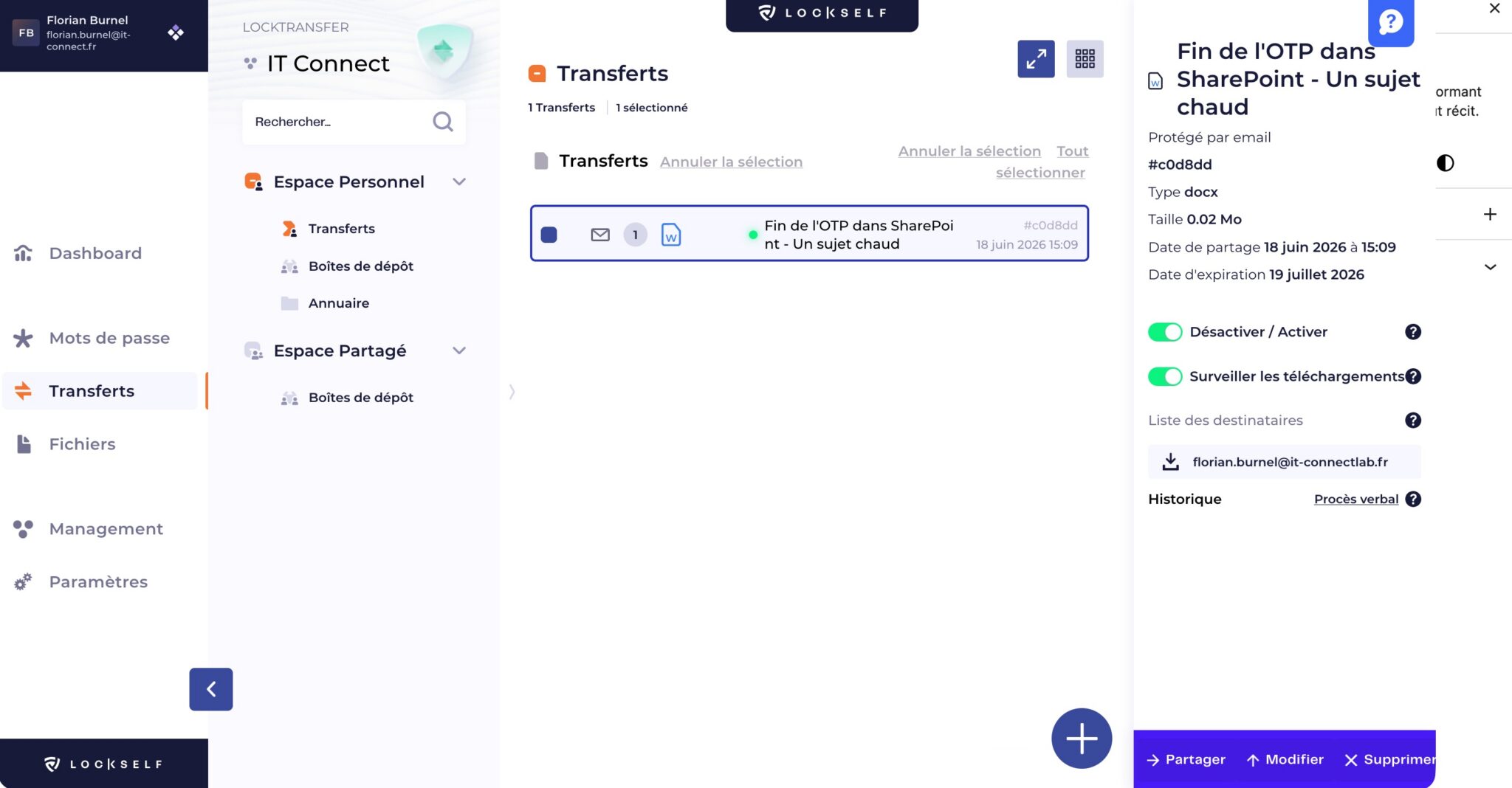
An employee needs to send a PDF, an office document (Word, Excel, etc.), or a video to an external recipient, outside any SharePoint or Teams space. The file is uploaded to LockTransfer, the recipient receives a secure link, and no guest account appears in your directory.
Recipient identity can be verified with a password delivered through a separate channel (phone, SMS), which acts as a second factor, or by a temporary token sent by email. The user uploading the file can choose (or IT can enforce a single sharing type for all users).
- Outlook integration
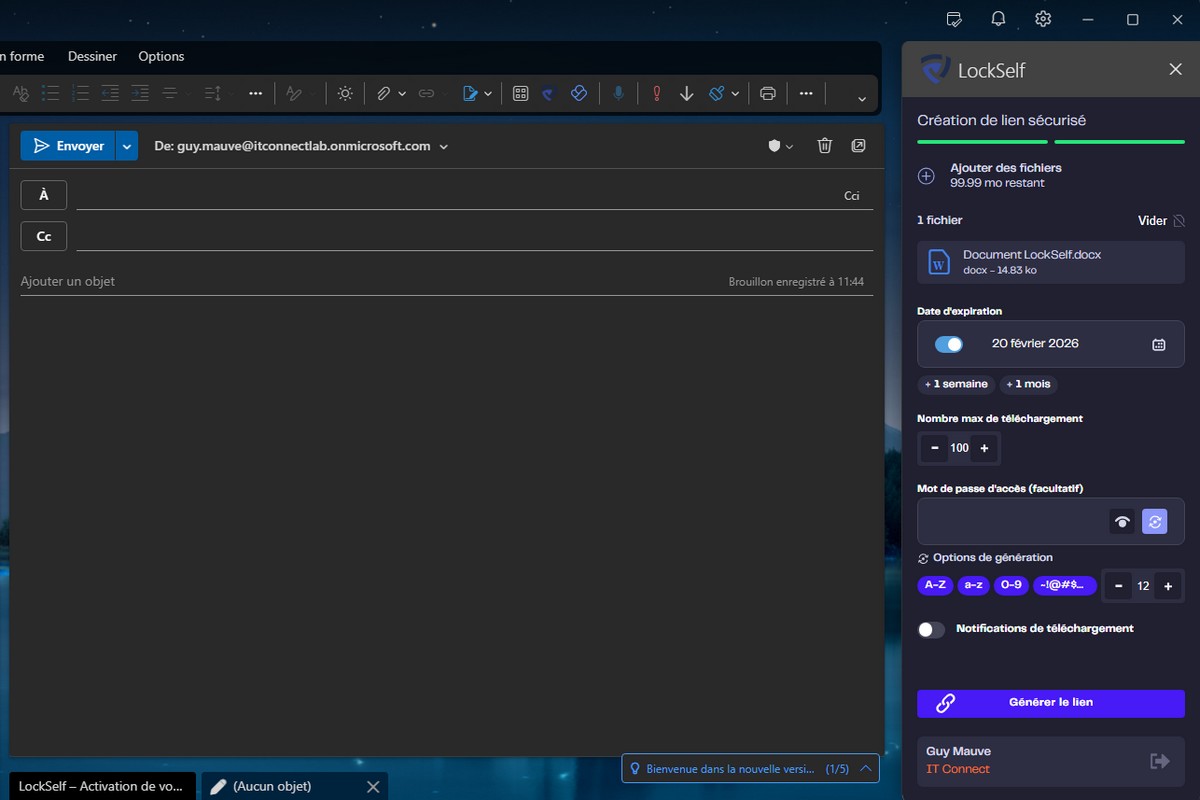
LockTransfer also includes an Outlook plugin. It is used directly from the email composition window in Outlook: the employee drag-and-drops their file, defines security options (expiration date, download quota, password), and an encrypted link is automatically inserted into the body of the message.
On the practical side: the user stays in their usual working environment and the recipient does not need a LockSelf account to receive the document, which reduces resistance to change on both sides of the exchange. In addition, LockTransfer ensures access to your download is logged: something that is impossible with a traditional attachment.
- Tenders and deliverable submission
For an RFP response, the recipient journey must be as smooth as possible: a customer who has to create an account or retrieve a password before even seeing your offer is starting from a bad place.
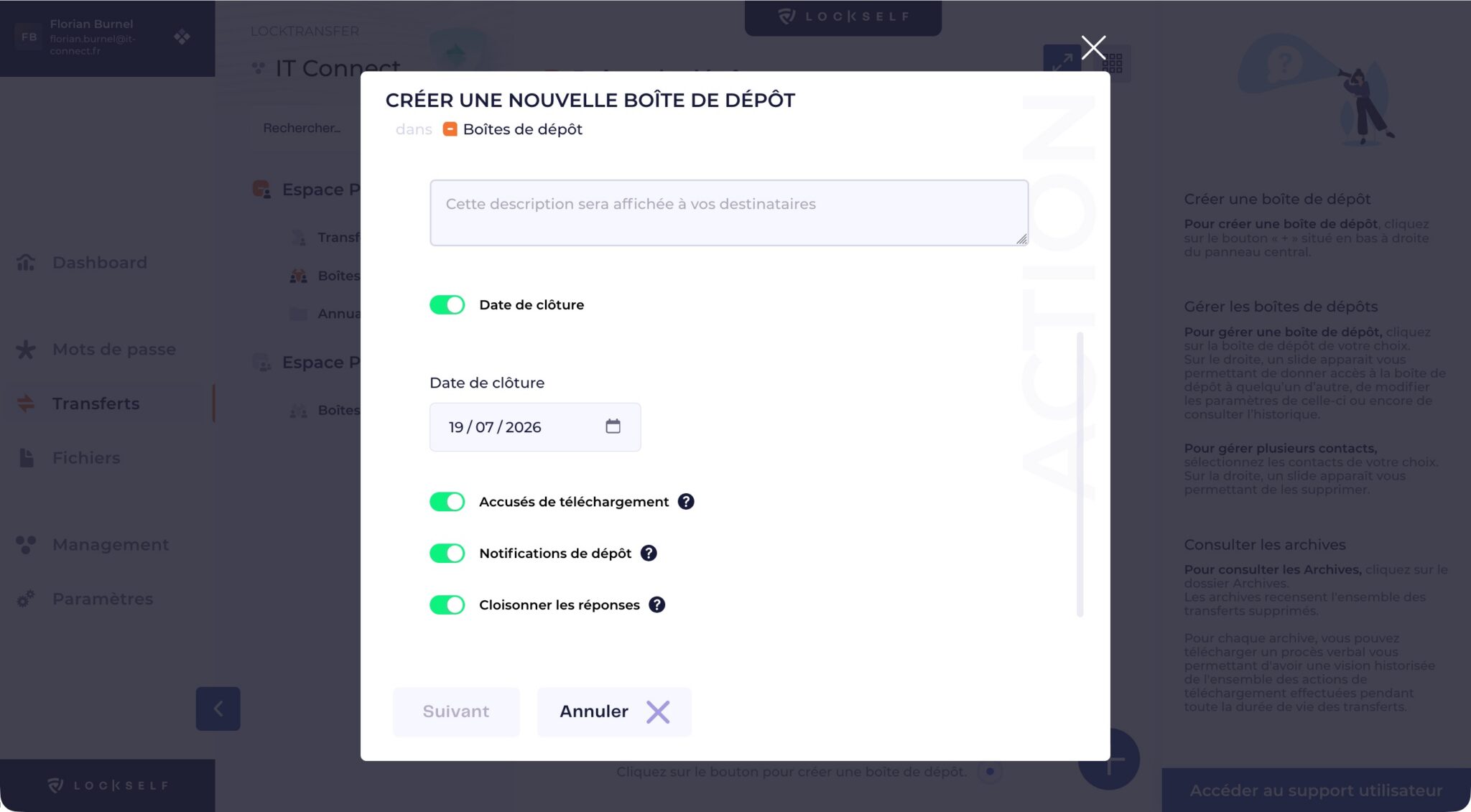
LockTransfer lets you create a secure drop box where the recipient can access the instructions and submit their response without an account. Responses from different bidders can be isolated, with each bidder seeing the instructions but not competitors’ submissions (otherwise, that would be a real problem, wouldn’t it?). The same mechanism applies to recruitment processes.
Checklist to complete before July 2026
As an IT director and CISO, here is the checklist of actions to take now to anticipate this change:
- Communicate internally. Inform users that some external sharing links will stop working and that they should not spontaneously switch to unapproved tools.
- Inventory existing OTP links. Use the SharePoint external sharing report to identify OTP guests without Entra B2B accounts and qualify the accesses that must be preserved.
- Decide, use case by use case, on the right channel. Reserve Entra B2B for recurring partners and direct occasional exchanges to a controlled transfer solution such as LockTransfer.
- Prepare guest governance. Review your conditional access policies applicable to guests, and define expiration rules.
- Check Entra settings. Make sure guest B2B OTP email remains enabled if you rely on it, and review your B2B collaboration policies (allowed or blocked domains).
- Equip occasional sharing. Deploy and promote a simple, sovereign alternative to stop shadow IT in its tracks.
To test the approach on your own use cases, LockTransfer offers a 14-day free trial. Follow this link to take advantage of it:
Conclusion
The removal of SPO OTP changes the way your employees share files externally, and it shifts to IT teams the burden of managing guest identities that did not previously exist. Data sharing is part of users’ daily work, so this will inevitably lead to a sharp increase in the number of guest accounts.
The right approach may be to segment: Entra B2B for durable, governed collaboration, and a dedicated, compliant transfer solution for one-off exchanges, in order to preserve an experience close to OTP.
If you were looking for a worthwhile topic to tackle this summer, here is one to put at the top of the list.