www.it-connect.fr

Proton Mail Rolls Out Post-Quantum Encryption: How to Enable It
Proton Mail can now protect your data with post-quantum encryption. This new feature, available as an optional upgrade for all users, is designed to help prepare today for the threat that future quantum computers will pose.
Preparing for the quantum threat
While today's quantum computers are not yet capable of breaking the encryption that protects our emails, the risk is taken very seriously by many vendors and service providers (and that's a very good thing). Since its early days, Proton Mail has used the OpenPGP standard with ECC and RSA encryption keys. These are well suited to today's computers and threats. However, the arrival of quantum computers could change everything, not least because of powerful mathematical algorithms such as Shor's algorithm.
"The biggest security transitions usually begin before the general public notices. By the time it becomes obvious to everyone, the organizations that waited are already behind.", Proton explains.
How does this new post-quantum protection work?
In a new blog post, Proton Mail announced the arrival of post-quantum cryptography (PQC) in its services. The good news is that this upgrade is available to all accounts, including free accounts. However, it is an optional upgrade: it is up to you to enable it.
Once the feature is enabled, Proton Mail generates post-quantum-compatible keys to protect newly encrypted emails. But note that there is no retroactive effect: this post-quantum protection will not apply to emails already in your inbox.
"As part of this work, we are also adding support for OpenPGP v6, the framework that makes it possible to use modern algorithms, including post-quantum cryptography.", Proton explains.
To enable post-quantum protection on your Proton Mail account, go to this page. You should see a new section with an activation button. Personally, I do not yet have access to this button on my account. But according to Proton's documentation, this is what it looks like:
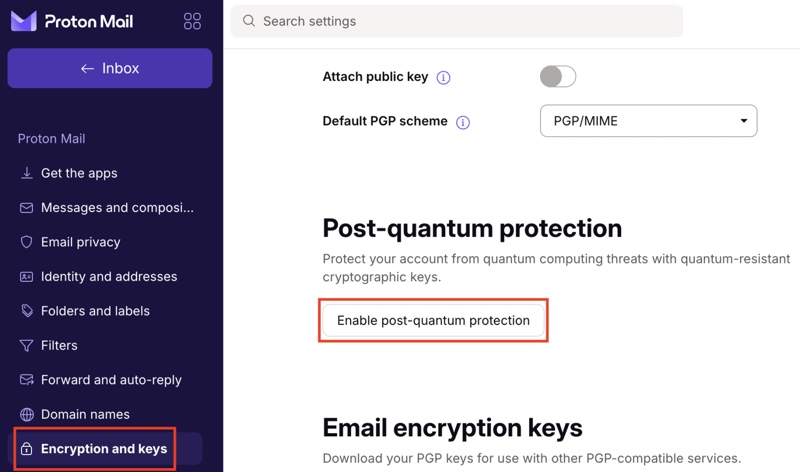
The new PQC keys are managed exactly the same way as your RSA or ECC keys. You can generate new ones later or mark them as obsolete and compromised.