www.it-connect.fr


Project Zenith: Microsoft Unveils a Windows 11 Edition for Developers and AI
Project Zenith is the name of the Windows 11 variant tailored for developers that Microsoft has just unveiled. Behind the name is a system that is clearly not meant for everyone, especially because your machine must have 64 GB of unified memory. Beyond that entry ticket, here’s what you need to know.
On September 4, 2026, Microsoft published an article on the Windows Developer Blog to introduce Project Zenith. Behind the name is a Windows experience designed for development environments in the age of AI, and above all, for machines in the developer-class.
Project Zenith is not a new version of Windows. It is a Windows 11 build preconfigured and tuned by manufacturers on certain new machines. There is also no indication that this will be a ready-to-use image available for download.
In any case, the hardware requirements are huge. If you already raised an eyebrow at the basic Windows 11 requirements, what will you think of the following? Microsoft requires at least 64 GB of unified memory and at least 250 GB/s of memory bandwidth. All of this is for AI, since the stated goal is to run models with more than 30 billion parameters locally, without a token counter running in the background.
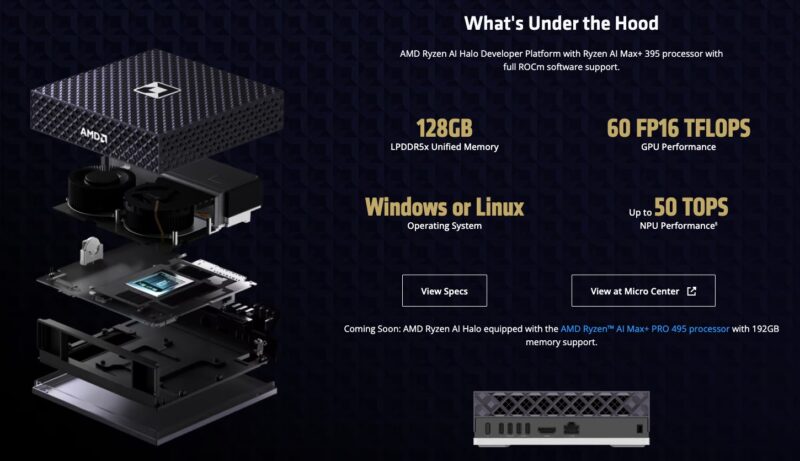
Microsoft did not choose the timing of this announcement by chance. Meanwhile, at IFA 2026 in Berlin, AMD introduced its Halo lineup, including the Ryzen AI Halo Developer Platform machine. This is a mini-PC already sold by AMD since this summer, powered by a Ryzen AI Max+ 395, with 128 GB of LPDDR5x unified memory and 256 GB/s of bandwidth. Project Zenith is therefore not landing on a brand-new machine, but it will be compatible with this system already available on the market. As for the price, the machine sells for $3,999.
Project Zenith: what Microsoft preinstalls and preconfigures
On these Project Zenith-compatible machines, what will Microsoft do? The Redmond company will install tools for you. Beyond Windows Terminal and Visual Studio Code, which will be pinned to the taskbar by default, Microsoft will install the following by default:
- Productivity and editing. Visual Studio Code, GitHub Copilot, PowerToys, WinAppCLI and Windows Dev Skills.
- Terminal and source control. Intelligent Terminal, PowerShell 7, Git, GitHub CLI, Azure CLI, Core Utils and Oh My Posh.
- Languages and runtimes. Python 3.14 and later, uv, NVM, Node 24 and later, WSL 2 with Ubuntu, and .NET 10.
So we are seeing several additions from Build 2026, starting with Intelligent Terminal, this fork of Windows Terminal designed for AI agents that I introduced in June. Microsoft will also preconfigure the system. For example, File Explorer shows file extensions, hidden files, the full path in the title bar, and long path support is enabled.
In reality, there is nothing revolutionary here: these are settings that many of you already apply manually. I would even say that when you are a developer, you are able to configure your own work environment. The possible added value is the out-of-the-box aspect, since everything is ready from the first boot.
"Project Zenith is the result of listening to developers about what they need from Windows today, and the direction they want the platform to take," writes Microsoft’s Logan Iyer. This configuration will rely in particular on WSL and Microsoft Execution Containers (MXC), its mechanism for isolating code executed by agents, also announced at Build 2026.
Microsoft also says that Project Zenith is only the beginning of what is planned. We’ll have to wait and see what comes next.
What do you think?