www.it-connect.fr


Microsoft to Turn Off Text Predictions by Default in Word and Outlook
Are you used to Word or Outlook finishing your sentences for you? That is about to change! Microsoft has decided to disable text predictions by default in both applications. You will still be able to enable them yourself. Here is what you need to know.
On Microsoft’s side, there are sometimes surprising decisions. I consider this one to be among them. On September 1, 2026, a post was published on the Microsoft 365 Insider blog to announce an upcoming change: "We are updating the default experience for text predictions in Microsoft Word and Microsoft Outlook to give you more control over whether you receive suggestions while typing," Microsoft explains. The Redmond-based company does not justify its decision any further, other than by pointing to user choice: we are not going to complain, as some people may consider this feature intrusive.
Currently, text predictions rely on Microsoft Editor to suggest the rest of the word or sentence you are typing, displayed as gray text. Press the Tab key, and the suggestion is inserted into the document or email. This feature is not new; it was introduced in February 2021 in Word, and at the time Microsoft presented it as a feature designed to save time every day.
Five years later, what is the verdict? "While some people find these suggestions useful, others prefer to write without predictive text," the Redmond-based company acknowledges. In other words, the feature remains available for those who like it, but it no longer gets in everyone else’s way. It is still a step backward, and it is surprising: Microsoft has trained us to expect new features to be pushed on us.
Which applications are affected?
Microsoft specifies the versions from which the new default behavior will apply. Text predictions will be turned off by default in Word for the web, as well as in the following apps:
- Word for Windows. Version 2609 (build 20430.20000) or later.
- Classic Outlook for Windows. Version 2608 (build 20329.20000) or later.
- Outlook for Mac. Version 16.113 (26080119) or later.
- Word for Android. Build 16.0.20326.20000 or later.
- Word for iOS. Version 2.112 (build 26080127) or later.
You will notice that Word for Mac is not included in this list. Unless I am mistaken, this feature is not available in Word for Mac. If you have a affected version and want to re-enable the feature, you can find it again in the advanced settings of Word or Outlook (checkbox).
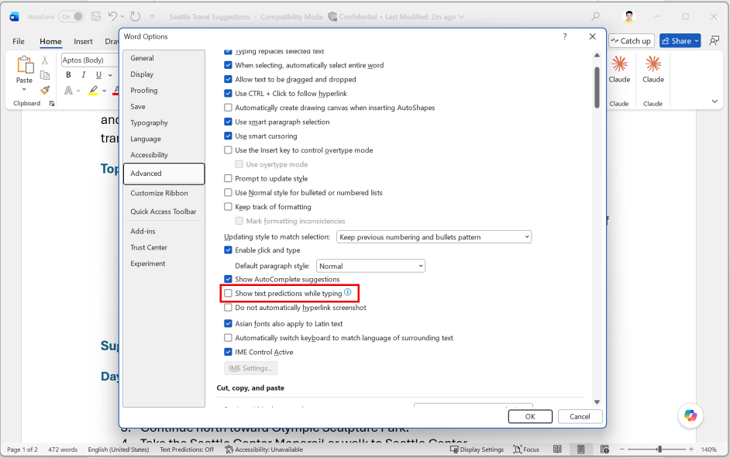
Microsoft is standardizing the configuration of its apps
Turning off text prediction in Microsoft applications is not really new. In fact, the Redmond-based company had already started this shift in 2025. As proof, message MC1093235, published on June 12, 2025 in the Microsoft 365 Message Center, announced that text predictions would be disabled by default starting July 1, 2025 in the new Outlook for Windows and in Outlook on the web.
So the real change in September 2026 is the extension of this setting to the apps that had still escaped it: Word, on all its platforms (Windows, web, Android, and iOS), as well as the two legacy desktop clients, Classic Outlook for Windows and Outlook for Mac. In other words, this is the first time Word is affected, and the first time the classic Outlook versions are affected as well. The new Outlook had already been using this setting for over a year.
With this decision, Microsoft can therefore be seen as making the default configuration of its apps more consistent. It remains to be seen when these new versions will roll out: they are still in the beta channel for now.