www.it-connect.fr

Microsoft Admits the Copilot Key Was a Mistake and Will Let You Remap It
Microsoft admits that the famous Copilot key, found on almost every new PC, was a mistake. A future Windows 11 update will let users reassign this key to something other than launching Copilot.
A forced key that Microsoft now acknowledges is problematic
Introduced in 2024 on most new computers, the Copilot key was supposed to provide quick access to the AI assistant and save time, according to Microsoft’s messaging at the time. Microsoft moved a little too fast, and the Redmond company now admits as much in its documentation.
This key frustrates users. It is frustrating because it changes привычles, especially for keyboard shortcut users. On keyboards, it does not necessarily add an extra key, since it often takes the place of the right Ctrl key or the context menu key.
Microsoft also acknowledges that the implementation is not consistent: "Copilot key implementations may vary depending on keyboard layouts and hardware configurations." - The Redmond company explains that it "continues to work toward consistent and accessible experiences across Windows devices while minimizing disruptions to productivity and accessibility workflows". In this case, that effort has failed.
With Copilot, Microsoft dared to do what it had not done with Cortana: move beyond software and make the impact visible all the way into hardware, proof that anything is possible with AI. But now, Microsoft seems to regret it.
Remapping the Copilot key without removing it
There is little chance that Microsoft will decide to remove the Copilot key. After all, it is physically present on many laptop keyboards and even as a physical button on some mini PCs. What is being considered, however, is allowing the Copilot key to be remapped from Windows Settings. That way, the Copilot key could restore the previous key’s original function:
- make it act as the context menu key (right-click) ;
- map it back to the right Ctrl key.
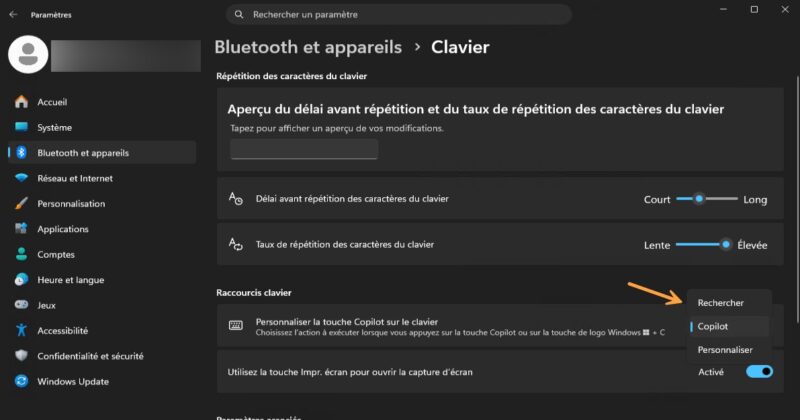
An idea already mentioned by Microsoft at the end of 2024 and later implemented in Windows 11: it is already possible to customize the Copilot key, but only for three actions (Search, Copilot, Microsoft 365 Copilot).
An update to the support document points to an upcoming change: "Microsoft is committed to enabling customers to choose how the Copilot key works. A Windows 11 update will be deployed later this year and will add a settings option to remap the Copilot key so that it acts as the context menu key or the right Ctrl key."
These new choices should be available under Settings > Bluetooth & devices > Keyboard, in the same place as the existing setting. Microsoft could even give us the option to assign it to any application, which would be even better.
Ultimately, Microsoft’s choice is not surprising, as the American company seems to be slowing the integration of AI into Windows 11. That said, this key will continue to equip future machines, at least for now. Proof of that: the new Surface Laptop Ultra equipped with the RTX Spark, which has nevertheless dropped the “Copilot+ PC” branding, still keeps this key on its keyboard.
What do you think?