www.it-connect.fr

Windows 11 KB5124008 Breaks Active Directory Trust Relationships
Following the installation of September 2026 update KB5124008, many system admins are reporting sign-in issues on Windows 11 machines, along with broken trust relationships between workstations and Active Directory. Here’s what we know.
On September 8, 2026, Microsoft released KB5124008 for Windows 11 24H2 and 25H2. And it’s fair to say things have not gone as planned, since it has already accumulated several issues: silent USB audio devices, inaccessible shares in WSL, Remote Desktop Services outages.... To the point that Microsoft released out-of-band updates, including KB5129195 for Windows 11, to fix part of these problems. However, one disruptive bug for businesses remains, and it has not been fixed by these new updates.
It all started with a thread on Microsoft Q&A: after installing KB5124008 on Windows 11 25H2 endpoints, the machines lose their secure channel with the domain. This has several consequences, starting with the fact that users can no longer log on interactively, except with cached credentials (that is, offline). As a good admin, he ran his diagnosis and the news is not good:
- The
Test-ComputerSecureChannelcommand returnsFalse, - The
nltest /sc_querycommand returns errorERROR_NO_TRUST_LSA_SECRET(1786). - On the domain controllers side, event 4625 appears for the computer account, with error code
0xC000006A.
6 Windows 11 machines with the September 2026 patch, 6 machines affected, in an environment with Windows Server 2019 domain controllers. "Remove the patch, everything works again after a full rejoin to the domain. Reinstall it after the repair, and it breaks immediately, without the few-hour delay observed the first time.", he wrote. Other admins then observed exactly the same thing, but this time with Windows Server 2022 controllers, patched or not.
First observation: the problem is therefore not tied to a specific Windows Server version.
Machine Identity Isolation, the prime suspect
For now, Microsoft has not commented on this malfunction. But progress is being made nonetheless, and one potential culprit has been identified: Machine Identity Isolation. This Credential Guard-related feature moves the computer account secret out of LSA to store it in the virtualization-isolated environment. The goal: prevent extraction of this secret from the registry, notably to protect gMSA and dMSA accounts that rely on machine accounts.
Microsoft documents it for Windows Server 2025, with three modes: disabled (0), audit (1), and enforcement (2). That is important to point out, because the admins affected by this issue had in fact been playing around with this Registry value: the MachineIdentityIsolation registry value was set to 2 (enforcement), or to 1 (audit), on the affected machines. By setting it to 0 and then repairing the secure channel, the trust relationship stops breaking.
One question remains: they claim they never enabled this famous Machine Identity Isolation option. One admin states that his GPO did enable VBS and Credential Guard, but the setting for Machine Identity Isolation had remained on "Not configured." Yet after the update, the value was nevertheless set to 2.
Could the KB5124008 update released by Microsoft have re-enabled something that was not supposed to be enabled? Without a response from Microsoft, that question remains unanswered.
The workaround while waiting for Microsoft to respond
This Tuesday, September 15, the official KB5124008 page lists three known issues. Unfortunately, nothing about this trust relationship problem. The KB5129195 and KB5129242 out-of-band updates do not fix this bug... So for now, you can try to work around it.
I do not personally have a fix to offer, but the Microsoft Q&A discussion points to a serious lead that, above all, seems to be working. As you might expect, this temporary fix involves disabling Machine Identity Isolation protection. If you want to test it, here are the steps to follow.
- Step 1: confirm the diagnosis
On an affected machine, run Test-ComputerSecureChannel in an elevated PowerShell console. A return value of False confirms that the secure channel is broken.
- Step 2: check Machine Identity Isolation
Open the HKLM\SYSTEM\CurrentControlSet\Control\Lsa key and check the MachineIdentityIsolation value. If it is set to 1 or 2, you are in the case described by the admins on Microsoft Q&A.
- Step 3: disable the feature
Two options. The first is via GPO: Computer Configuration, Administrative Templates, System, Device Guard, "Turn On Virtualization Based Security", then set "Machine Identity Isolation Configuration" to Disabled.
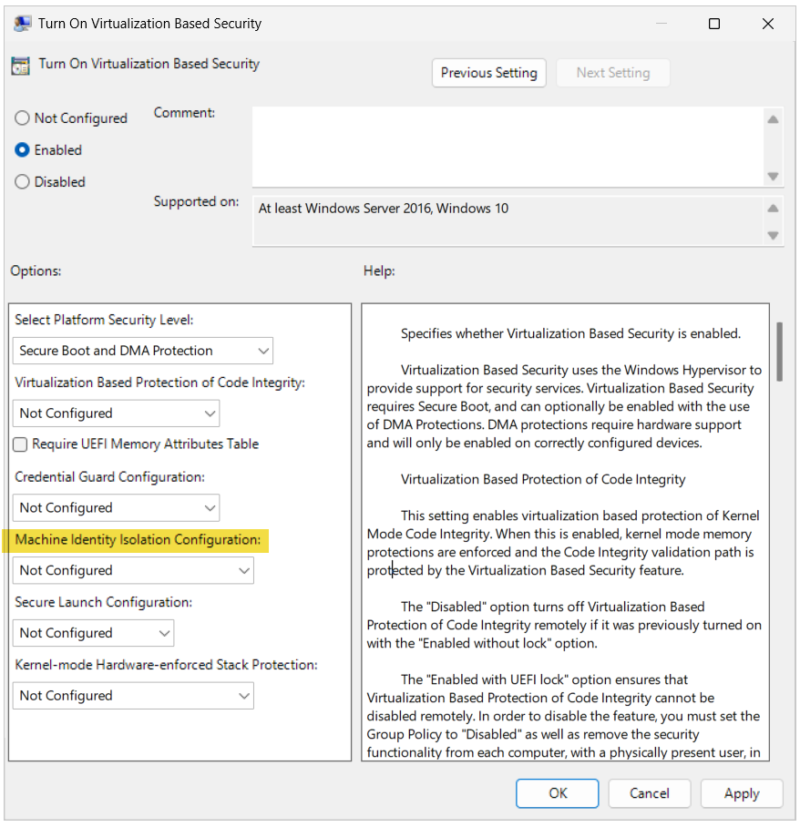
Otherwise, you can directly push a Registry key via GPO to force MachineIdentityIsolation to 0 (through preference settings). Alternatively, with PowerShell, one command will have the same effect for testing on a machine right away:
Set-ItemProperty -Path "HKLM:\SYSTEM\CurrentControlSet\Control\Lsa" -Name MachineIdentityIsolation -Value 0 -Type DWordAt first glance, editing the Registry directly seems more effective than using the GPO setting intended to configure VBS.
- Step 4: reset the machine password
Run the following PowerShell command with an administrator account: Reset-ComputerMachinePassword -Server <VotreDC> -Credential (Get-Credential)
- Step 5: repair the secure channel
Run the following command, again in PowerShell:
Test-ComputerSecureChannel -Server VotreDC -Credential (Get-Credential) -RepairIf that fails, restart your machine and try again.
- Step 6: verify with nltest
Check that everything is working with the nltest tool, like this: nltest /sc_verify:VotreDC. This should return success.
As a last resort, uninstalling KB5124008 is also an option, even though it is still inconvenient (especially with a Patch Tuesday covering nearly 1,000 vulnerabilities). For other methods of repairing a trust relationship, my tutorial on this topic is still relevant.
And you, have you seen this issue across your fleet after installing KB5124008?