www.it-connect.fr


Hackers Use an AI-Generated PowerShell Script to Map Active Directory
In early June 2026, a cybercriminal deployed a vibe-coded PowerShell script to map an Active Directory directory before the collected data was exfiltrated. Cybersecurity firm Huntress, which analyzed the incident, sees it as a concrete example of vibe coding applied to cybercrime. Here’s what is known about this tool.
An RDP Access, a Homemade Script, and an Exposed Directory
The attack described by Huntress dates back to June 3, 2026, and at its core, it is nothing revolutionary: an intrusion followed by data theft. What makes this attack interesting is one of the tools used: a custom PowerShell script generated by AI.
But before discussing the script itself, let’s take a moment to look at how the attack unfolded so we can understand exactly when it was used. Here is the exploitation path reconstructed by researchers Jevon Ang and Dray Agha:
- The attacker establishes an RDP connection to a domain-joined Windows server using previously compromised credentials. According to Huntress, the context suggests the initial access was obtained via the VPN.
- The tools are dropped into the
C:\ProgramData\directory, a common storage location for this type of operation. - A few minutes later, the
Untitled1.ps1script is executed to map Active Directory. Our famous PowerShell script. - The attacker then deployed
s5cmd.exe, a legitimate tool used for Amazon S3 operations that attackers like to repurpose for data exfiltration. - An enumeration tool named
SharpShares.exe, used to identify network shares, is run to locate other user-accessible storage spaces.
By relying on Event ID 4104 from the Microsoft-Windows-PowerShell/Operational log, which stores executed PowerShell script blocks (this logging capability is natively available on Windows), they were able to access the script code.
This PowerShell script first tries to identify the domain controller using multiple techniques (DNS, nltest, the Active Directory module, environment variables, and finally a hardcoded value). It then proceeds with massive data collection, exporting users, computers, groups, organizational units, and trust relationships into a series of CSV files. Finally, it generates an HTML report highlighting the state of Active Directory (no example shared). As it stands, this script appears to focus solely on directory enumeration.
An AI-Generated PowerShell Script for AD Enumeration
How did Huntress conclude that this script was generated by AI? Several details scattered throughout the code point in that direction.
- The title itself: 100% Working AD Information Gathering Script - FULLY FIXED. It suggests a typical back-and-forth between a user and an AI chatbot. The user likely fed error messages back to the model until a corrected version was produced.
- An example server name, left unchanged in the code block responsible for finding the domain controller. According to Huntress, the attacker copy-pasted the code without adapting this variable.
- The script is overengineered, with five separate methods for locating the domain controller, where a human developer would likely keep only one or two. Here, it covers all the bases.
- Unusual visual polish, with a colorized console display (cyan, green, red, yellow) via
Write-Hostcommands, a common habit of models trying to be helpful.
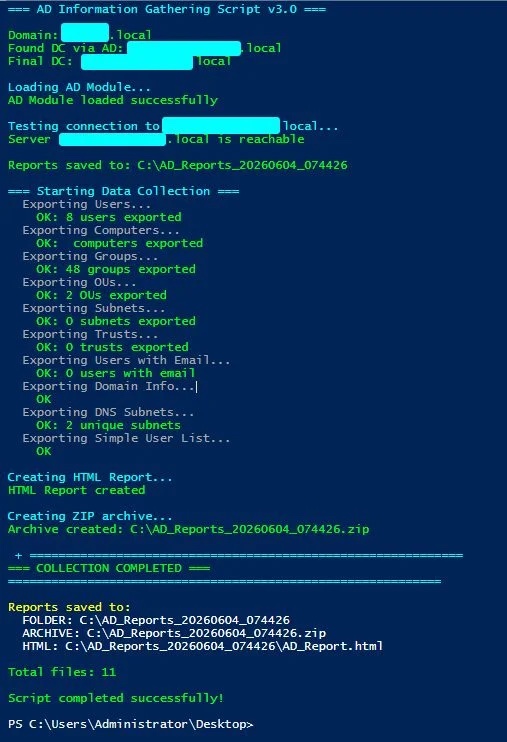
"LLMs love to beautify console output (so do I, to be honest, but I am not an AI). The excessive use of cyan, green, red, and yellow in Write-Host output is a common trait of an AI trying to appear 'helpful' to whoever is prompting it.", the researchers explain.
For defenders, this type of AI-generated script is inherently unique. The PowerShell script Untitled1.ps1 had never existed before and will likely never be run in exactly the same way again, which undermines signature-based detection methods.
"AI can alter code syntax, but it cannot easily change the fundamental mechanics of Active Directory enumeration.", the researchers explain. In other words, even if the code changes, the actual interactions with the system remain the same.
You can review the Huntress report for additional details and, in particular, to access this famous PowerShell script.