www.it-connect.fr


Email Tracking Pixels: What the CNIL Changes and How to Block Tracking
Over the past few days, have you been receiving lots of emails like “Information regarding your emails”? Are banks, media outlets, transit operators, and online stores asking you to opt out of the use of “tracking pixels”? It’s no coincidence. Starting this Tuesday, July 14, 2026, the three-month deadline granted by the CNIL to comply with its recommendation on these invisible trackers has expired. It’s a good time to recap what they are and what obligations the CNIL requires.
An invisible pixel, a very real tracker
What are we talking about exactly? To measure recipient interactions, marketers embed in the body of their messages a one-pixel image, invisible to the naked eye and associated with a unique identifier. This image is hosted on a remote server. When your email client renders the message, it loads that pixel from the remote server. That simple request makes it possible to know whether the message was opened.
This request to the web server hosting the image also reveals other information: the date and time it was opened, the IP address used, and even the email client employed. These signals are used in particular to optimize campaigns (for example, by improving send time) and can be accurate enough to identify who actually opened the email (an identified contact).
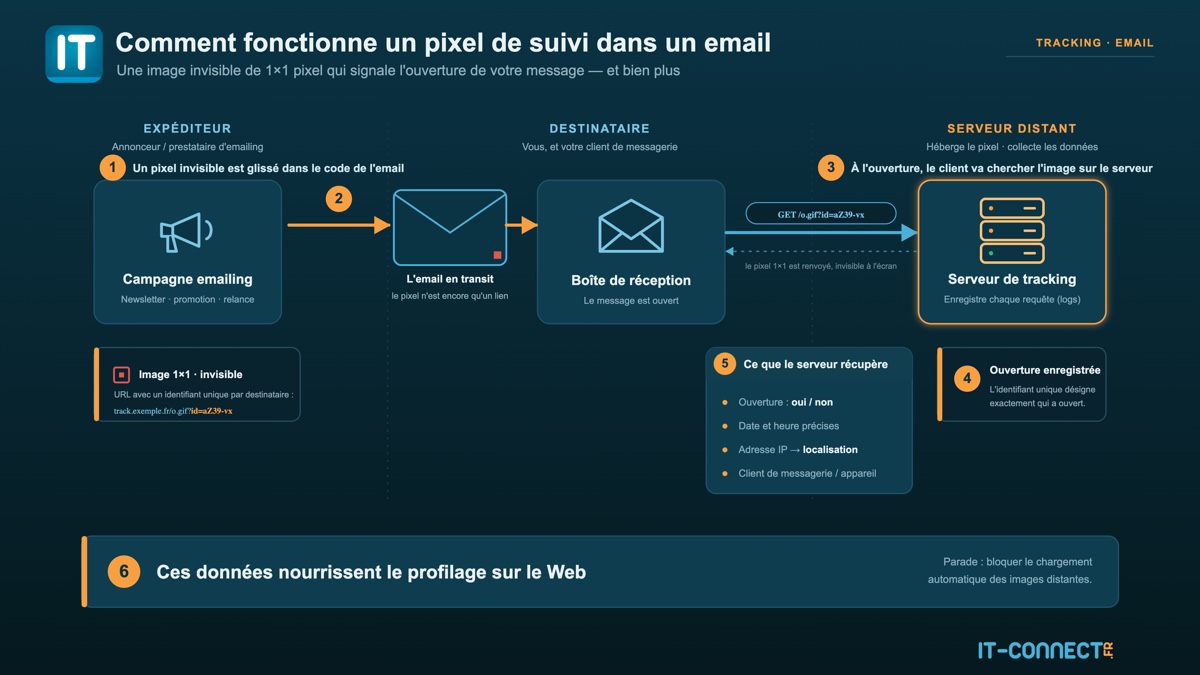
The practice is old, but the CNIL has decided to step in. In its Deliberation No. 2026-042 of March 12, 2026, it states that these pixels fall under Article 82 of the French Data Protection Act, the same text that governs cookies. This article, which transposes the ePrivacy Directive into French law, requires user consent before any read or write operation on their device, except in certain cases.
Consent is mandatory: users must be able to choose
The principle is therefore modeled on cookies: you must obtain the user’s agreement before downloading an image to their computer, especially a pixel used for tracking. As soon as a pixel is used for optimization or performance tracking in a marketing context, consent becomes mandatory. The purpose of each tracker must be specified so that the user can make an informed choice, according to the CNIL. That’s not all: this consent must be just as easy to withdraw as it was to give.
There are still some exceptions, such as emails related to two-factor authentication and transactional emails (order confirmation, parcel tracking, password reset, etc.).
As for the timeline, here is what the CNIL says:
- For new subscribers registered as of July 14, 2026, consent must be obtained before using tracking pixels.
- For existing databases, the CNIL does not require retroactive consent. The obligation is limited to informing recipients about the use of pixels and offering them a simple way to object, via a dedicated link separate from the unsubscribe link.
That is precisely why you are receiving emails at the moment: you are being informed that tracking pixels will be used in the future, and in some cases, a link is provided if you want to opt out.
Personally, I use the French service Brevo to send my weekly newsletter. Rather than asking for your consent, I simply disabled tracking via a pixel (no point for me) so that tracking remains anonymous. If you use Brevo, I invite you to read this page, everything is explained there.
Block images, stop tracking
When facing this tracking method, the defense principle is simple. If the pixel is not loaded, the information does not get sent back. All you need to do is block automatic image downloads, a feature offered by most email clients, to block tracking pixels.
So whether you use Thunderbird, Apple Mail, or Proton Mail, you can adjust the settings to block tracking pixels. In fact, these protections are enabled by default in the three tools and services I just mentioned (Apple does this through Mail Privacy Protection).
For going further, there is also Trocker, an open source extension (Chrome, Firefox, and Chromium-based browsers) that works locally without sending data. It blocks tracking pixels in Gmail, Yahoo, or Outlook.com, highlights the location of trackers, and detects tracking links by trying to redirect you directly to the destination without going through the tracker.
Blocking pixels does not eliminate all tracking. Most email marketing platforms rewrite the message’s hyperlinks to attach tracking parameters, but tracking pixels are probably the most intrusive.