www.it-connect.fr

Fed Up with Bloatware? Rufus 4.14 Streamlines and Cleans Up Windows 11 Installation
Rufus version 4.14 Beta, already available for download, brings notable new features such as silent installation and a new option to remove Microsoft’s built-in Windows apps.
A Cleaner Windows 11 Installation with Rufus
To create a bootable USB drive to install Windows 11, there are many applications available, including for unsupported machines. However, for many years, Rufus has established itself as one of the most popular tools. The release of version 4.14 Beta (available on GitHub) also adds several noteworthy options and improvements.
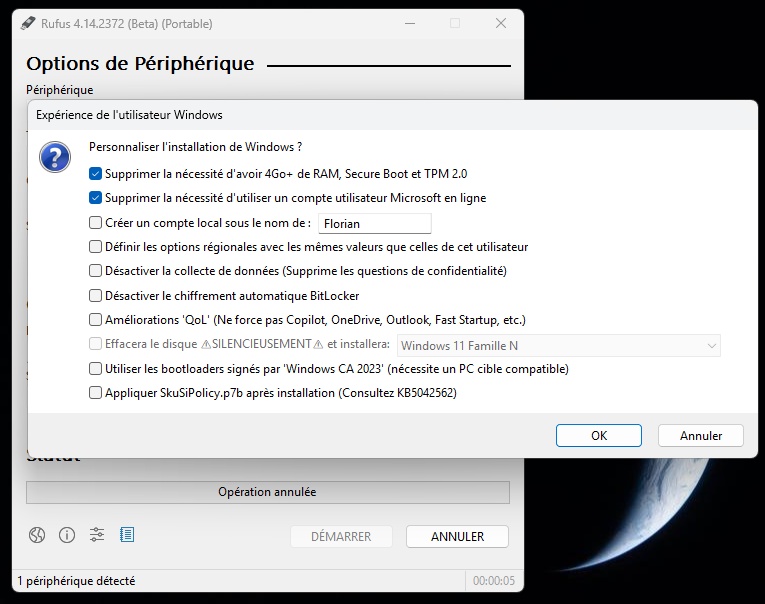
Indeed, when preparing a Windows 11 installation media, Rufus now gives you the ability to directly disable Teams, Outlook, Copilot, as well as other apps considered bloatware. There are other tools for doing this cleanup, but Rufus has chosen to handle it directly as part of the installation process.
These new cleanup options are added to Rufus’s already well-known features:
- Removal of Microsoft hardware requirements (ideal for unsupported machines)
- Automatic disabling of BitLocker encryption.
- Creation of a local profile, so you do not have to use a Microsoft account.
This new option has been named "Quality of life" (QoL) by the Rufus team. See for yourself:
The Arrival of Silent Installation
The other notable addition in version 4.14 Beta is support for silent installation, you know, the famous unattend answer file (XML format). In practical terms, Rufus takes care of creating the answer file for you so that the USB media it creates automatically detects the first disk in your machine and installs Windows 11 on it for you. The benefit: you do nothing, everything is automatic, so you do not see a single prompt on screen!
In addition, this version’s changelog mentions other improvements and fixes:
- An option to copy the
SkuSiPolicy.p7bfile to the ESP partition during installation. - Better support for Bazzite and other Fedora derivatives that do not follow EFI conventions.
- Fixes for potential errors when creating Windows To Go media (due to the use of newer versions of
bcdboot). - Resolution of errors with local accounts that start or end with spaces.
- Limited support for extracting El-Torito UEFI images (mainly for Dell BIOS update ISOs).
You can download this version directly from the Rufus GitHub.