www.it-connect.fr

Windows Autopilot: Microsoft Bakes PC Ownership Into the UEFI
Microsoft is rolling out a new feature for Windows Autopilot: Device Association. This new approach lets you link a Windows 11 PC to your tenant before it is enrolled in Intune, thanks to a marker written directly into the UEFI firmware. It is permanent, because it survives even a reset.
A marker written in UEFI, attested by the TPM
This is one of the new features introduced by the optional KB5120998 update for Windows 11, available since August 27, 2026. Its name: Device Association for Windows Autopilot. But be careful, since optional updates are not deployed in enterprise environments, it will be available starting with the next Patch Tuesday scheduled for September 8, 2026.
Until now, proving that a machine belonged to an organization relied on the Autopilot hardware hash or on enterprise identifiers loaded into Intune. From now on, this will change with Device Association: the device identity is validated through hardware attestation, then written into the firmware. Here is how it works in practice:
- During OOBE, a technician opens the Autopilot menu and exports a DeviceLink file in CSV format to a USB drive. In the screenshots published by Microsoft, you can also see an option to scan a QR code from another device.
- The administrator imports this file into the Intune admin center (via Devices > Enrollment > Device association), and can then assign a preparation policy to the machine.
- The association between the Intune tenant and the device is then written at the UEFI level, once the device gets network access during the OOBE phase.
- The machine then connects to the tenant and retrieves the policy assigned to it. Most importantly, the device is automatically marked as company-owned.
Below are images shared by Microsoft.
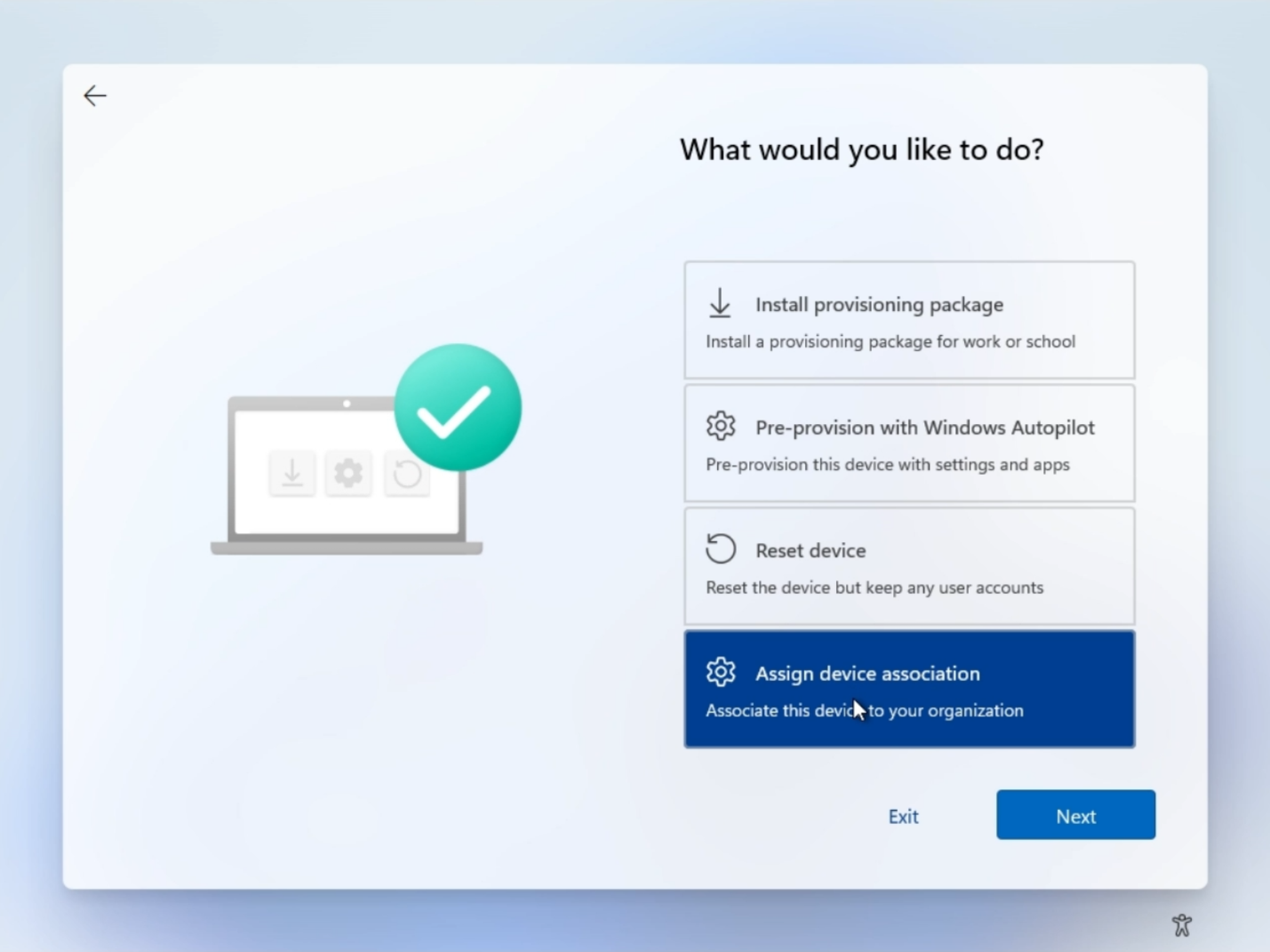
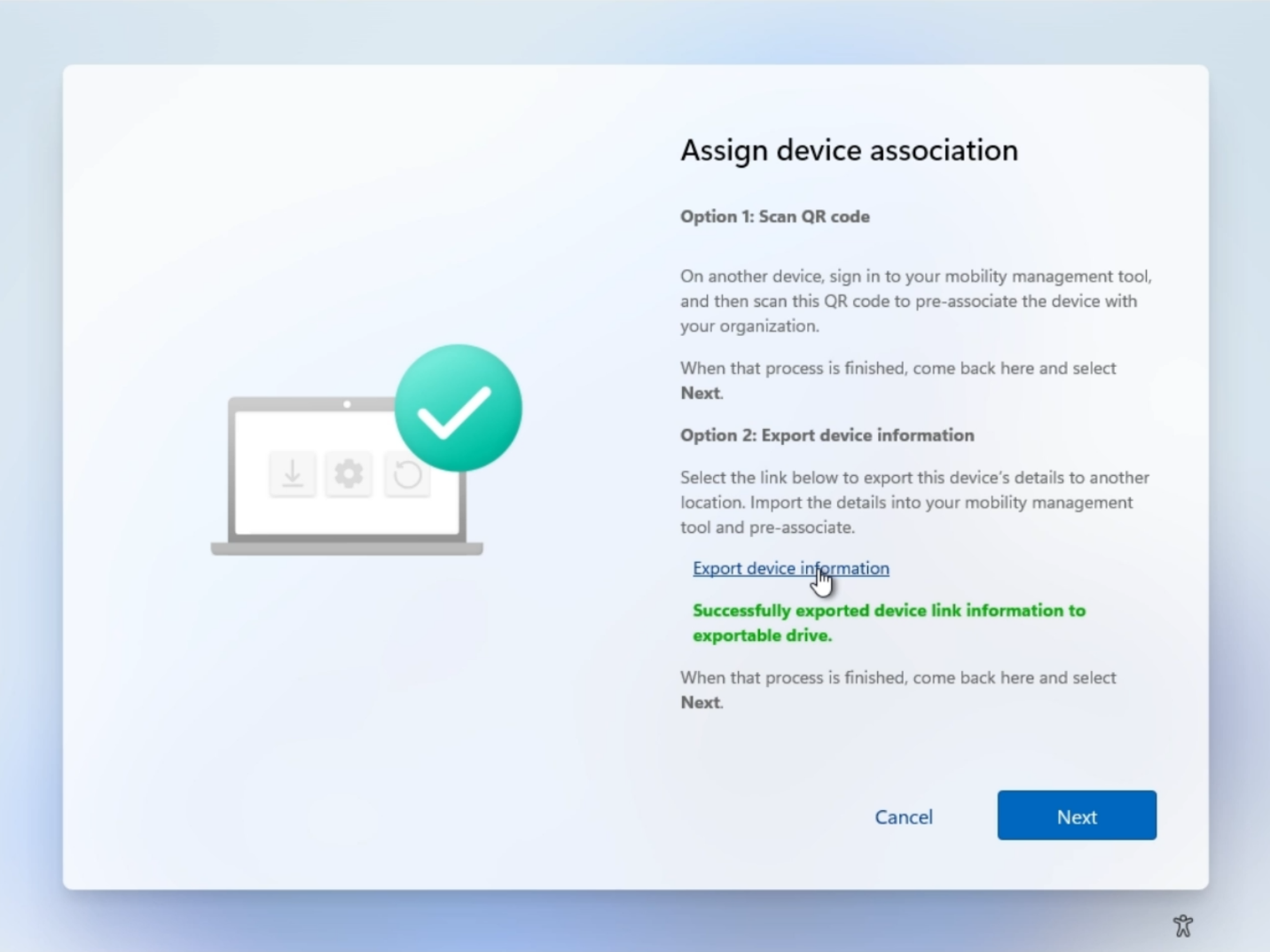
This new feature means that a preparation policy can be assigned to a specific device, not just to a user group. Microsoft also states: "When both device-based and user-based assignments are available, the device-based assignment takes precedence."
For IT teams, this also means part of the configuration can be prepared in advance: language and region, automatic keyboard configuration, hiding the license agreement, or applying a naming template for the machine (with the serial number, for example).
What are the prerequisites? How do you roll back?
As the first part of this article suggests, a certain level of updates is required on Windows 11. In fact, but this is not the only prerequisite, here is the full list:
- Windows 11 24H2 or 25H2 with KB5120998 or later, in Pro, Education, or Enterprise editions.
- An enabled TPM 2.0 chip.
- A physical device. Virtual machines are not supported.
Most importantly, removing a machine that has already been associated from the Intune console does not erase the tenant affinity stored in the machine's UEFI. Microsoft explains that you must first run a PowerShell script on the device to clear the Device Link variables, after unenrolling the machine from Intune. Otherwise, it will keep trying to associate again. This is an important point to consider and one that will inevitably come into play during the device lifecycle.
"When a device permanently leaves the organization (for example, if it is sold, recycled, or transferred), the association must be removed as part of decommissioning. Because tenant affinity is stored on the device, removing a completed association can be done locally on the physical device using a script, without needing access to the service.", Microsoft notes.
What do you think?