www.it-connect.fr

Windows 11 26H2: What Are the New GPO Settings?
With the release of Windows 11 26H2, Microsoft has published new versions of the Administrative Templates (ADMX) that make it possible to configure this release and its features in enterprise environments. On the menu: 35 new settings added by Microsoft. AI agents and MCP, NTLM blocking, taskbar, BitLocker... Here’s the roundup.
As I explained in my article about the availability of Windows 11 26H2, this new version brings very few new features. Microsoft has added a few security-related capabilities and recycled some old ideas (such as the setting that lets you reposition the taskbar). When it comes to Group Policy, there is a bit more to look at. On September 29, 2026, Microsoft published the Windows 11 2026 Update administrative templates (.admx), along with a reference Excel file for the Windows 11 26H2 GPO settings.
As I did last year for the new GPO settings in Windows 11 25H2, I downloaded this Excel file and reviewed all the settings where the New in Windows column contains the value 26H2. Result: 35 identified lines, which means 32 distinct settings, because three of them exist both on the computer side and the user side.
Note: some already existed and were simply updated, such as the list of certificate fingerprints for trusted .rdp file publishers or the prohibition on configuring a network bridge. Likewise, the Supported On column is sometimes approximate: AI agent connectors are listed there as compatible with “at least Windows Server 2016, Windows 10”... Which surprises me...
The 32 New GPO Settings in Windows 11 26H2
The table below lists all the settings associated with version 26H2 in Microsoft’s file. The names and locations are the ones you will find in the Group Policy Management Console in French, using Microsoft’s translations (sometimes approximate). In the rest of this article, I’ll focus on the ones I find most interesting!
| Setting | Location | Scope | In brief |
|---|---|---|---|
| Désactivez le composant de dépendance de la boîte de réception de l'application | Composants Windows\Inventaire des applications et des appareils | Ordinateur | Once enabled, this application inventory component no longer runs. It tracks application dependencies on built-in Windows components to identify compatibility issues |
| Permettre aux applications Windows d'accéder aux clés d'accès | Composants Windows\Confidentialité de l'application | Ordinateur | Default value for all applications (user controlled, force allow, or force deny), with exceptions by package family name. Not configured: the user decides in Settings > Privacy |
| Autorisez les applications Windows à remplir automatiquement des clés d'accès | Composants Windows\Confidentialité de l'application | Ordinateur | Same options as the previous setting, applied to passkey autofill by applications |
| Autoriser les applications Windows à accéder au contenu texte à partir des applications de premier plan | Composants Windows\Confidentialité de l'application | Ordinateur | Controls whether Windows apps can read text displayed by the foreground app. Same options: user control, force allow, or force deny, with per-app exceptions |
| Configurer les options de caméra | Composants Windows\Appareil photo | Ordinateur | AutoShare: the camera is shared and can be used by multiple apps at the same time. SafeMode: automatic sharing in restricted mode to improve reliability. Not configured: default behavior |
| Configurer les connecteurs d'agent | Composants Windows\Windows AI | Ordinateur | Three choices: User in control, Force enable, or Force disable agent connectors |
| Stratégie d'accès du connecteur d'agent | Composants Windows\Windows AI | Ordinateur | JSON whitelist of allowed connections between MCP hosts and MCP servers. Not configured: an MCP host can connect to any MCP server with user consent |
| Durée du consentement de l'agent | Composants Windows\Windows AI | Ordinateur | Validity period for an “Allow” consent granted to an agent’s capabilities before prompting the user again. From 1 to 8,760 hours (one year), 720 hours (30 days) by default |
| Niveau de journalisation du registre sur l'appareil | Composants Windows\Windows AI | Ordinateur | Three levels: Error and above, Information and above, Debug and above. Microsoft does not specify which registry is involved |
| Désactiver la Prise en main | Composants Windows\Contenu cloud | Ordinateur | The Get Started app no longer launches automatically and closes immediately if the user opens it. Its background tasks no longer run |
| Désactiver l'épinglage de l'écran Copilot | Composants Windows\Contenu cloud | Ordinateur | Blocks the Microsoft 365 Copilot setup assistant shown at sign-in. Copilot and its licenses are not affected |
| Afficher l'indicateur d'emplacement d'appui NFC sur l'écran d'ouverture de session | Système\Ouverture de session | Ordinateur | Overlay that indicates where to present a security key or NFC badge, if the antenna location is configured on the device. Displayed by default, disabling it always hides it |
| Désactivez la fonctionnalité d'Explorer permettant de précharger une fenêtre en arrière-plan | Composants Windows\Explorateur de fichiers | Ordinateur | Prevents users from enabling prelaunch, which creates a File Explorer window in the background to speed up launch time |
| Rendre la touche Impr écran réactive | Composants Windows\Explorateur de fichiers | Ordinateur | Enabled or not configured: apps can intercept the key and replace the native screenshot behavior. Disabled: the key keeps its legacy behavior. A restart may be required |
| Autoriser les opérations de descripteur de groupe de fichiers à écrire dans n'importe quel chemin de destination | Composants Windows\Explorateur de fichiers | Ordinateur | Disables a protection that is enabled by default: files received via copy/paste or drag-and-drop (CFSTR_FILEDESCRIPTOR) whose name attempts to escape the destination folder are rejected. Enable only if a business use case depends on it |
| Autoriser les SPN basés sur l'adresse IP lors de l'authentification Kerberos | Système\Kerberos | Ordinateur | Once enabled, the Kerberos client tries to use an IP-based SPN when connecting to a service. Not configured: it does not |
| Interdisez l'installation et la configuration d'un pont réseau sur votre réseau. | Réseau\Connexions réseau | Ordinateur | Existing setting that prevents creating a network bridge (Layer 2 MAC bridge). On an Entra ID joined device, it applies to all networks. On an AD joined workstation, only on the domain network |
| Blocage NTLM amélioré | Système\NTLM | Ordinateur | Four rules, each configurable as Audit, Enabled (blocking), or Disabled: domain account single sign-on, domain controllers, machine-binding failure, and total blocking. Shared allow list (target names or SPNs) |
| Configurez le classement des pilotes Windows Ready Print | Imprimantes | Ordinateur | Enabled: Windows prioritizes the Microsoft IPP class driver for IPP printers, whether network or USB. Enabled by default if nothing is configured. Applies only to new printer installations |
| Autoriser l'analyse hors connexion à partir de l'Environnement de récupération Windows approuvé | Système\Récupération | Ordinateur | Offline scanning launched from WinRE runs without asking for the BitLocker recovery key if BitLocker trusts WinRE. By default, the key is requested and the scan does not start without it |
| Contrôler le montage des volumes ReFS sur des disques USB et IEEE 1394 | Système\Système de fichiers | Ordinateur | Three modes: Block (mount denied and event logged), Audit only (mount allowed and event logged), or Disabled. Restart required to apply a change |
| Contrôler le montage des volumes ReFS sur des disques connectables à chaud | Système\Système de fichiers | Ordinateur | Same modes, applied to all disks marked as hot-pluggable, regardless of the bus. For a storage space, the physical disks in the pool are evaluated |
| Limiter les données de service requises pour le démarrage sécurisé | Composants Windows\Démarrage sécurisé | Ordinateur | Removes the daily event that reports Secure Boot configuration and firmware variable status, sent regardless of telemetry level. Intended for organizations that apply the Windows Restricted Traffic Limited Functionality baseline |
| Désactiver la modification de la position de la barre des tâches | Menu Démarrer et barre des tâches | Ordinateur et utilisateur | Moves the taskbar back to the bottom of the screen and grays out the position option in the Settings app |
| Désactiver la modification de la taille de la barre des tâches | Menu Démarrer et barre des tâches | Ordinateur et utilisateur | Returns the taskbar to its default size and grays out the size option in the Settings app |
| Spécifier les empreintes numériques des certificats représentant des éditeurs .rdp approuvés | Composants Windows\Services Bureau à distance\Client Connexion Bureau à distance | Ordinateur et utilisateur | Existing setting. Now accepts SHA-256, SHA-384, and SHA-512 fingerprints with a prefix (sha256:, sha384:, sha512:) and adds a checkbox to reject SHA-1, which will be disabled by default in a future update |
| Autoriser les ruches du Registre du profil utilisateur et AppData depuis des chemins non standard | Système\Profils utilisateur | Ordinateur | Accepts non-standard path formats for profile registry hives and AppData folders. Microsoft warns about security risks and reserves it for applications that require it |
| Désactiver l'approbation BitLocker de l'Environnement de récupération Windows (WinRE) | Composants Windows\Chiffrement de lecteur BitLocker\Lecteurs du système d'exploitation | Ordinateur | WinRE can no longer access the system volume without the recovery key. Startup repair, quick recovery, Push-button Recovery, and remote wipe via MDM may then require manual intervention |
| Sélectionnez le canal pour les mises à jour mensuelles de la plateforme Microsoft Defender [appelé à être abandonné] | Composants Windows\Antivirus Microsoft Defender | Ordinateur | Existing setting, due to be replaced by the secure deployment channel. Choice between Beta channel, current channel (preview, gradual, or broad), and a critical mode with a 48-hour delay |
| Sélectionnez le canal pour les mises à jour mensuelles du moteur de Microsoft Defender [appelé à être abandonné] | Composants Windows\Antivirus Microsoft Defender | Ordinateur | Same thing for Defender engine updates |
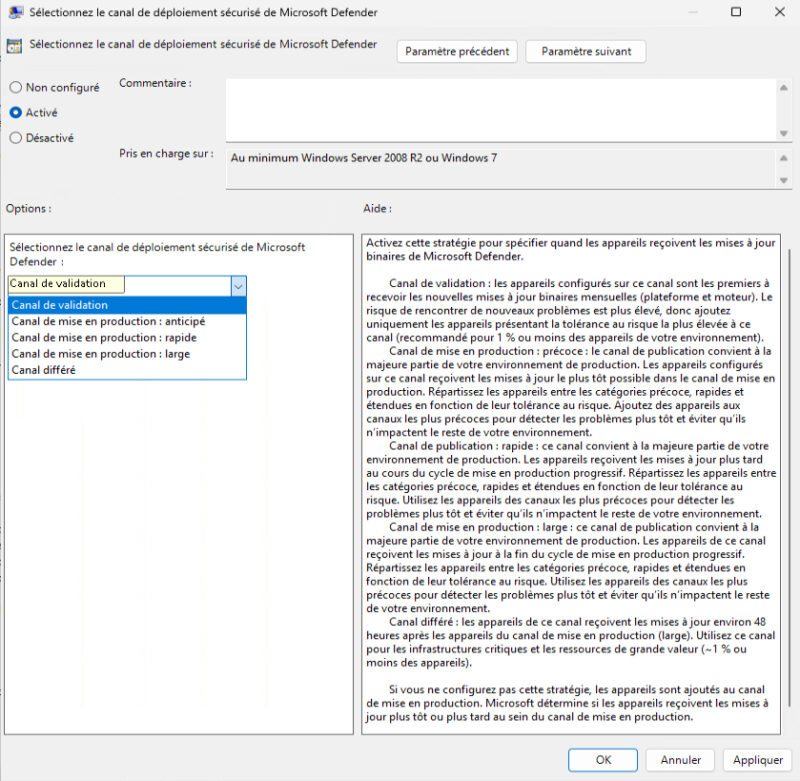
| Sélectionnez le canal de déploiement sécurisé de Microsoft Defender | Composants Windows\Antivirus Microsoft Defender | Ordinateur | Five channels for platform and engine updates: validation (no more than 1% of devices), early release, fast, broad, and deferred (about 48 hours after the broad channel, for critical assets) |
| Configurer le nombre maximal de jours pendant lesquels les mises à jour peuvent être suspendues | Composants Windows\Windows Update\Gérer l'expérience utilisateur final | Ordinateur | Caps user update pauses between 1 and 35 days. Once the limit is reached, the pause cannot be extended any further. The pause option remains available |
AI Agents and MCP: New Control Levers
Microsoft has introduced new settings in the Windows AI section. They concern agent connectors, which allow AI applications to interact with Windows via the MCP (Model Context Protocol). The Configurer les connecteurs d'agent setting enables or disables them, while Agent Connector Access Policy lets you define, in the form of a JSON string, the list of allowed connections between MCP hosts and MCP servers.
"If this policy is not configured, the MCP host can connect to any MCP server with the user's consent", Microsoft says. In other words, without a whitelist, the user decides.
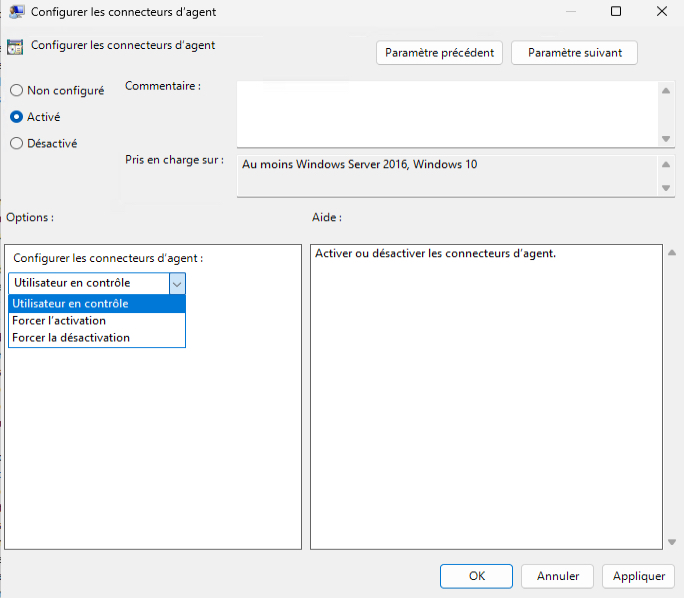
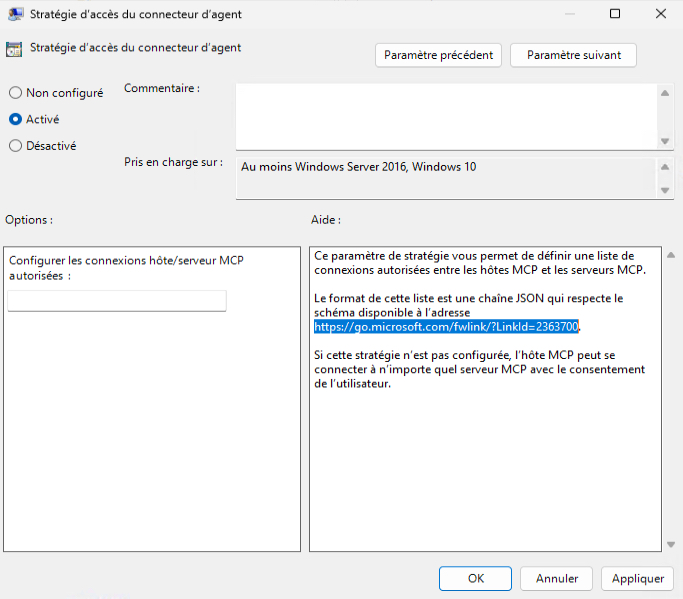
In addition, the Durée du consentement de l'agent setting determines how long an “Allow” consent granted to an agent’s capabilities remains valid before the user is prompted again. The value ranges from 1 hour to 8,760 hours (one year). By default, it is set to 720 hours, or 30 days.
As for Microsoft Copilot, there is the Désactiver l'épinglage de l'écran Copilot setting, which prevents Microsoft 365 Copilot recommendations from being shown at sign-in. In the same vein, there is another setting you can enable to disable the Windows Get Started app: Désactiver la Prise en main.
NTLM, BitLocker, Taskbar: What Will Interest Admins
On the security and administration side, several settings deserve your attention, especially NTLM, which is still managing to make headlines.
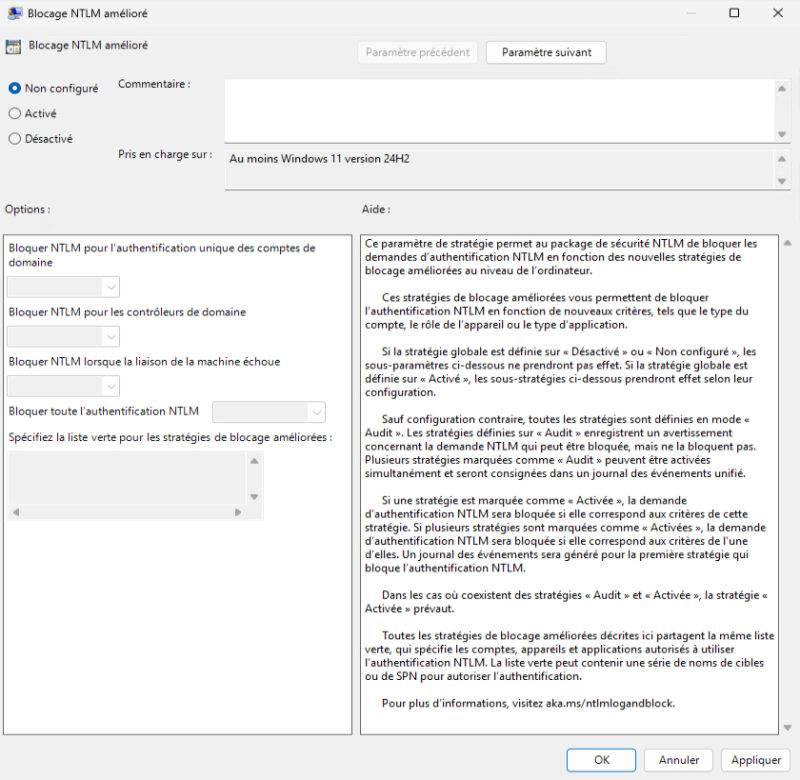
- Enhanced NTLM Blocking (NTLM Enhanced Blocking): after enhanced NTLM logging introduced in version 25H2, this setting now provides better blocking controls. It lets you block NTLM authentication based on account type, device role, or application type, with a shared exception list. Once the policy is enabled, any subsettings that are not configured switch to audit mode. A logical next step, since Microsoft has presented a 3-phase roadmap to disable NTLM by default.
Here are the other interesting settings, some of which directly echo recently added features (taskbar position, for example).
- Kerberos and IP addresses: the Autoriser les SPN basés sur l'adresse IP lors de l'authentification Kerberos setting allows the Kerberos client to use IP-based SPNs. This helps reduce reliance on NTLM when a resource is accessed by IP address rather than by name.
- Signed .rdp files: the list of trusted publisher certificate fingerprints now accepts SHA-256, SHA-384, and SHA-512, with a prefix (for example sha256:). A Do not allow SHA-1 fingerprints checkbox also appears. But still: "Support for SHA-1 fingerprints will be disabled by default in a future security update", Microsoft warns.
- BitLocker and WinRE: Désactiver l'approbation BitLocker de l'Environnement de récupération Windows (WinRE) requires the recovery key for any WinRE operation on the system volume. Be careful: Microsoft says startup repair, Quick Machine Recovery, Push-button Recovery, or even remote wipe via the RemoteWipe CSP may then require manual intervention.
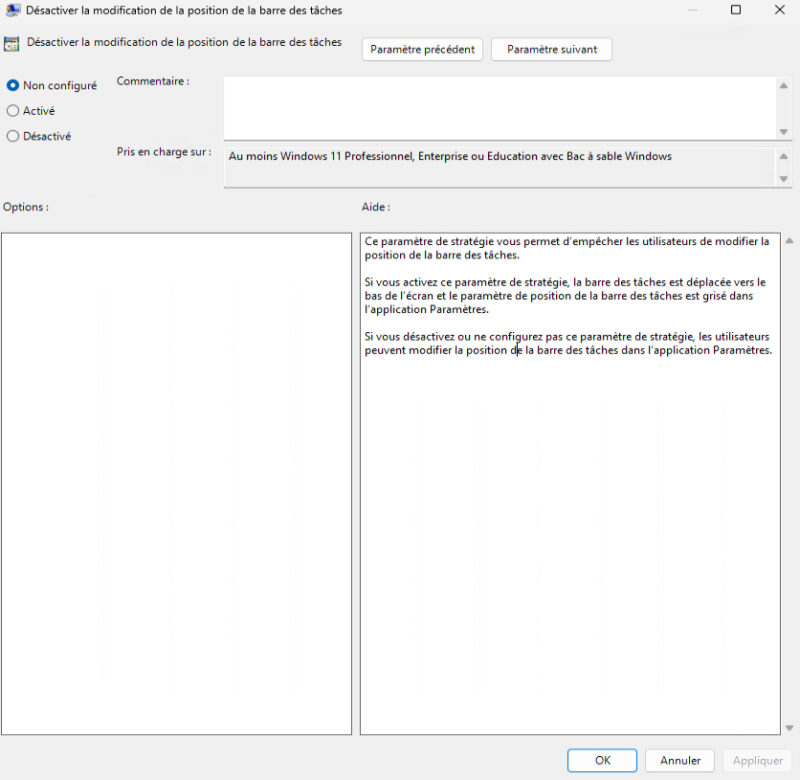
- Taskbar: now that Windows 11 lets you move the taskbar to the top or side of the screen, two settings let you lock its position (bottom) and size (default). Enable this setting if you want to draw the wrath of your users.
- Windows Update: you can now limit how long users can pause updates, between 1 and 35 days. This setting does not remove the pause option; it simply restricts the duration beyond a threshold you consider acceptable.
- Microsoft Defender: a new setting lets you choose the deployment channel for binary updates (validation channel, early release, fast or broad, and deferred channel). The two older channel-selection settings, for the platform and the engine, will be removed later.
- ReFS on removable drives: two settings can block or audit mounting ReFS volumes on USB, FireWire, or hot-pluggable disks. "ReFS is not a supported configuration on hot-pluggable or removable drives", Microsoft reminds us.
- Printing: Configure Windows Ready Print driver ranking lets you control the priority given to Microsoft’s IPP class driver when installing a printer. Without configuration, this behavior is enabled by default.
That’s it—now all you have to do is configure the settings that interest you through Group Policy. The NTLM and Kerberos ones are particularly interesting if you want to prepare for a future without NTLM!
What do you think?