www.it-connect.fr

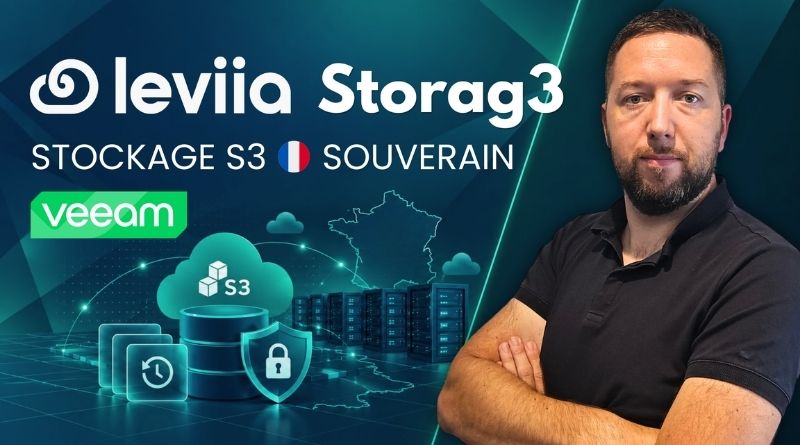
Sovereign S3 Storage in France: How to Build Immutable Veeam Backups with Leviia Storag3
Looking for S3 storage hosted in France to offload your backups and make them immutable? That is exactly what Leviia Storag3 delivers, the S3-compatible object storage service from French provider Leviia.
Leviia Storag3 can address two real-world scenarios that fit today’s market. On one side, an SME that backs up its virtual machines with Veeam Backup & Replication and needs to add an offsite copy to its 3-2-1-1-0 strategy, without sending data to a US hyperscaler. On the other, an IT provider (MSP, integrator, managed services provider) that wants to offer offsite backup to its customers, with a single console to manage everything. Leviia Storag3 covers both use cases.
I first tested this service in November 2023, when it was still called Leviia Object Storage. A lot has changed since then: new name, new infrastructure, two storage zones in France (Lyon and Marseille), ISO 27001 and HDS certifications, a partner program, and a much richer dashboard. This article has therefore been fully updated to accurately reflect what Leviia Storag3 is today.
In this article, I’ll review the Leviia Storag3 offering and the different ways to consume it, either directly or through a partner. Then we’ll take a tour of the dashboard, and finally see how to create a bucket with object locking and use it as an immutable backup repository in Veeam Backup & Replication.
This article includes commercial content for Leviia.
Leviia, a French Cloud provider
Leviia is a French company specializing in data storage and online collaboration. It presents itself as a sovereign Cloud provider: a French legal entity, hosting exclusively in France, and a software stack based on open source. As you will have understood from the first lines of this article, the goal is to offer an alternative to Microsoft, Amazon, and Google services, not subject to US extraterritorial laws such as the Cloud Act.
Leviia is clearly gaining traction and has grown significantly over the years. In 2023, I mentioned 300,000 users. Today, Leviia reports more than 1.5 million users across all its services, and more than 500 companies and public-sector organizations using Leviia Storag3. Among the references cited by the vendor are the Île-de-France Region, Brest University Hospital, Grand Frais, and the Château de Versailles.
Leviia’s offering is built around two solutions:
- Leviia Storag3: S3-compatible object storage, designed for offsite backup, archiving, and large-scale storage. This is the focus of this article.
- Leviia Next: a collaborative suite based on Nextcloud (file storage and sharing, online editing, chat, video conferencing), which replaces the Drive offerings previously provided by Leviia.
The infrastructure has also evolved. In 2023, the service relied solely on OVHcloud datacenters (Roubaix, Gravelines, and Strasbourg). Since 2024, Leviia has relied on Free Pro datacenters, with three sites located in Lyon and Marseille. This is when Leviia Object Storage gave way to Leviia Storag3, a product certified ISO 27001 and HDS (Hébergeur de Données de Santé).
What is HDS certification? In France, it is mandatory for hosting personal health data. It requires, among other things, access traceability and regular audits. Even if you do not work in healthcare, it is still an indicator of the level of rigor applied to the hosting platform.
HDS certification is useful beyond health data hosting. With NIS2, logging and access traceability will become cybersecurity requirements for many organizations. Even if you do not handle health data, HDS is a good indicator of the security and traceability level that is increasingly becoming the norm. With Leviia Storag3, you benefit from that because the solution is certified.
Leviia Storag3: pricing and features
How much does Leviia Storag3 cost?
The current pricing for S3 storage is as follows:
- Starting at €9.99 excluding tax per TB per month, with decreasing prices depending on volume
- No extra fees: no egress charges, no API request fees, no deletion fees
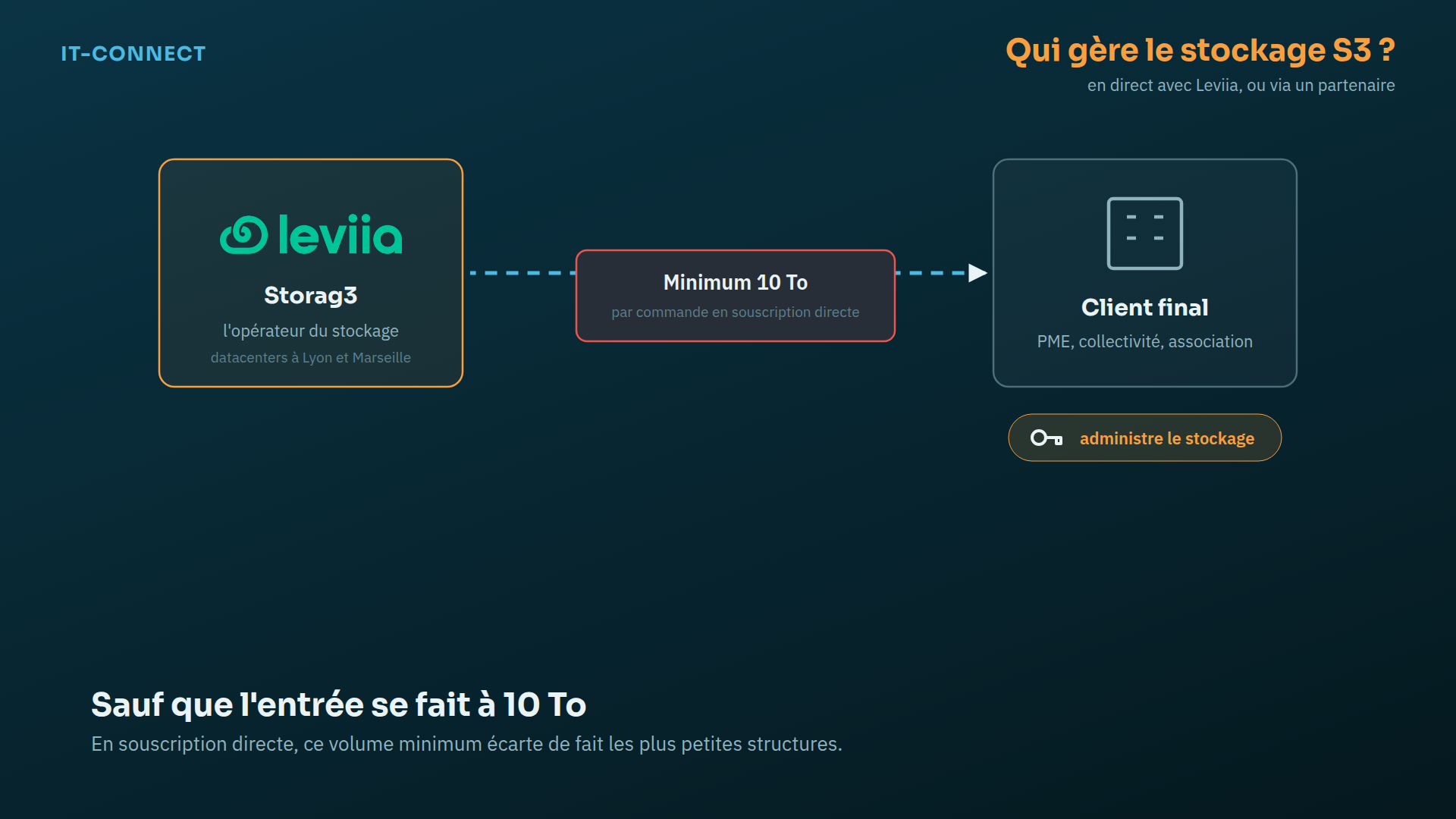
- Minimum volume of 10 TB per order for a direct subscription, meaning a starting price of €99.90 excluding tax per month
- 15-day free trial, no credit card required, with full dashboard access and up to 1 TB of data
At this price point, all customers are treated the same way: geo-distribution, ISO 27001 and HDS certifications included in the price. What I like about Leviia is that the pricing is still easy to understand, which is far from being the case with Cloud providers in general. With a hyperscaler, the cost of a full restore can hold unpleasant surprises because of outbound traffic fees. Here, restoring 5 TB costs no more than storing it (you no longer have any excuse not to test your offsite backups).
Leviia is not the cheapest provider on the market, but this is a deliberate positioning that allows it to remain a sovereign and certified solution. Geo-distribution across 3 zones is included by design and provides an excellent level of resilience and service continuity. Despite a price increase, Leviia says its cost is about 60% lower for equivalent usage in the France region, compared with Amazon S3. If that interests you, Leviia’s website still offers a calculator to estimate the cost of your S3 storage, based on volume and outbound traffic percentage.
Note: the 10 TB minimum applies to direct subscriptions. If your needs are smaller, going through a Leviia partner is the route to explore, since the partner can freely allocate its capacity between customers (we’ll come back to this in a moment).
Technical features of Leviia Storag3
Let’s gradually get into the technical part of this article. Here are the technical characteristics of the S3 storage offered by Leviia Storag3.
| Feature | Leviia Storag3 |
|---|---|
| Protocol | S3 API compatible |
| Storage zones | Lyon and Marseille (chosen when creating an identifier) |
| Data protection | Multi-site erasure coding, distributed across three datacenters in France |
| Advertised durability | 99.9999% |
| Encryption | HTTPS during transfer, client-side encryption supported |
| Immutability | Object locking (S3 Object Lock), WORM model |
| Versioning | Yes (versioning) |
| Lifecycle | Yes (cleanup rules by bucket or by folder) |
| Certifications | ISO 27001 and HDS, GDPR compliance |
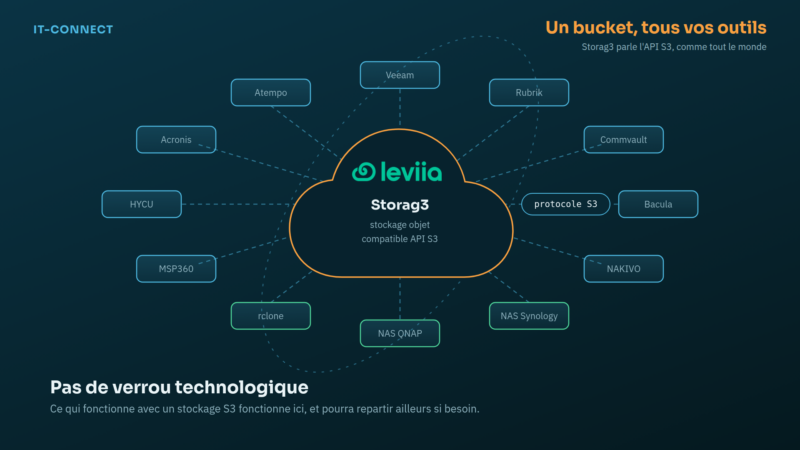
| Compatible software | Veeam, Acronis, Commvault, Rubrik, Atempo, Bacula, NAKIVO, HYCU, MSP360, rclone, Synology and QNAP NAS, etc. |
What is erasure coding? Instead of storing several full copies of an object, the system splits it into fragments, adds parity fragments, and distributes everything across several sites. The object can be rebuilt even if some fragments are lost, for example in the event of a datacenter disaster.
Three ways to use Leviia S3 storage
This is one of the major changes since 2023: there are now several ways to consume Leviia Storag3. The explanations below will help you better understand what you will see later in the article.
Direct, self-managed
Your organization subscribes directly with Leviia and manages its own identifiers, buckets, and users from the dashboard. This is the model I described in the first version of this article. It is intended for organizations that need to store at least 10 TB.
Through a partner, with three management modes
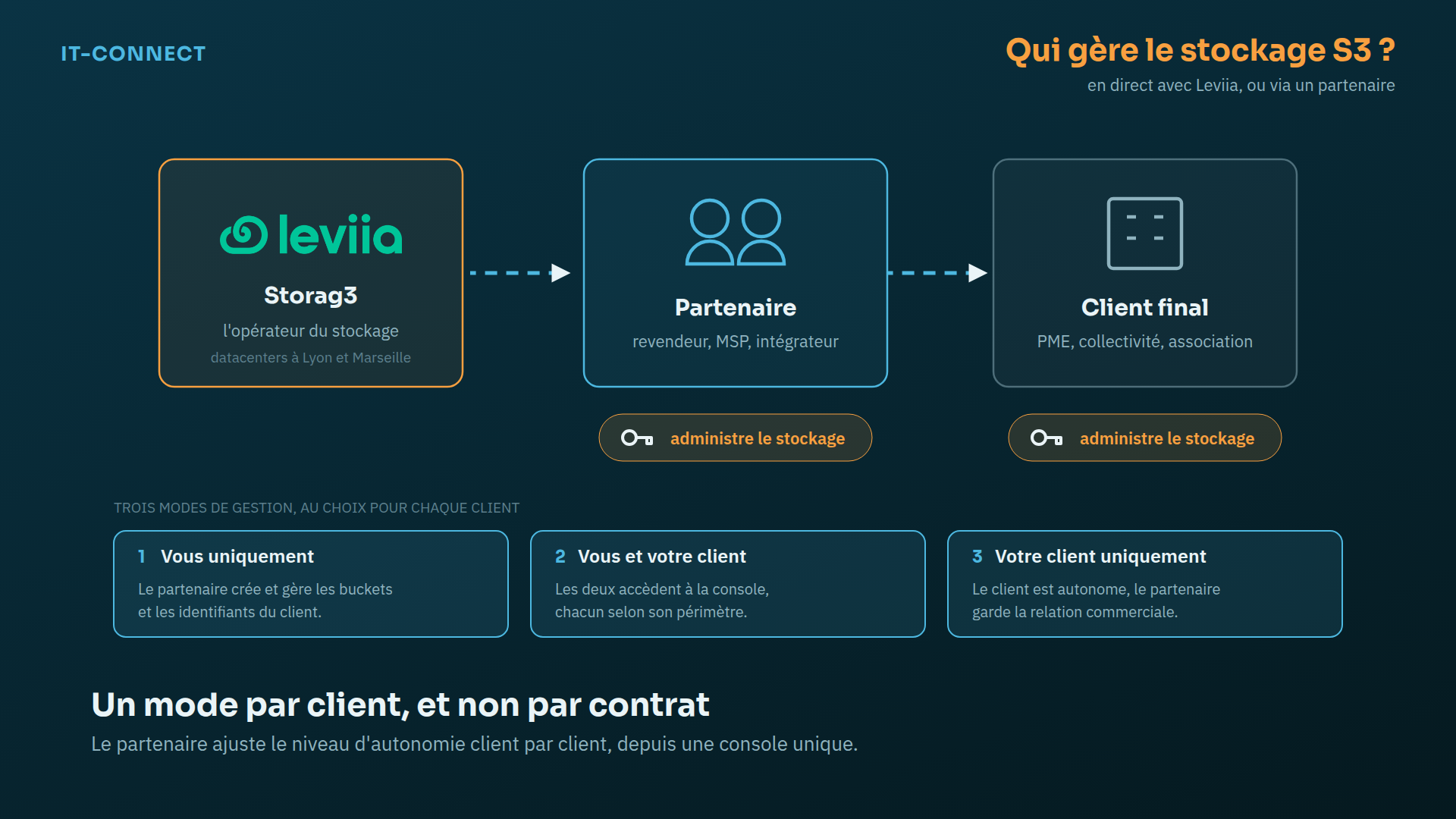
Leviia has launched a partner program for resellers, MSPs, integrators, and managed service providers. The partner gets a dedicated console (menu Storag3 Partner) where they create customers, assign storage volume, and choose, customer by customer, a storage management mode.
| Management mode | Who administers the identifiers and buckets? | Typical use case |
|---|---|---|
| You only | The partner | Managed offsite backup: the end customer does not need to log in to Leviia |
| You and your customer | The partner and the customer | Co-management: the customer’s IT team keeps control, the partner can step in for support |
| Your customer only | The end customer | The customer is autonomous, while the partner keeps the commercial relationship |
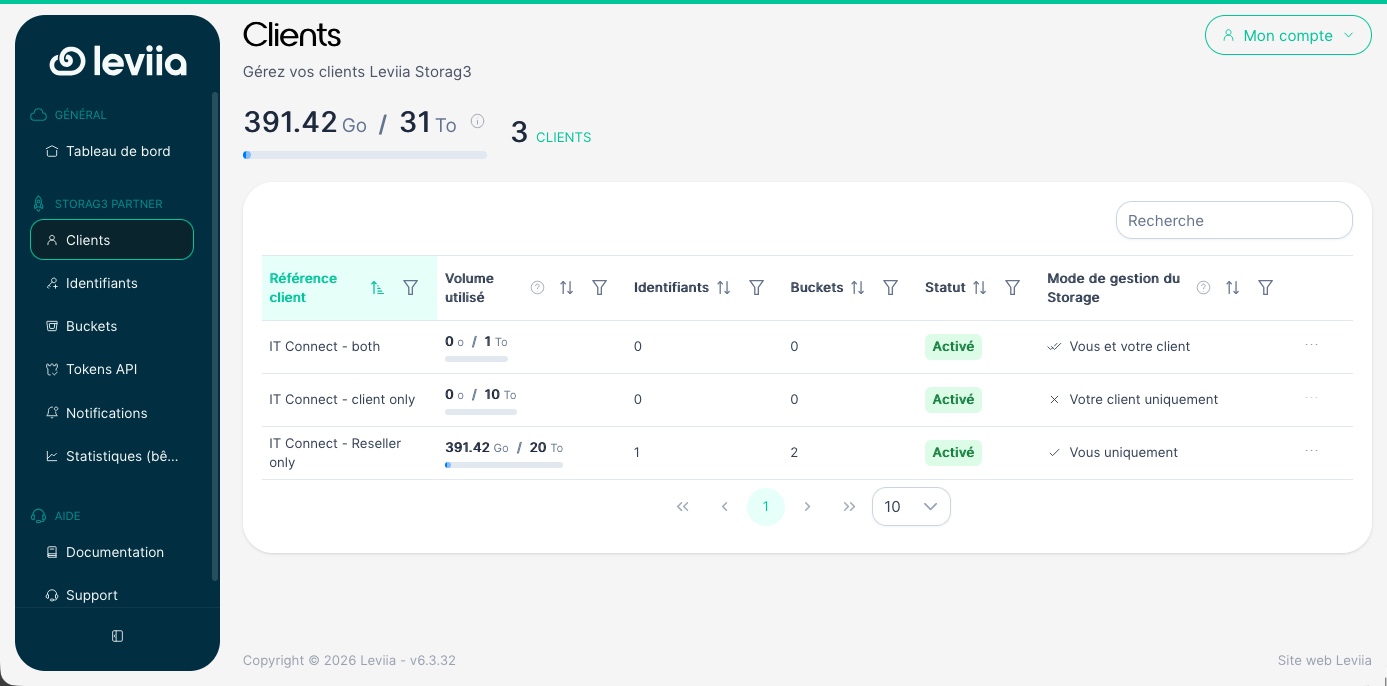
In my demo console, I created three customers, one for each mode, with 1 TB, 10 TB, and 20 TB assigned respectively. The Customers view displays for each one the used volume, the number of identifiers and buckets, the status, and the management mode.
On the billing side, Leviia says the partner can choose between a per-customer subscription and a global capacity reservation that can be freely allocated across customers. The program does not require a minimum volume commitment to get started. For a service provider, the benefit is being able to offer immutable offsite backup with a predictable cost per TB, and therefore an easy margin to calculate. To learn more, you can visit the Leviia partner program page.
Overview of the Leviia dashboard
All management is done from a single dashboard, accessible in a browser. The screenshots in this article were taken from a partner account. The dashboard for a direct customer uses the same menus, except for the Customers view.
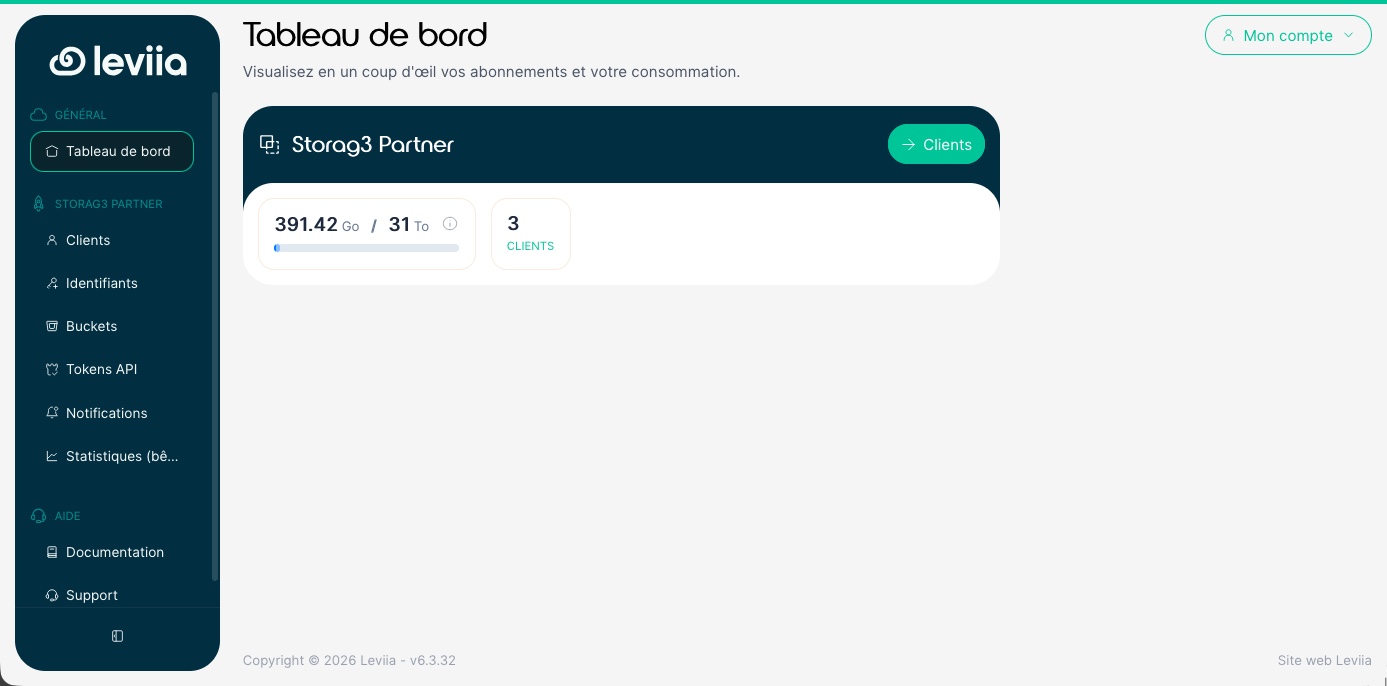
The home page summarizes consumption: in my case, 391.42 GB used out of 31 TB allocated across my three customers. If I also had access to Leviia Next, a corresponding section would appear in the same dashboard, but that is not the case here.
Identifiers and sub-identifiers
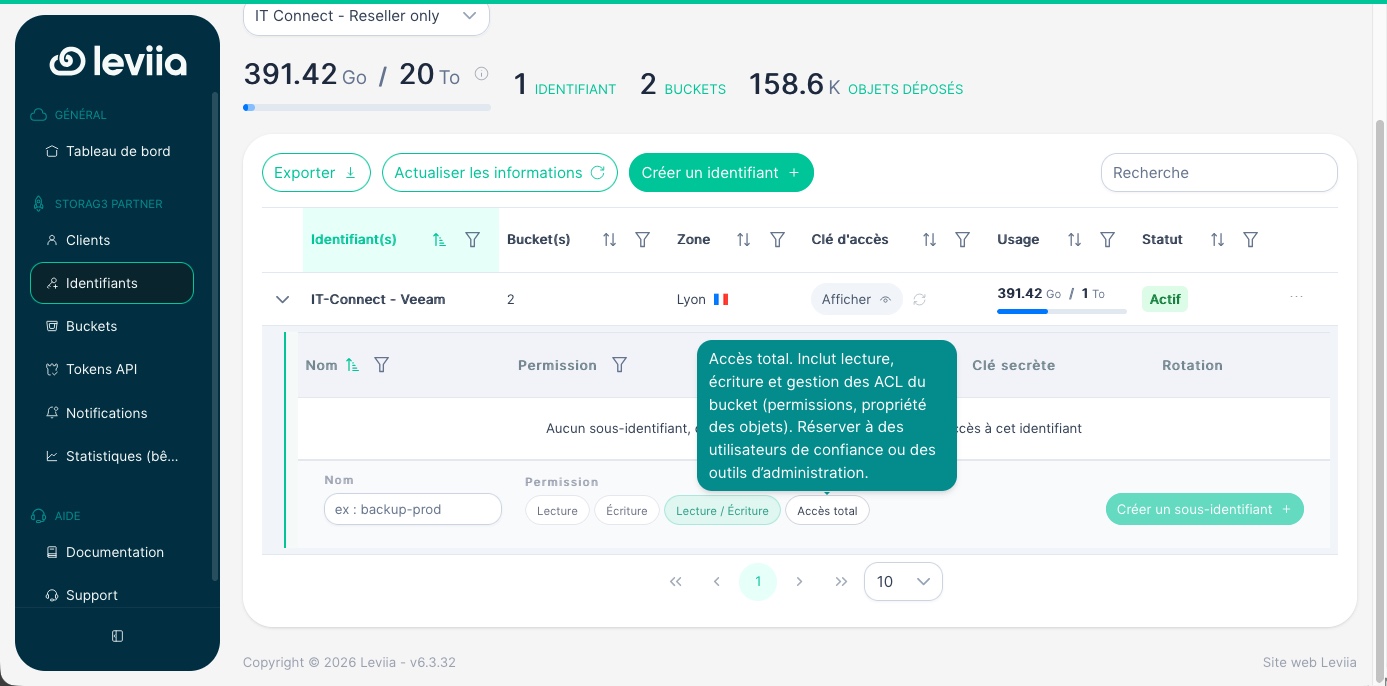
A Storag3 identifier is a pair of access key and secret key, tied to a zone (Lyon or Marseille) and limited by a quota. The interface shows for each identifier the number of buckets, the zone, usage versus quota, and status.
Currently, and this was not the case when I first introduced this service, there is an interesting new feature: sub-identifiers. For a single identifier, you can generate secondary access keys with restricted permissions:
- Read: view and download objects only
- Write: upload objects only
- Read / Write: the right level for most applications
- Full access: read, write, and manage bucket ACLs (permissions, object ownership)
This is a good way to enforce the principle of least privilege. For example, a monitoring tool that checks whether backups are present only needs a read-only sub-identifier. The backup application itself can use a sub-identifier with the appropriate permissions.
Buckets
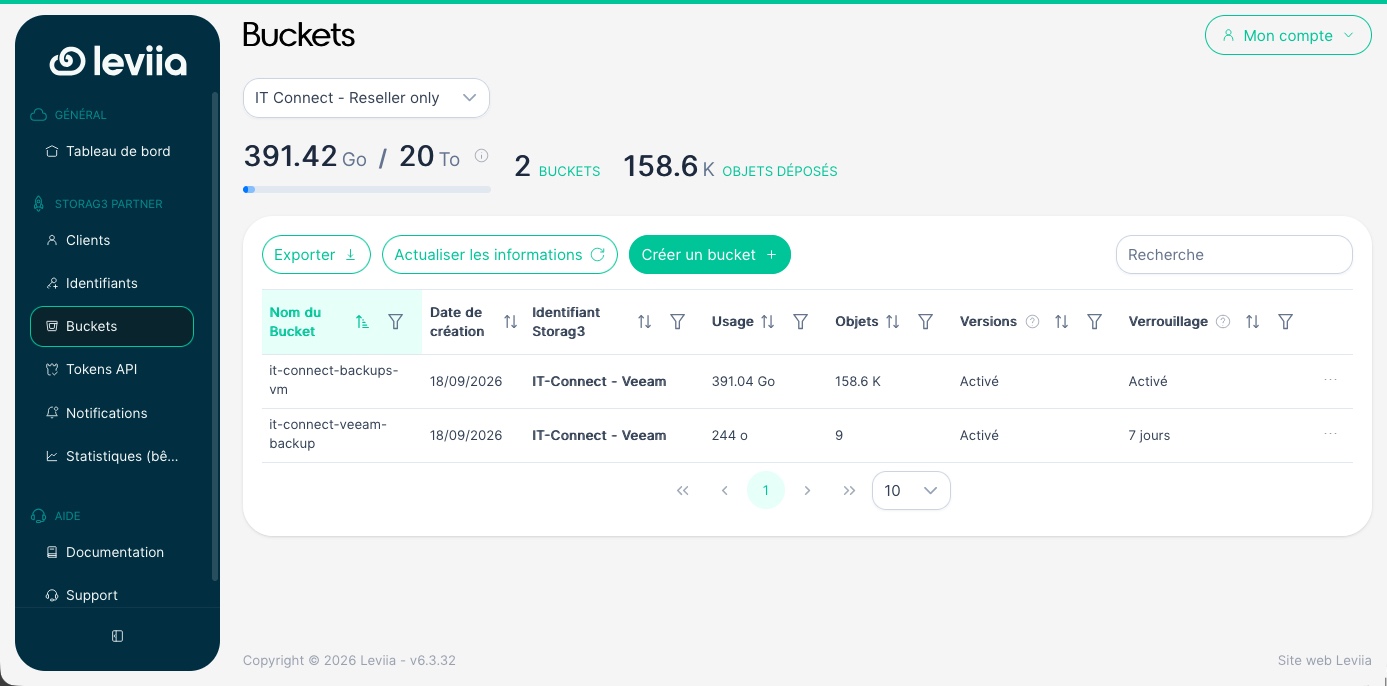
The Buckets menu lists the storage spaces with their associated identifier, usage, number of objects, and the status of versioning and locking. In my lab, the bucket used by Veeam currently holds more than 390 GB and about 158,600 objects. Note that the bucket and identifier lists can be exported in CSV format.
API tokens
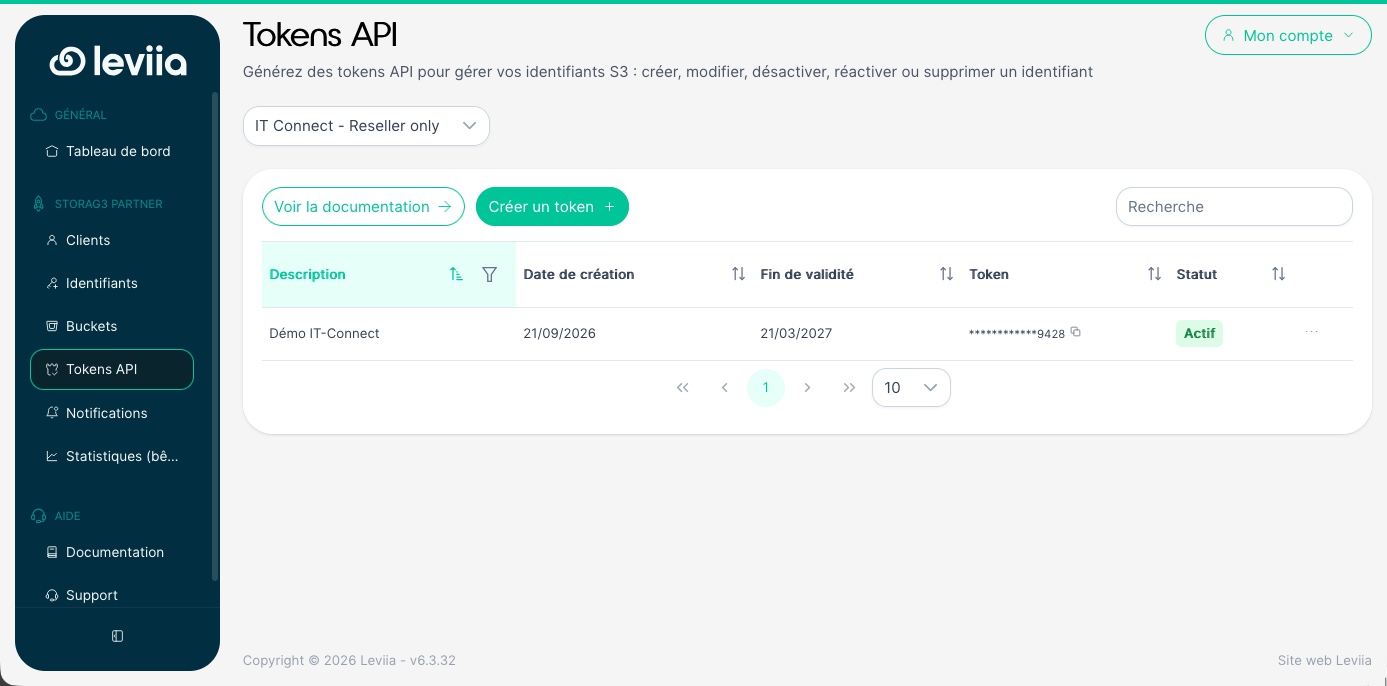
The API Tokens menu is used to generate tokens for managing your Leviia Storag3 environment through the API. Each token has a description and an expiration date. At the moment, you can create, modify, disable, re-enable, or delete an identifier, and view quotas. The API exposes five routes under the root https://backend.api.leviia.com/api/v1/.
For example, for an MSP, this makes it possible to automate access creation when onboarding a new customer, from a ticketing tool or an onboarding script. Another example: a backup script can enable an identifier before sending data to S3, then disable the identifier once the operation is complete. Thanks to the S3 API, you can also automate bucket management, whether for creation or deletion, making it possible to build complete workflows.
Notifications
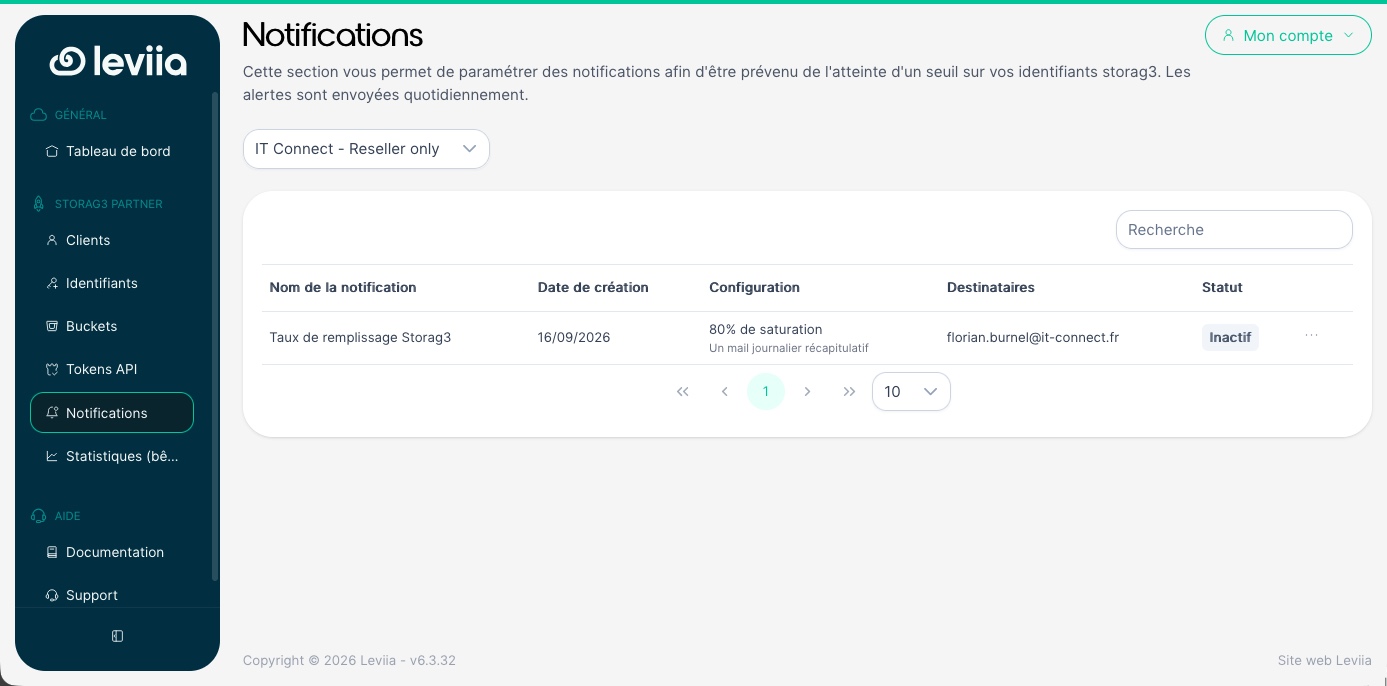
The Notifications menu lets you get alerted when a threshold is reached on your Storag3 identifiers. In my example, a “Storag3 fill rate” alert triggers at 80% capacity and takes the form of a daily summary email. Simple, but useful: a Veeam repository that hits its quota means failed backups. It is better to anticipate it.
Statistics
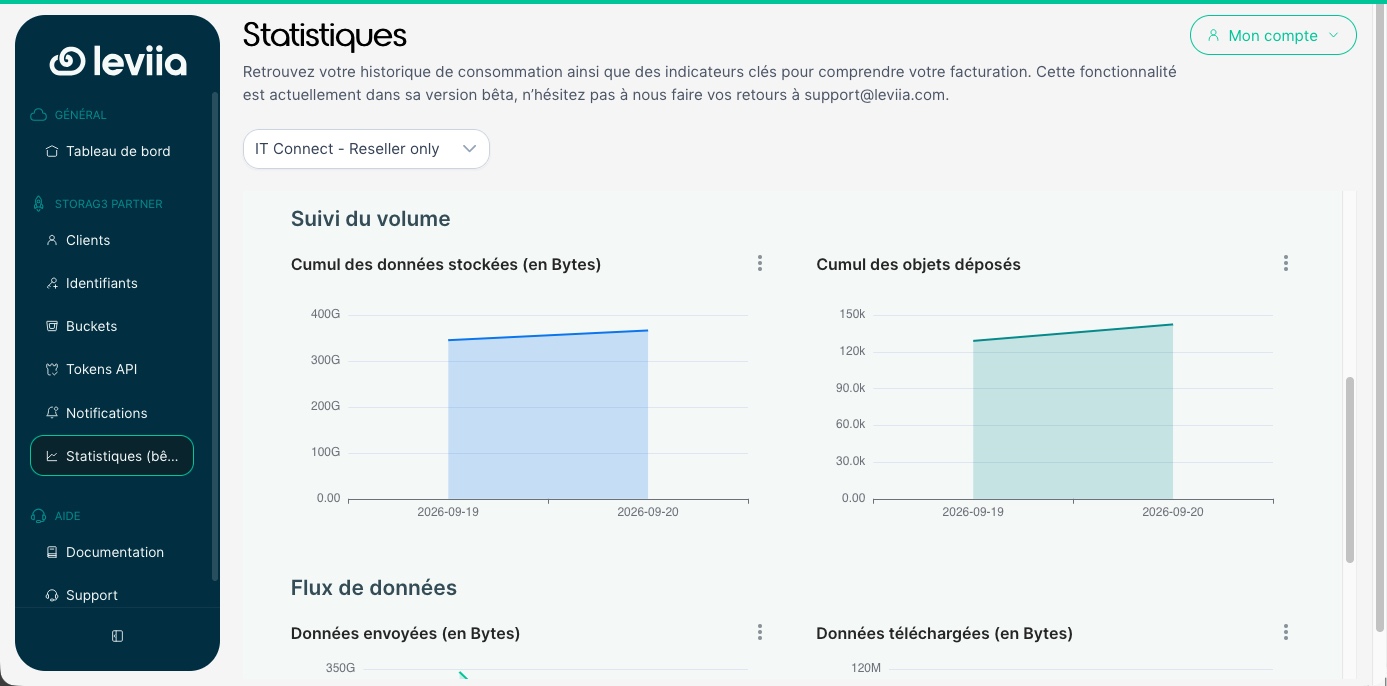
The Statistics menu, still in beta, displays usage history: total stored data, total objects uploaded, data sent, and data downloaded. A partner can filter by customer, which helps understand and justify billing. If this screen is still in beta, there is a reason: getting accurate statistics from S3 storage is not that simple, especially when versioning is enabled.
Account security and team management
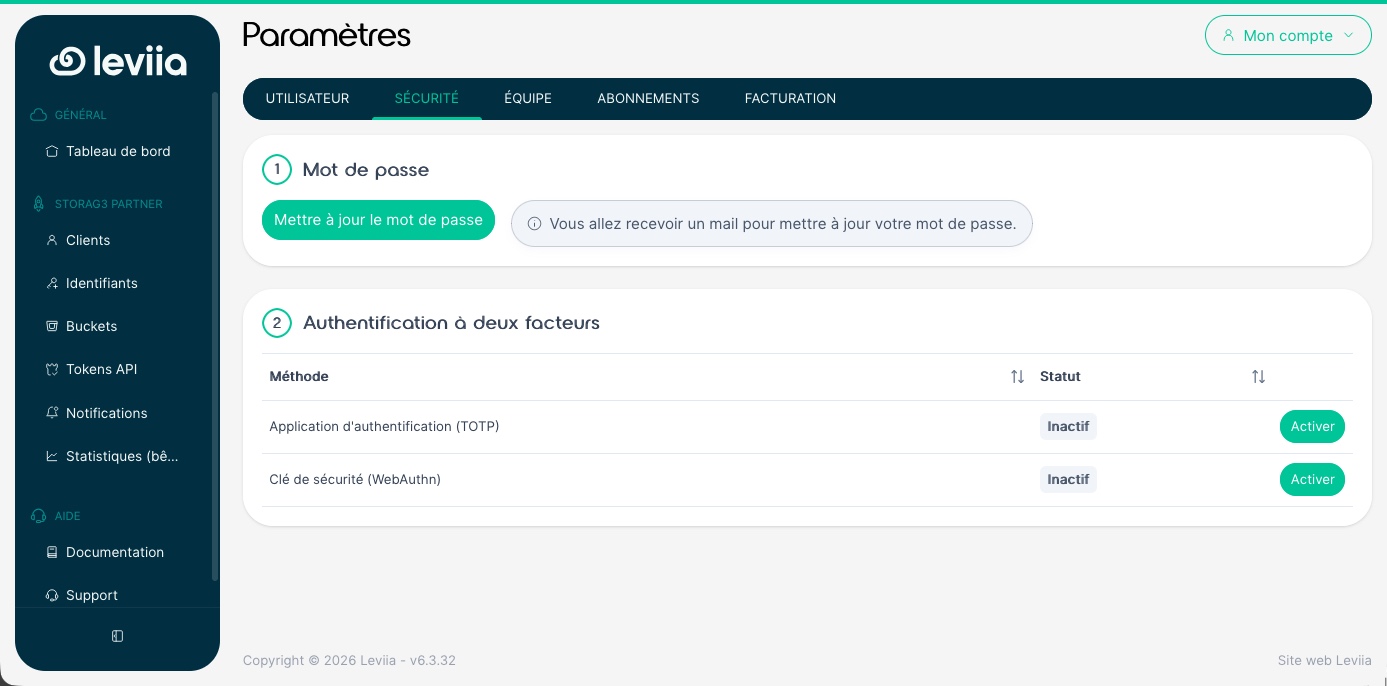
Under My account, then Settings, the Security tab lets you enable two-factor authentication. Two methods are available: an authenticator app (TOTP) or a security key (WebAuthn). I obviously recommend enabling it.
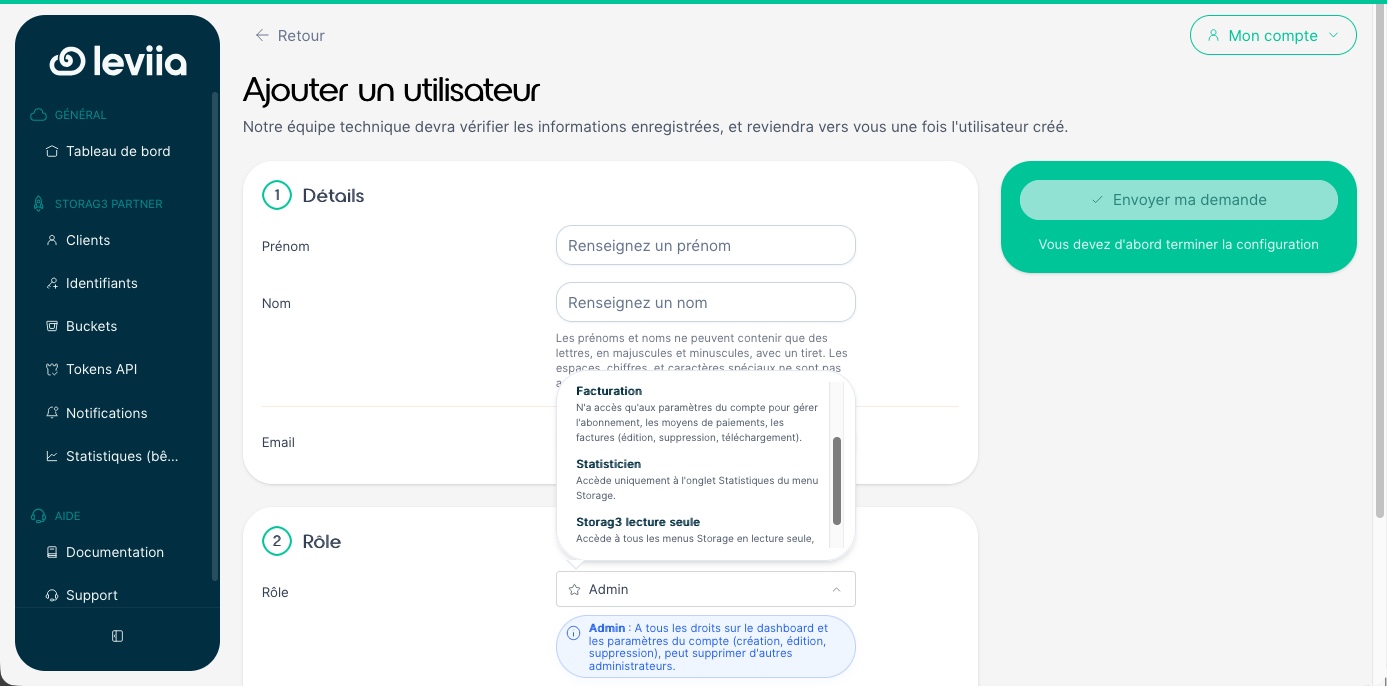
The Team tab lets you add users to your environment, with a role suited to their function, for example:
- Admin: full rights on the dashboard and account settings
- Billing: limited access to the subscription, payment methods, and invoices
- Statistician: access to the Statistics tab only
- Storag3 read-only: view access to the storage menus, without changes
Immutable backups with Veeam Backup & Replication and Leviia Storag3
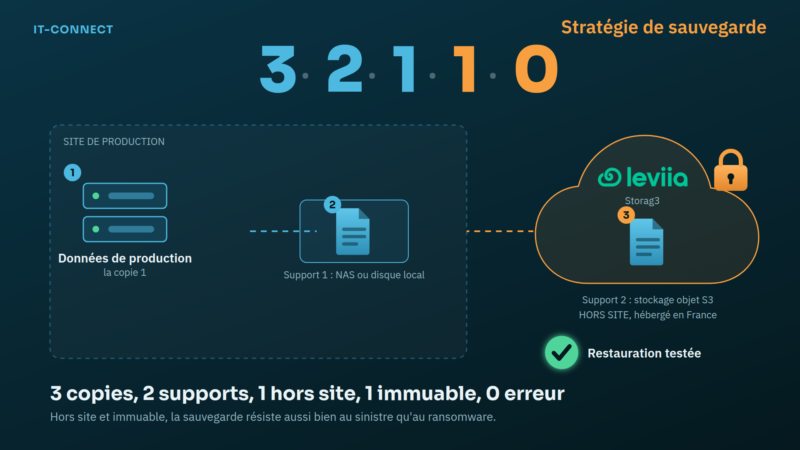
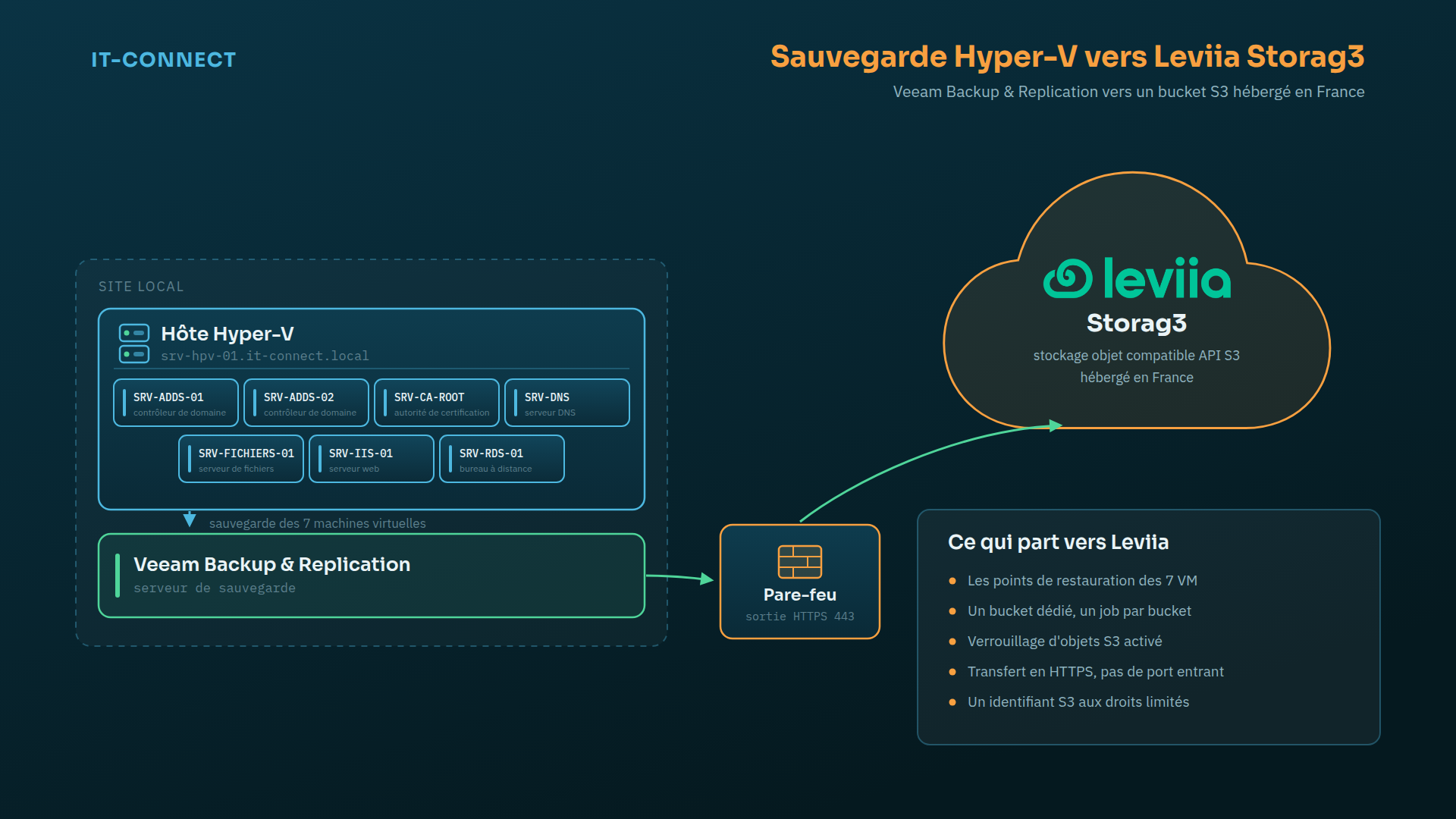
Now let’s focus on the following challenge: how do you build offsite backups in France, protected against deletion, while keeping costs under control? If you are an IT manager, this question has probably crossed your mind. Whether in the context of a backup strategy based on the 3-2-1 rule or its expanded 3-2-1-1-0 version, Leviia’s S3 storage plays the role of the offsite immutable copy.
If we pause for a moment on the 3-2-1-1-0 strategy, I want to remind you that the 0 refers to having no errors, which means testing backup restores. With Leviia, there are no egress fees, so you can test your backups as many times as needed without paying a cent more.
If this concept is new to you, I recommend reading this article: what is immutable backup?
In this demonstration, a Veeam Backup & Replication server backs up the virtual machines of an Hyper-V host directly to a Leviia Storag3 bucket.
Installing Veeam Backup & Replication
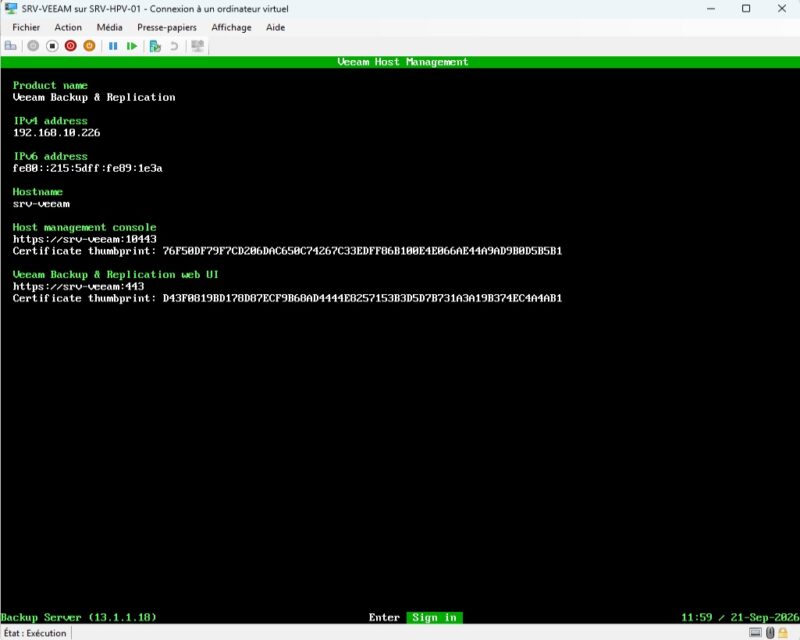
After downloading the installation media from Veeam’s official website, launch the installation of Veeam Backup & Replication 13. I won’t go into detail here, but this is the starting point for the rest of the procedure. For my part, I deployed a Linux-based Veeam appliance (provided by the vendor on its website).
Adding the Hyper-V host to Veeam
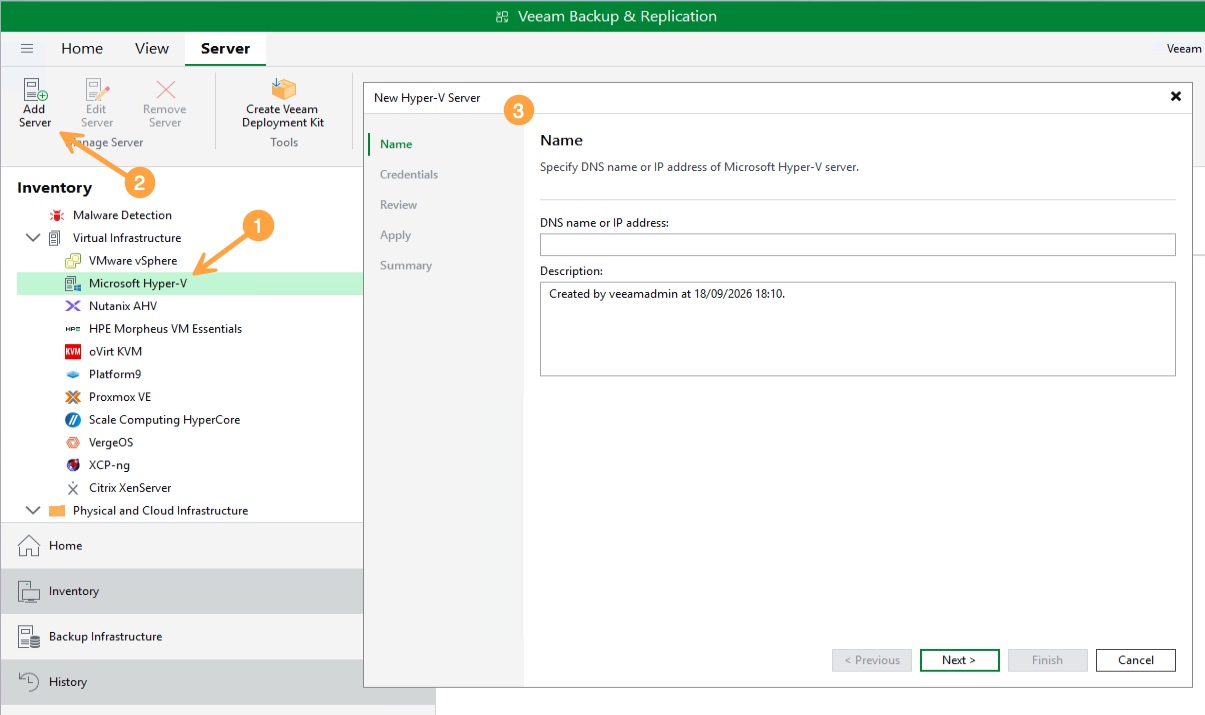
The first step is to add the server to the inventory. In Inventory, click Add Server, then select Microsoft Hyper-V. Veeam then asks whether it is a Hyper-V cluster, a server managed by SCVMM, or a standalone hypervisor. In my case, I choose Microsoft Hyper-V server (standalone).
Then enter your server’s DNS name (preferred) or its IP address.
The Credentials step is usually the one that causes the most issues, because Windows Firewall (or your security solution) may block the traffic. Veeam must connect remotely to the Hyper-V server to deploy its components. Use an account that is a member of the Hyper-V server’s local Administrators group (required to install the components).
Warning: in this demo, the Veeam server uses a domain account for simplicity. In production, Veeam and ANSSI best practices point toward a backup infrastructure isolated from the production Active Directory domain. If the domain is compromised, the attacker should not inherit access to the backup server.
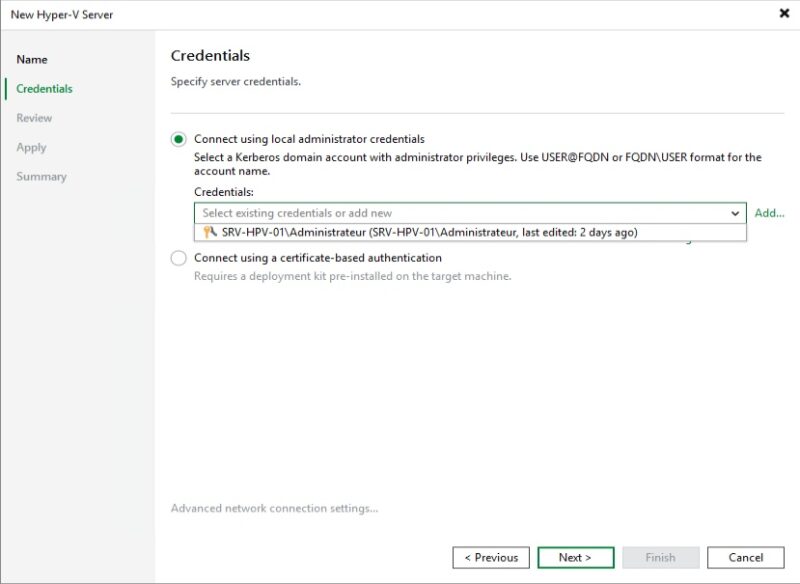
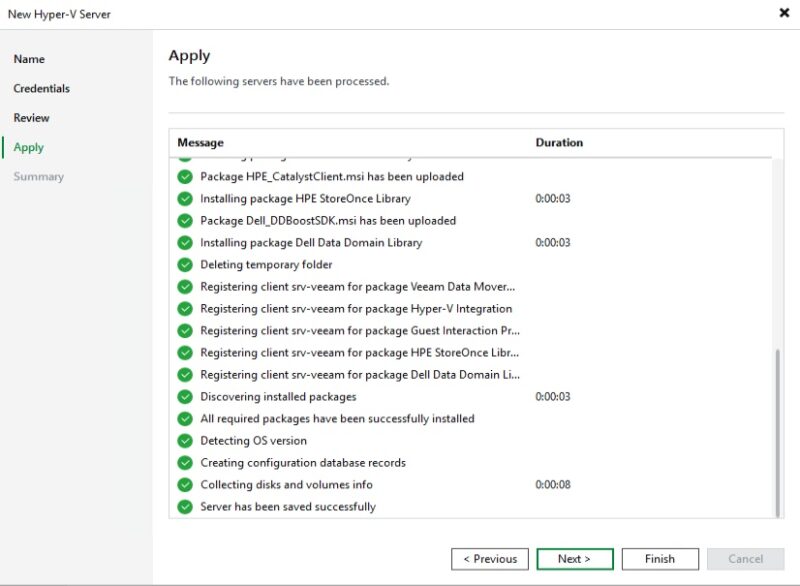
Click Next, then Apply, and wait for the deployment to complete.
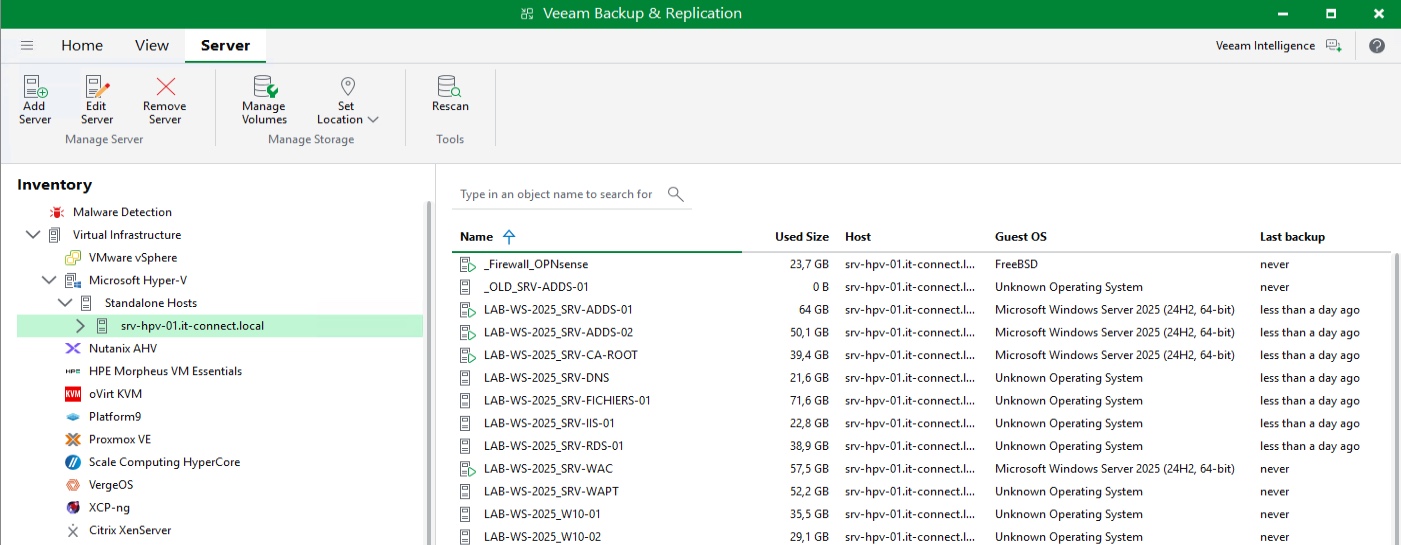
Once completed, the Hyper-V server appears in the console, along with the virtual machines it hosts.
Creating a Storag3 identifier on Leviia
The rest happens in the Leviia dashboard. In a partner-managed context, you must select the relevant customer from the drop-down list at the top of the page. As a partner, you can switch from one customer to another: this is the context. Unless the customer is self-managed, keep in mind what we covered earlier.
Click Identifiers in the left menu, then Create an identifier. Three pieces of information must be entered:
- Description: a label that makes the identifier easy to find. Here: IT-Connect - Veeam.
- Zone: the data hosting region, Lyon or Marseille. For this demo, I chose Lyon.
- Quota: the maximum volume that can be uploaded through this identifier, across all buckets. Here, 1 TB, but you can refine it with a quota in GB.
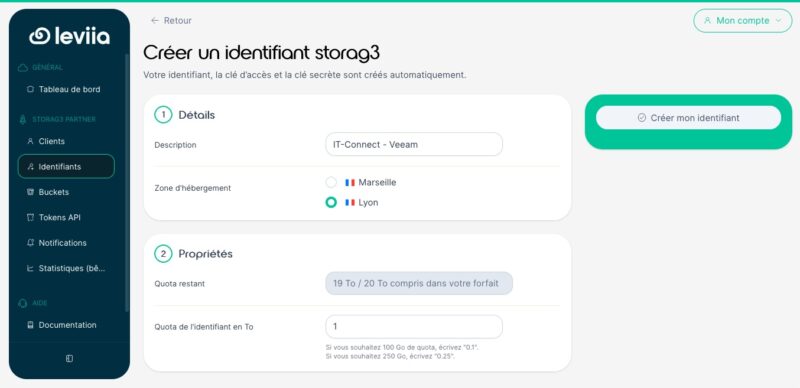
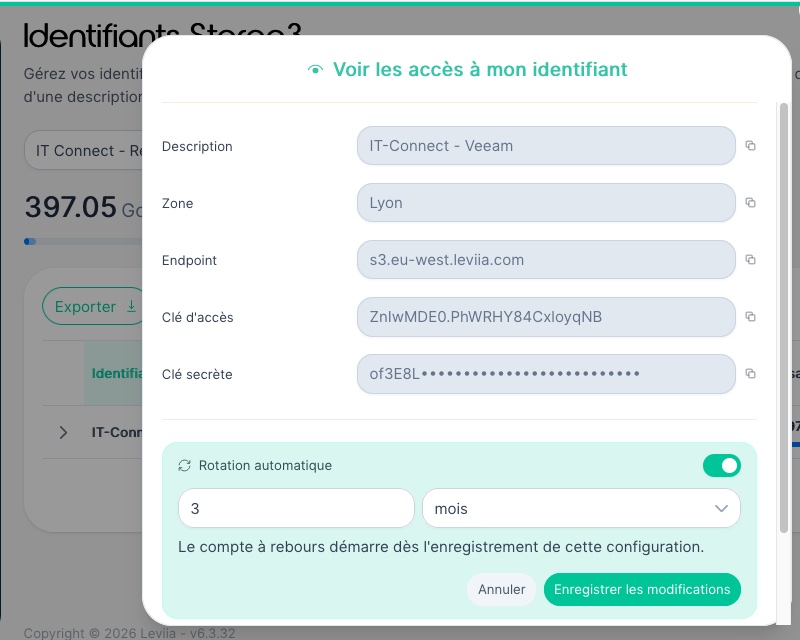
Leviia automatically generates the identifier, access key, and secret key. Display them and store them in your password manager: we’ll need them in Veeam. Also note the endpoint associated with the identifier, meaning the S3 service address to contact.
I want to draw your attention to the Automatic rotation option. An S3 access key is a static secret: it will not expire on its own, and it is stored on the client side (backup software, script, etc.). The longer it lives, the more likely it is to be left lying around somewhere... such as on a former administrator’s or former intern’s workstation. Rotating keys at regular intervals reduces the window during which an exfiltrated key remains usable, and it is also the right reflex when an employee leaves or after an incident. Leviia offers two options: automatic rotation (scheduled) and immediate rotation to cover those different scenarios. This mechanism is even more interesting because it is available at the sub-identifier level (and therefore potentially for the sub-identifier you give to an intern whose end date you know in advance).
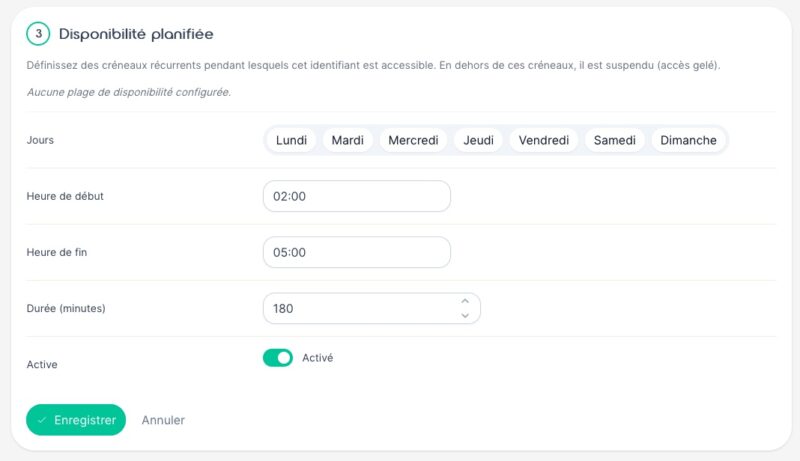
Another useful addition: the scheduled availability of an identifier. The principle is simple. You define recurring time slots, by day of the week and time range, during which the identifier can be used. Outside those slots, it is suspended: any S3 request made with its keys is rejected, as if access were frozen. In the example below, the identifier dedicated to Veeam is only accessible from 2 a.m. to 5 a.m. every day, i.e. a 180-minute window aligned with the night backup job.
The security benefit is to reduce the attack surface to the strict minimum. A stolen S3 access key is useless if it is active only three hours per night: outside that window it is inert, and during that window it cannot delete locked objects. This limited availability also acts as a safeguard against human error and scripts running outside the expected hours, and it provides an interesting detection signal (a connection attempt refused at 2 p.m. on an identifier meant to live only at night is an anomaly). That said, be careful not to make the availability window too strict or you may break your backups.
Creating an S3 bucket suited for Veeam backups
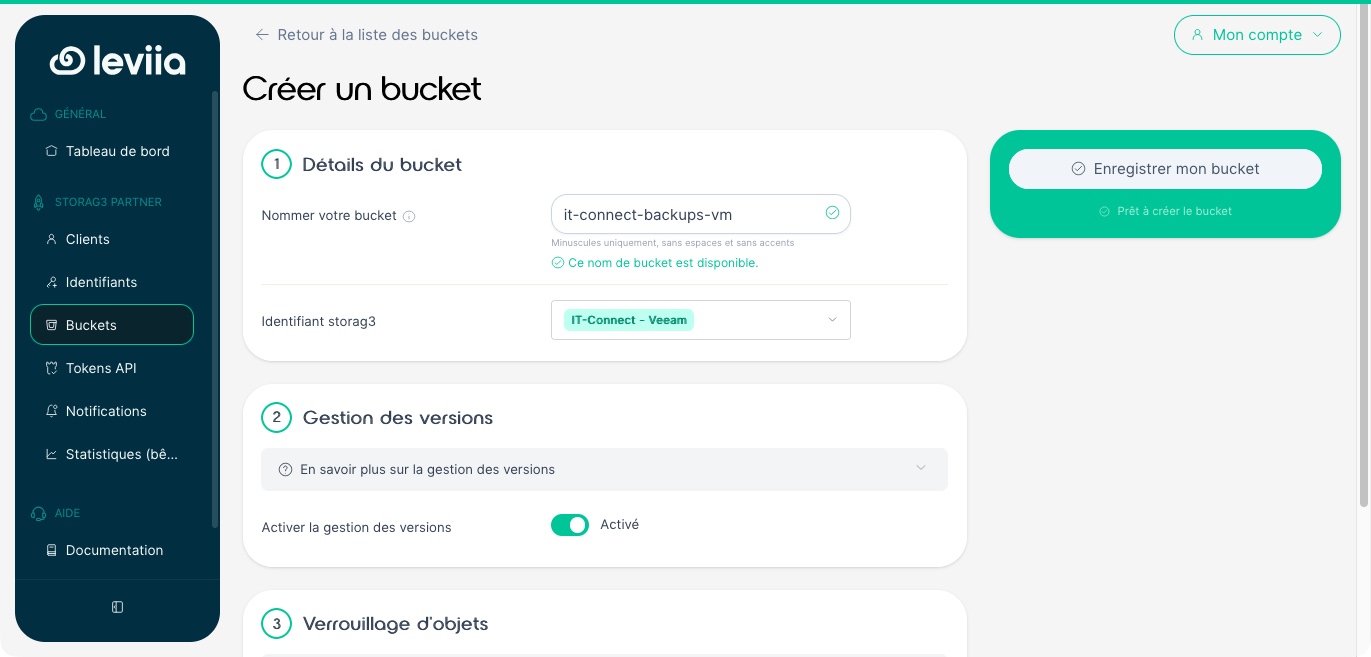
Click Buckets, then Create a bucket. Bucket creation is split into several sections.
1. Details
Name the bucket and associate it with the identifier created earlier (only active identifiers are offered). The name must be unique across all buckets hosted by Leviia: prefix it with your organization’s name. Here, the bucket is called it-connect-backups-vm.
2. Versioning
When this option is enabled, the bucket keeps multiple versions of the same object. This leads to additional storage consumption, independently of any versioning that your backup software may perform.
3. Object Lock
This is the option we care about. Object Lock (S3 Object Lock) prevents an object from being deleted or overwritten for a specified period, using a WORM (Write Once, Read Many) model. This is the mechanism that makes backups immutable. Enable Allow object locking, but leave the Default retention option disabled.
Why? Because there are two ways to lock:
- Lock without default retention (manual mode): the third-party application sets the lock duration for each object. This is the mode expected by Veeam, so let it manage it.
- Lock with default retention (compliance mode): the retention period is defined at bucket level and applies to all uploaded objects. No identifier can delete a protected object version before expiry. This mode is suitable for regulatory archiving, not for a Veeam repository.
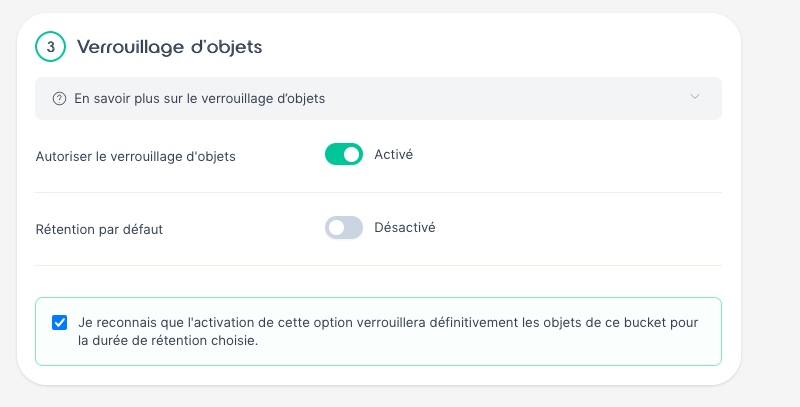
Veeam’s documentation is explicit on this point: when Object Lock and versioning are enabled, default retention must not be enabled, or unpredictable behavior may occur. Leviia also specifies that Veeam will display an error if it cannot set the retention itself. That makes sense!
4. Lifecycle
This is another dashboard feature. Lifecycle rules automate bucket cleanup, either across the entire bucket or within a specific folder. Three rules are available:
- Clean up completed deletes: removes delete markers when no older versions remain
- Delete old versions: deletes non-current versions after a delay, while keeping the most recent ones
- Delete interrupted uploads: removes leftover parts from a multipart upload that never completed
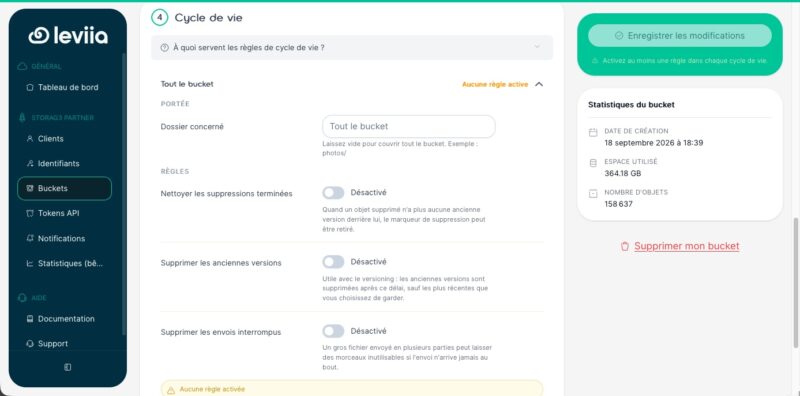
Lifecycle management is part of the S3 protocol, which means it can also be controlled through the API. In practice, bucket configuration takes the form of a JSON file containing a list of rules. Each rule includes several fields, including an ID, a status, a filter that limits its scope, and the cleanup action to perform. Leviia’s documentation provides the expected format for the three cleanup modes available in the dashboard:
- Clean up completed deletes: the
ExpiredObjectDeleteMarkerfield set totrue - Delete old versions: the
NoncurrentVersionExpirationfield, whereNoncurrentDaysdefines the delay before deletion andNewerNoncurrentVersionsdefines how many versions should still be kept - Delete interrupted uploads: the
AbortIncompleteMultipartUploadfield, whereDaysAfterInitiationdefines the cleanup delay
Once the file is written, three commands are enough to apply it, read it back, and remove it. Leviia points to the usual compatible clients: AWS CLI, S3cmd, or Cyberduck. With AWS CLI, using the endpoint and keys of your identifier, the syntax would look like this:
aws --endpoint-url https://VOTRE-ENDPOINT s3api put-bucket-lifecycle-configuration \
  --bucket mon-bucket --lifecycle-configuration file://regles.json
aws --endpoint-url https://VOTRE-ENDPOINT s3api get-bucket-lifecycle-configuration --bucket mon-bucket
aws --endpoint-url https://VOTRE-ENDPOINT s3api delete-bucket-lifecycle --bucket mon-bucket
The benefit over dashboard management is that you can automate tasks. The cleanup policy becomes a JSON file that you version together with the rest of your infrastructure, and apply to as many buckets as needed without going back through the interface. For a service provider managing dozens of customers, this is very useful for applying the same configuration everywhere.
Note: I think these features should not be enabled on a bucket used by Veeam. Veeam Backup & Replication should manage this storage area itself, without interference.
Confirm the creation. The bucket appears in Leviia’s interface!
Adding Leviia S3 storage in Veeam
Now that the bucket is ready, we will declare it in Veeam as a backup repository. In the console, click Backup Infrastructure, then Backup Repositories, and right-click to choose Add backup repository.
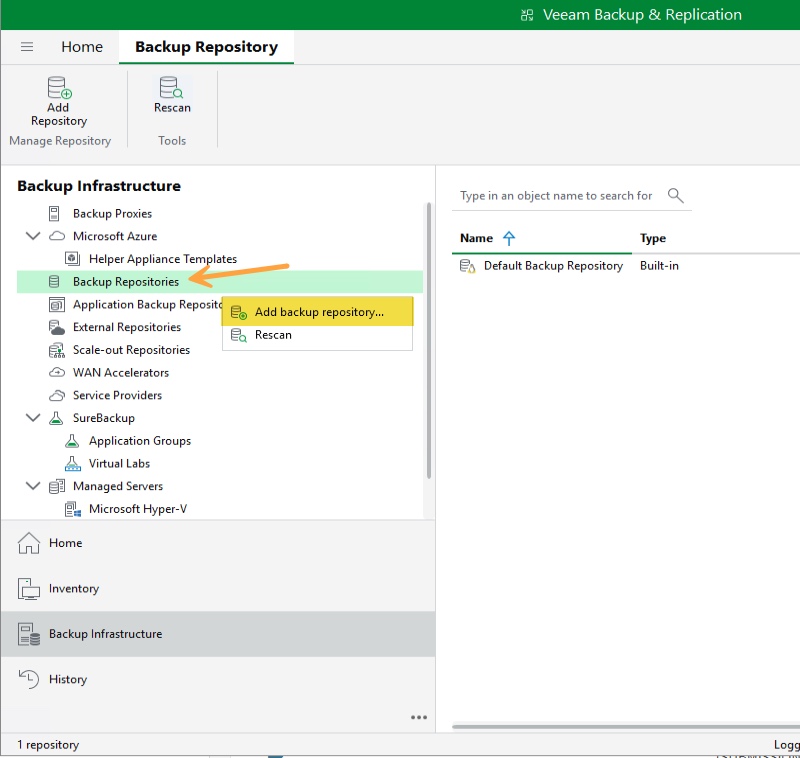
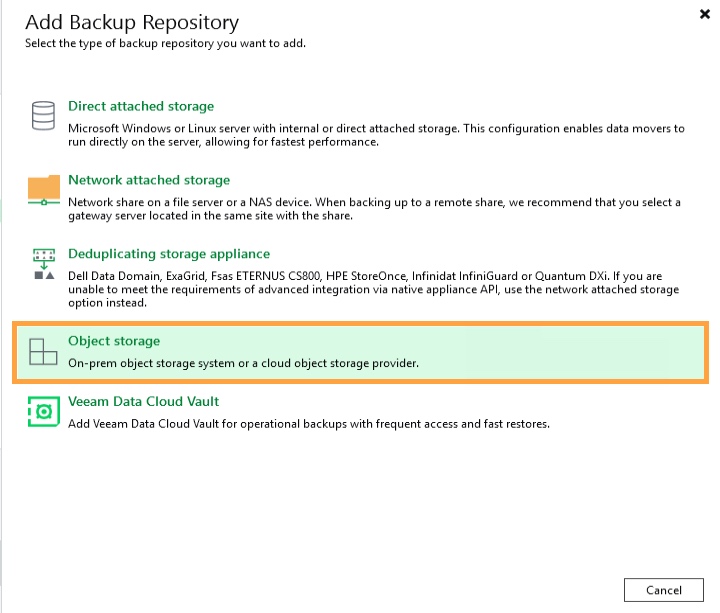
Choose the Object storage type, then S3 Compatible.
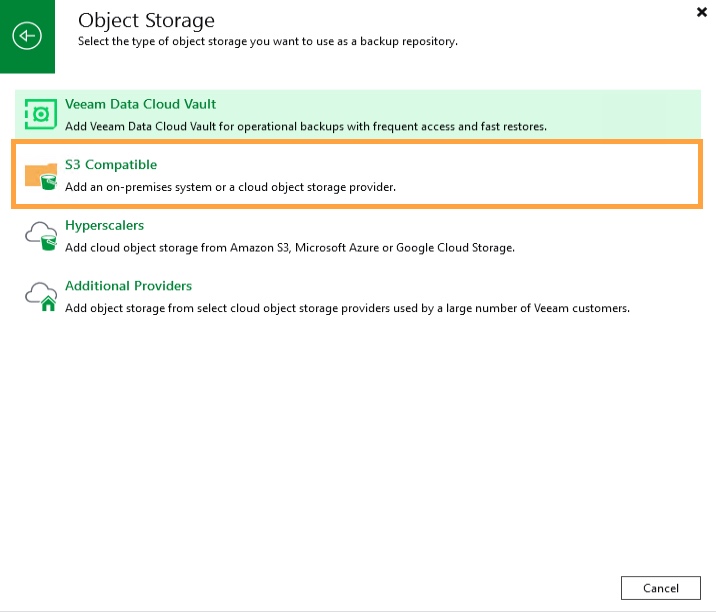
An assistant starts. Begin by naming the repository.
At the Account step, fill in the fields like this:
- Service point: the S3 endpoint noted in the Leviia dashboard, for your identifier
- Region: keep the default value, as Leviia’s documentation indicates (you can enter a city name and it will work)
- Credentials: click Add to declare a new set of credentials, then paste your access key and secret key retrieved from the Leviia portal
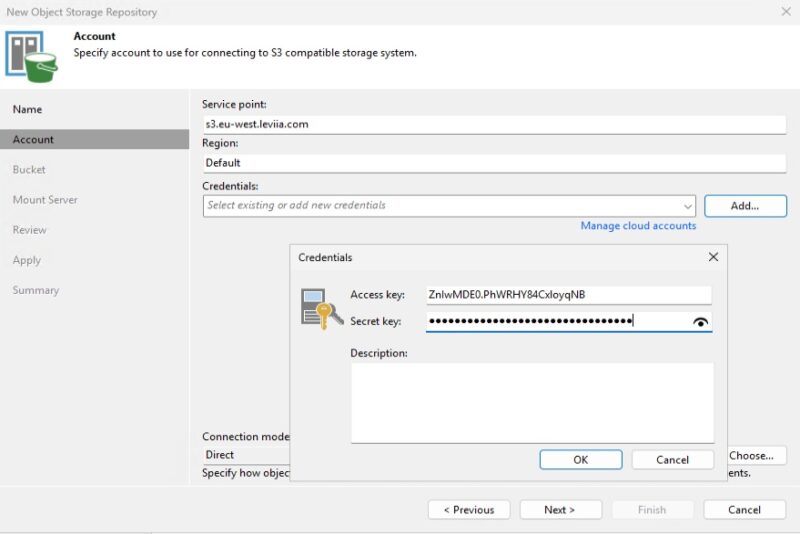
Validate: Veeam will try to establish the connection. Once connected, click Browse to the right of Bucket to select your bucket. Then, to the right of Folder, click Browse and create a new folder where Veeam will store its data. Here, the folder veeam has been selected.
On the same screen, check Make recent backups immutable for X days. This is what enables immutability: backups cannot be deleted or modified for the specified period. What you must understand clearly is that even an administrator on the Veeam server cannot bypass this. Under the hood, Veeam applies a lock on each object uploaded to the S3 bucket.
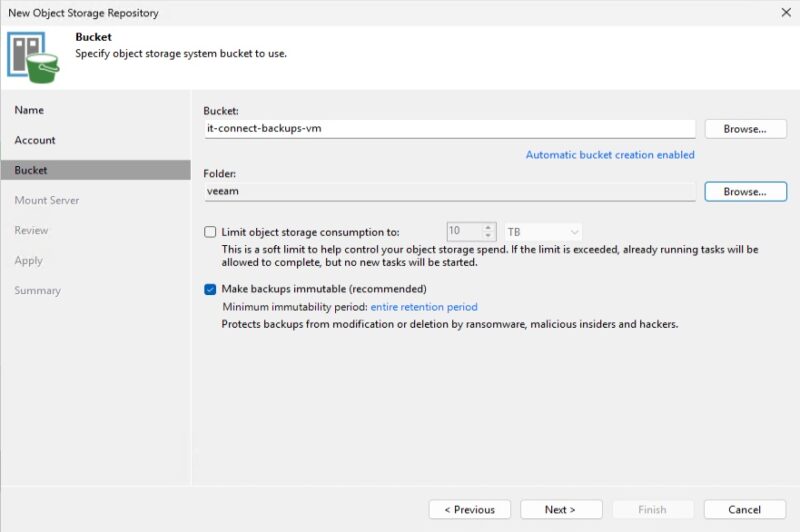
Continue to the end without changing the other settings, then validate. The Leviia repository is ready to use.
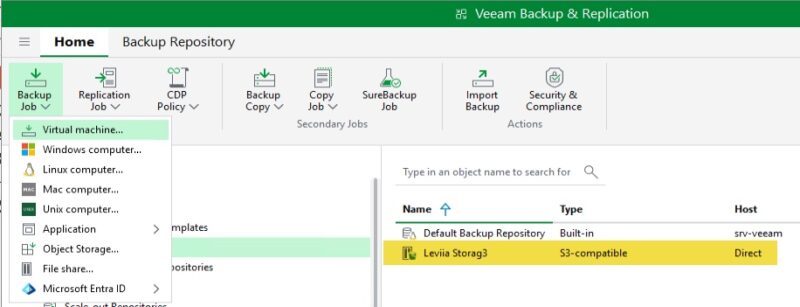
Creating your first offsite backup in France
Now we need to create a backup job. In Home, click Backup Job, then Virtual Machine.
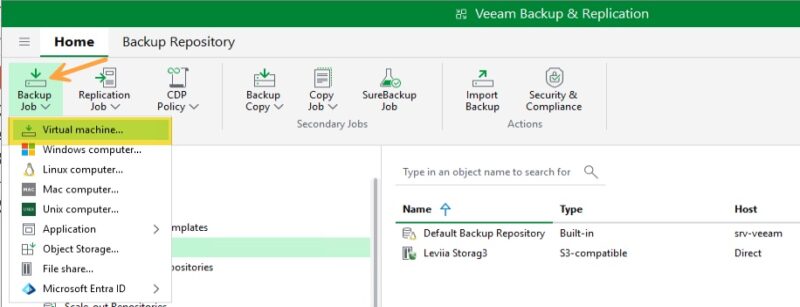
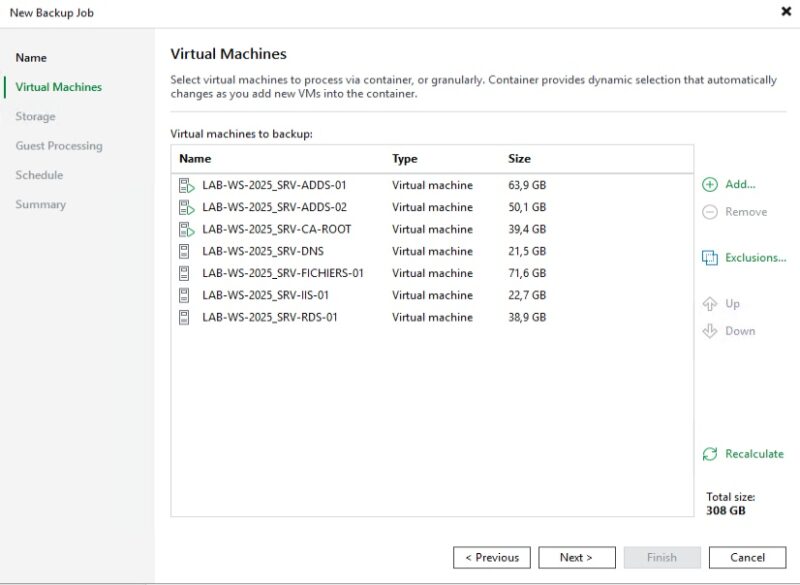
Give this job a name, then select the virtual machines to back up using the Add button. Here, I select several virtual machines running on my local hypervisor.
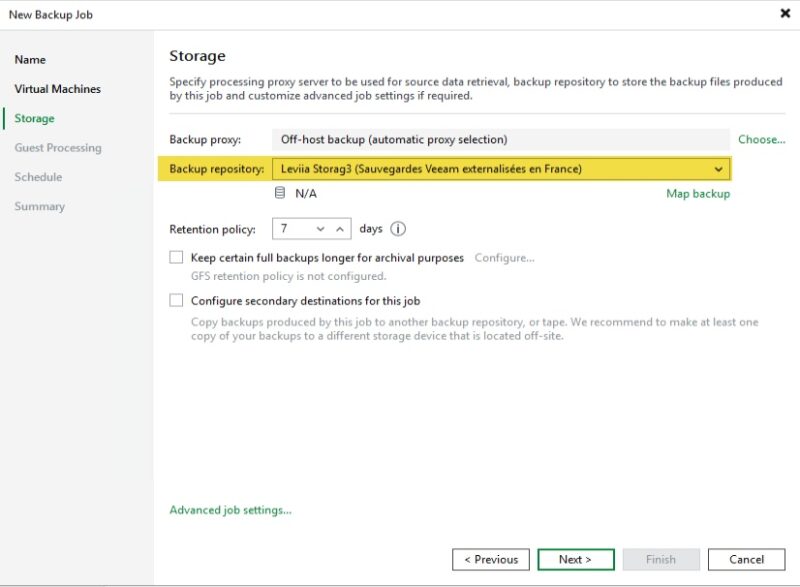
At the Storage step, make sure you choose the Leviia repository as the Backup repository and define your retention policy.
Take the opportunity to click Advanced, then in the Storage tab set Storage optimization to 4 MB. This recommendation from Leviia’s documentation increases the size of the blocks sent to object storage, thereby reducing the number of objects and requests.
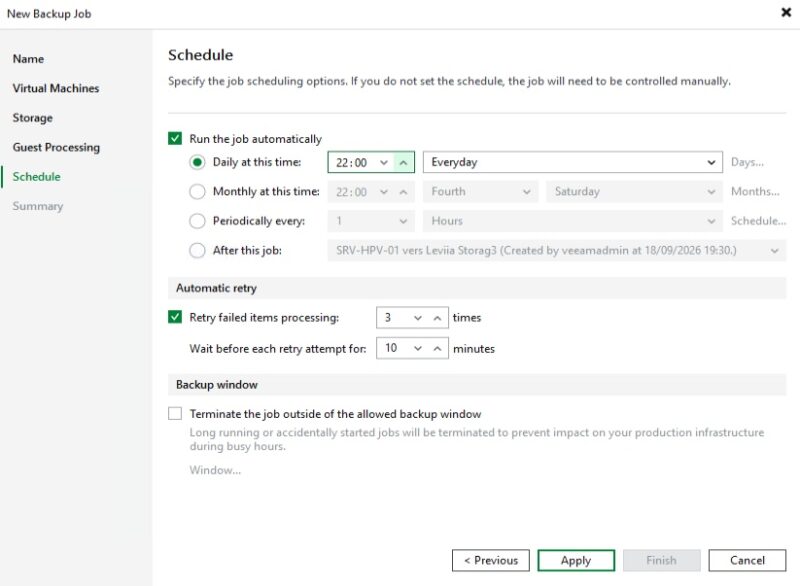
Then schedule the backup according to your needs (once a day at a fixed time, every X hours, etc.), and click Apply. If you configured scheduled availability on your Leviia identifier, take it into account and leave a few minutes of margin.
The job is created. For a first test, right-click it and choose Active full to generate a full backup of the VMs.
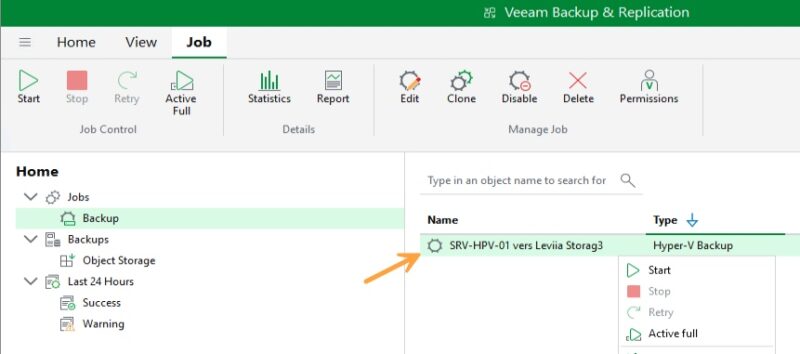
You can monitor progress in the Veeam console. Throughput will mainly depend on your Internet upload speed, since the data goes directly to the Cloud. Once the job is complete, consumption is visible in the Leviia dashboard, at bucket level (used space, number of objects) and in the Statistics menu. That’s it, it is now in place!
Can the immutable backup be deleted?
To finish, we will try to delete the backup. This is the only way to verify that immutability is indeed active.
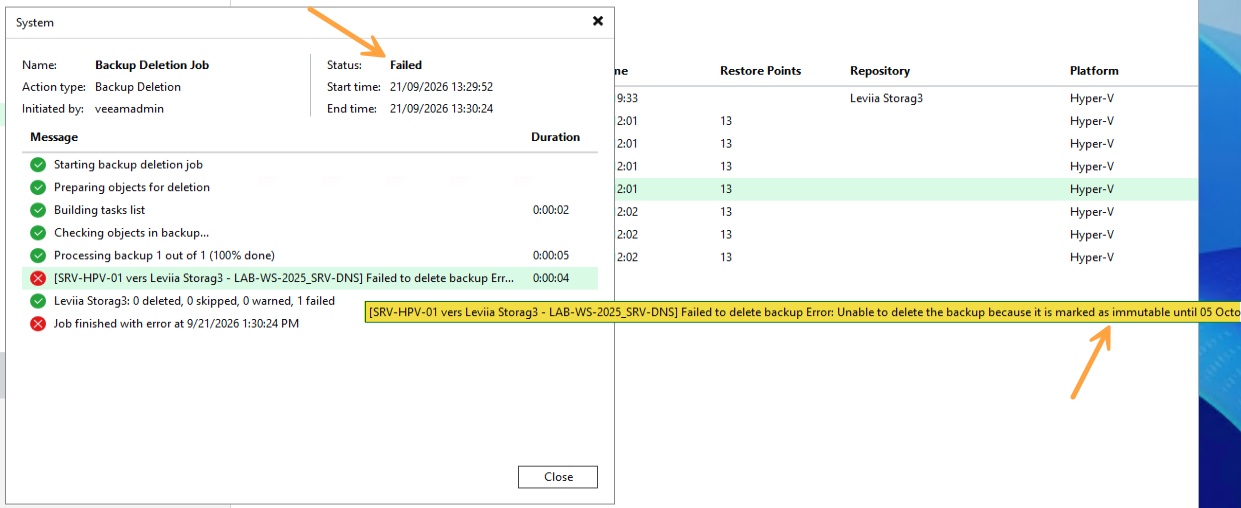
In the Veeam console, go to Home, then Backups and Object Storage. Right-click the relevant VM and click Delete from disk.
A few seconds later, the deletion task switches to Failed. Veeam explains that the backup is marked immutable and provides the unlock date. This block is not just software protection on the Veeam side: it is enforced by Leviia storage itself, thanks to object locking. An attacker who obtained the S3 keys and tried another tool would hit the same refusal.
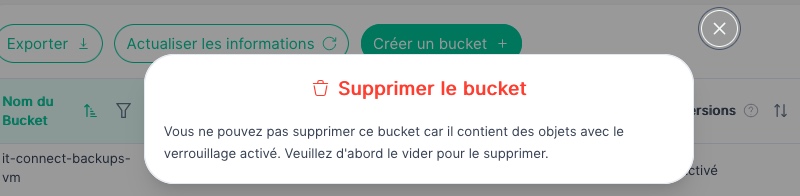
On the Leviia dashboard side, the result is the same: Leviia does not allow a bucket containing objects to be deleted, and locked objects cannot be deleted before their retention period expires. The bucket therefore cannot be removed.
And for collaborative work: Leviia Next
In the first version of this article, I presented Leviia Drive, a file storage and sharing service based on Nextcloud. The offering has evolved into Leviia Next, a collaborative suite aimed at businesses and public-sector organizations, positioned as an alternative to Microsoft 365.
It is still based on Nextcloud (Leviia is a Platinum Partner of the vendor) and includes file storage and sharing, collaborative editing with ONLYOFFICE (and maybe soon Euro-Office?), calendar, project management with Deck, chat, and video conferencing. Each customer gets a dedicated instance and domain name, with external SSO, 2FA, antivirus, and backups retained for 180 days.
The commercialization model has also changed, with Leviia offering it as a project-based solution for large-scale deployments. Details are available on the Leviia Next pricing page.
Conclusion
Since my first test, Leviia has moved to another level. The entry-level object storage at €5.99 per TB has been replaced by Leviia Storag3, a more expensive but also more mature and complete service: infrastructure hosted in Lyon and Marseille, multi-site erasure coding, ISO 27001 and HDS certifications, and a dashboard that has made real progress. Sub-identifiers, key rotation, API tokens, notifications, and lifecycle rules are all real improvements for day-to-day operations. More importantly, these changes respond to the needs of Leviia’s customers, whose feedback is valuable when defining the roadmap.
With Veeam Backup & Replication, integration remains straightforward and immutability works as expected, provided you follow two rules: no default retention and no lifecycle rule on the bucket. The partner program is also a major evolution, especially because it opens access to Leviia Storag3 for smaller organizations through their IT provider, with three well-designed management modes.
You can test Leviia Storag3 free for 15 days:
To go further, here are some useful links:
- Cloud backup: why it matters and how to do it with Leviia Storag3 and Commvault
- Immutable backups for beginners
- Backup: what is the 3-2-1 rule?
- Leviia documentation: configuring immutability with Veeam Backup & Replication
- Veeam documentation: limitations of S3-compatible object storage
FAQ
What is Leviia Storag3?
Leviia Storag3 is an object storage service compatible with the S3 API, offered by French Cloud provider Leviia. It is hosted exclusively in France, certified ISO 27001 and HDS, and is primarily aimed at offsite backup, archiving, and large-scale storage.
How much does Leviia Storag3 cost?
Pricing starts at €9.99 excluding tax per TB per month, with lower rates depending on volume. There are no egress fees, no API request fees, and no deletion fees. For direct subscriptions, the minimum volume is 10 TB per order. A 15-day free trial, limited to 1 TB, is available without a credit card.
Where is Leviia Storag3 data hosted?
Data is hosted exclusively in France, in datacenters located in Lyon and Marseille. When creating a Storag3 identifier, you choose the storage zone: Lyon or Marseille. Leviia says it protects data with erasure coding distributed across three remote datacenters, for an advertised durability of 99.9999%.
Is Leviia Storag3 compatible with Veeam Backup & Replication?
Yes. Leviia Storag3 is added in Veeam Backup & Replication as an Object storage repository, then S3 Compatible. You only need to provide the S3 endpoint, access key, and secret key for a Leviia identifier, then select the bucket. The service is also compatible with Acronis, Commvault, Rubrik, Atempo, Bacula, NAKIVO, and Synology and QNAP NAS devices. In practice, Leviia uses the standard S3 protocol.
What is S3 Object Lock?
Object Lock is an S3 API feature that prevents an object from being deleted or overwritten for a defined period, using a WORM (Write Once, Read Many) model. This is the mechanism used by backup software to create immutable backups, protected against ransomware and malicious deletion, including sabotage by an administrator.
What is the difference between a Leviia identifier and a sub-identifier?
A Storag3 identifier combines an access key, a secret key, a storage zone, and a quota. Buckets are attached to it. A sub-identifier is a secondary access created under that identifier, with restricted permissions: read, write, read and write, or full access. It lets you apply the principle of least privilege to applications and users.
How does Leviia’s partner program work?
The program is designed for resellers, MSPs, integrators, and managed service providers who want to resell Leviia Storag3 to their customers. The partner has a console to create customers, assign them capacity, and choose a management mode: partner only, partner and customer, or customer only. No minimum volume commitment is required to get started.
Can Leviia Storag3 be tested for free?
Yes. Leviia offers a 15-day free trial, no credit card required, with full access to the dashboard and its features. You can store up to 1 TB of data during the trial, which is enough to validate Veeam integration and test immutability. Enough to reproduce this tutorial for real!
Is Leviia subject to the Cloud Act?
Leviia is a French company, hosts data exclusively in France, and says it relies on an open source software stack without dependence on an American vendor. As such, it states that it is not subject to US extraterritorial laws such as the Cloud Act or FISA, unlike American providers, even when their servers are located in Europe.