www.it-connect.fr

Entra ID Licensing in 2026: What You Need to Know
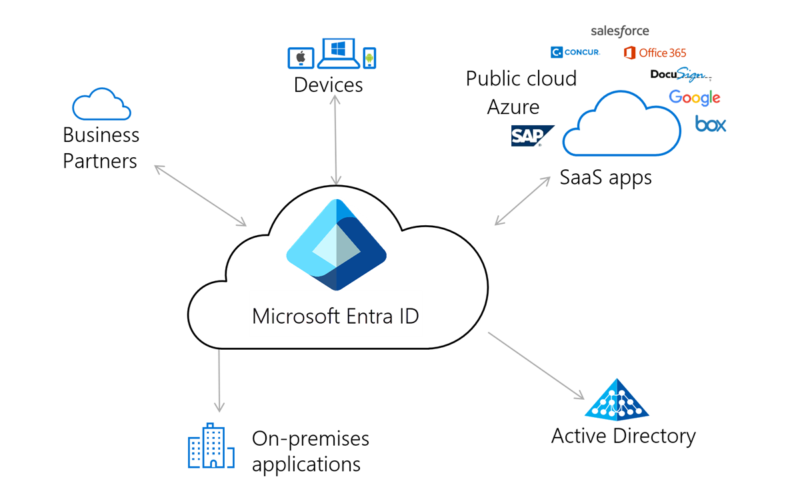
Microsoft Entra ID (formerly Azure AD) is the central component of identity management across Microsoft cloud services. It lets you manage users, groups, access policies for cloud and on-prem resources, as well as privileged roles. This service is everywhere in Microsoft 365 and Azure environments. In this article, we’ll review the different license plans available, how licensing is managed, and finally how to optimize costs.
Like many Microsoft services, Entra ID comes in several license tiers: Free, P1, P2, and Entra Suite. Each tier unlocks additional features, from dynamic groups to Privileged Identity Management (PIM), as well as real-time risk detection with Identity Protection. But between what is already included in your Microsoft 365 subscription, what requires an add-on, and the exact user assignment rules, it’s easy to get lost. This article explains the rules in effect in 2026 so you can license your users correctly and optimize your costs.
Entra ID licenses and features
There are three Entra ID license tiers (Free, Premium P1, and Premium P2), plus Entra Suite, which we’ll cover later. Each tier unlocks additional features, from dynamic groups to Privileged Identity Management (PIM), including real-time risk detection with Identity Protection. Let’s review the features available in each one.
| Feature | Free | P1 | P2 |
| Multifactor authentication | ✅ | ✅ | ✅ |
| Passwordless authentication | ✅ | ✅ | ✅ |
| Temporary Access Pass (TAP) | ✅ | ✅ | ✅ |
| Identity verification | ❌ | ✅ | ✅ |
| Company branding | ✅ | ✅ | ✅ |
| Sign-in activity report (user) | ✅ | ✅ | ✅ |
| Single sign-on (SSO) | ✅ | ✅ | ✅ |
| Dynamic groups | ❌ | ✅ | ✅ |
| Self-service password change (cloud user cloud) | ✅ | ✅ | ✅ |
| Self-service password reset (SSPR, without Active Directory) | ❌ | ✅ | ✅ |
| Password reset writeback to Active Directory | ❌ | ✅ | ✅ |
| Enterprise State Roaming | ❌ | ✅ | ✅ |
| Windows Autopilot | ❌ | ✅ | ✅ |
| Conditional Access | ❌ | ✅ | ✅ |
| Custom security attributes | ❌ | ✅ | ✅ |
| External MFA service | ❌ | ✅ | ✅ |
| Microsoft Identity Manager 2016 | ❌ | ✅ | ✅ |
| Administrative units | ❌ | ✅ | ✅ |
| Entra Connect Sync/Cloud Sync | ✅ | ✅ | ✅ |
| Entra Connect Health | ❌ | ✅ | ✅ |
| Entra App Proxy | ❌ | ✅ | ✅ |
| Password Protection | ❌ | ✅ | ✅ |
| Single-account access sharing | ❌ | ✅ | ✅ |
| Add your IT usage policy | ❌ | ✅ | ✅ |
| Dedicated SLAs | ❌ | ✅ | ✅ |
| Global Secure Access | ❌ | ✅ | ✅ |
| SMS authentication | ❌ | ✅ | ✅ |
| Access reviews | ❌ | ❌ | ✅ |
| Entitlement management | ❌ | ❌ | ✅ |
| Entra ID Protection (real-time sign-in risk evaluation) | ❌ | ❌ | ✅ |
| Privileged Identity Management (PIM) | ❌ | ❌ | ✅ |
| MFA registration policy | ❌ | ❌ | ✅ |
Entra ID Free only allows self-service password changes by the user when they already know their password. Password reset in case of forgotten credentials is available starting with Entra ID P1. Although these features are part of SSPR, it is important to distinguish this nuance.
What about Entra Suite?
Entra Suite extends Entra ID with advanced governance, network access control, real-time protection, and identity verification capabilities. It helps implement a Zero Trust policy beyond identity alone. This plan is available as an add-on to Entra ID P1 and P2 and adds five building blocks:
- Entra ID Governance: manage and automate the lifecycle of identities and access, enforce least privilege, and simplify audits.
- Entra ID Protection: detect and block identity compromise in real time using identity and network signal analysis. This component is already available with Entra ID P2, so it can be obtained with an Entra ID P1 base.
- Entra Private Access: a ZTNA (Zero Trust Network Access) solution that replaces the VPN. It secures access to private applications from anywhere, with identity- and context-based access controls.
- Entra Internet Access: secure Web and SaaS gateway (SWG). It applies identity-based controls to Internet traffic, SaaS applications, and now AI-related usage.
- Entra Verified ID (Face Check): basic Verified ID is available starting with Entra ID Free. Entra Suite unlocks identity verification through facial recognition with protection against impersonation attacks, including deepfakes, by integrating verifiable identity proofs into access journeys.
How much do Entra ID licenses cost?
Below are the public prices for Entra ID plans, with a cost-optimized approach for each component. Public prices exclude tax, are in euros, per month, and based on an annual commitment — excluding CSP/EA discounts.
| Plan | Public price excl. tax | Information / Optimization |
| Entra ID Free | N/A | Included by default with all Microsoft 365 and Azure subscriptions |
| Entra ID P1 | €5.20 / user | Included in M365 Business Premium, F1, F3, E3, A3 |
| Entra ID P2 | €7.80 / user | Included in M365 E5, E7, A5 |
| Entra Suite | €10.40 / user | As an add-on to a P1 base |
| Entra ID Governance add-on | €6.10 / user | Requires a P1 or P2 base. Included in M365 E7 |
| Entra Workload Identites | €2.60 / service principal | Lets you manage the lifecycle of service principals and managed identities |
| Entra Verified ID (Facial recognition) | €0.22 / verification | 8 identity verifications per user per month included with Entra Suite. Included in M365 E7 |
To optimize licensing costs, the winning approach is profile-based segmented licensing rather than buying a full plan for every user in an organization. The most common mistake that creates a significant budget loss is assigning an Entra ID P2 license to all users, even though only 20% to 30% of accounts use Entra ID P2-dependent features (Identity Protection, PIM, access reviews...).
In practice, you can start with P1 (Conditional Access, dynamic groups, SSPR...) for all users, then use P2 only for privileged accounts, administrators, and critical profiles that actually need it. I usually recommend inventorying profiles, the features they use, and the associated risks before any purchase or renewal of your license estate. Finally, don’t forget to regularly review assignments.
What changes in 2026: price increase and Microsoft 365 E7
Price increase effective July 1, 2026: Microsoft has announced a global price increase. This mainly affects Microsoft 365 and standalone plans such as Entra ID. Entra ID P1 is increasing by around 16%; Entra ID P2 is also affected.
Customers whose licenses renew before that date can lock in their price until the next renewal. Take this opportunity to review your needs and identify over-licensing in your tenant before renewing at the new price.
Microsoft 365 E7 has been available since January 1, 2026 at €91.90 excl. tax / user / month. It is the first plan to include the full Entra Suite. Previous plans were limited to Entra ID P1 and P2. In short, Microsoft 365 E7 includes all the features of the E5 plan plus Entra Suite. This plan is intended for organizations looking to implement a complete Zero Trust strategy while taking AI usage into account.
Entra ID licensing compliance
Entra ID Premium licensing has a fairly simple history, but with a very significant compliance and cost challenge.
When Azure AD Premium first arrived, many companies thought that a single tenant-wide license was enough to cover all users. I have performed Microsoft 365 compliance and security audits where Conditional Access was deployed across several hundred users with only one Entra ID P1 / Azure AD P1 license.
Technically, this did make the feature available at the tenant level. However, the organization was not compliant with Microsoft’s licensing terms. It must be said that, at the beginning, Microsoft struggled to communicate how licensing worked. The idea of one license per employee was mentioned by Microsoft for a long time, without appearing in the contractual terms.

Today, Microsoft is clearer about this: an employee using one of the Entra ID Premium features must have a license.
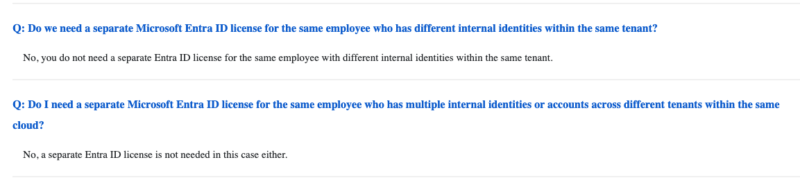
More specifically, it refers to the employee, not the number of accounts they have.

Let’s take the example of an employee hired as an IT administrator by their company, with Conditional Access in Entra ID.
According to best practices, the employee will have two user accounts in Entra ID:
- A user account: a standard account used to sign in to their computer and access day-to-day resources and applications. This account has privileges limited to business needs.
- Their admin account: an account with elevated privileges and roles used to manage, configure, and administer the company’s Microsoft 365 environment. This account should be restricted to administrative tasks and separated from the everyday user account.
Because Conditional Access requires Entra ID P1, the company must purchase and assign a license to the employee’s user account. The admin account does not need to be licensed because it belongs to the same employee, who is already covered.
This approach applies to features that are not account-based, such as Conditional Access. Governance features, on the other hand, are counted differently. For example, access reviews require one license per account within the scope of the feature (requesters, reviewers, reviewed users). Guests are subject to a separate billing model.
Conclusion
Entra ID licensing comes down to a simple principle: one license per employee, regardless of how many Entra ID accounts they have, except for governance features, which manage the lifecycle of accounts rather than the employee within the company. In practice, there are a few pitfalls: tenant-wide activation that is not compliant, unnecessary duplicate licensing, or, conversely, insufficient licensing for governance.
Take advantage of the 2026 price increase to become compliant and get help optimizing your Microsoft 365 licensing costs.