www.it-connect.fr

Microsoft Entra ID Backups Are Here—and They Can’t Be Deleted
Microsoft Entra Backup and Recovery is now generally available! This native solution automatically backs up critical Entra ID directory objects and lets you restore them to a previous state after a configuration mistake or a compromise. What features does it offer? Do you need a specific license to use it? Here’s what you need to know.
Until now, Entra ID allowed you to recover some deleted objects through soft delete, but it did not offer built-in, state-based backup to roll back to a previous configuration after a change or an error. The only option was to rely on alternatives, such as scripts or third-party tools.
Microsoft is now addressing this issue with a native tool. After a public preview launched on March 19, 2026, the Microsoft Entra Backup & Recovery feature is now available for all eligible tenants.
A daily backup, retained for 7 days and impossible to turn off
The concept is simple. Entra Backup and Recovery automatically takes a snapshot of objects once a day and keeps it for 7 days. As a result, you always have 7 restore points available. No configuration is required, and no schedule needs to be defined. Microsoft handles everything (reassuring? Some of you may not think so).
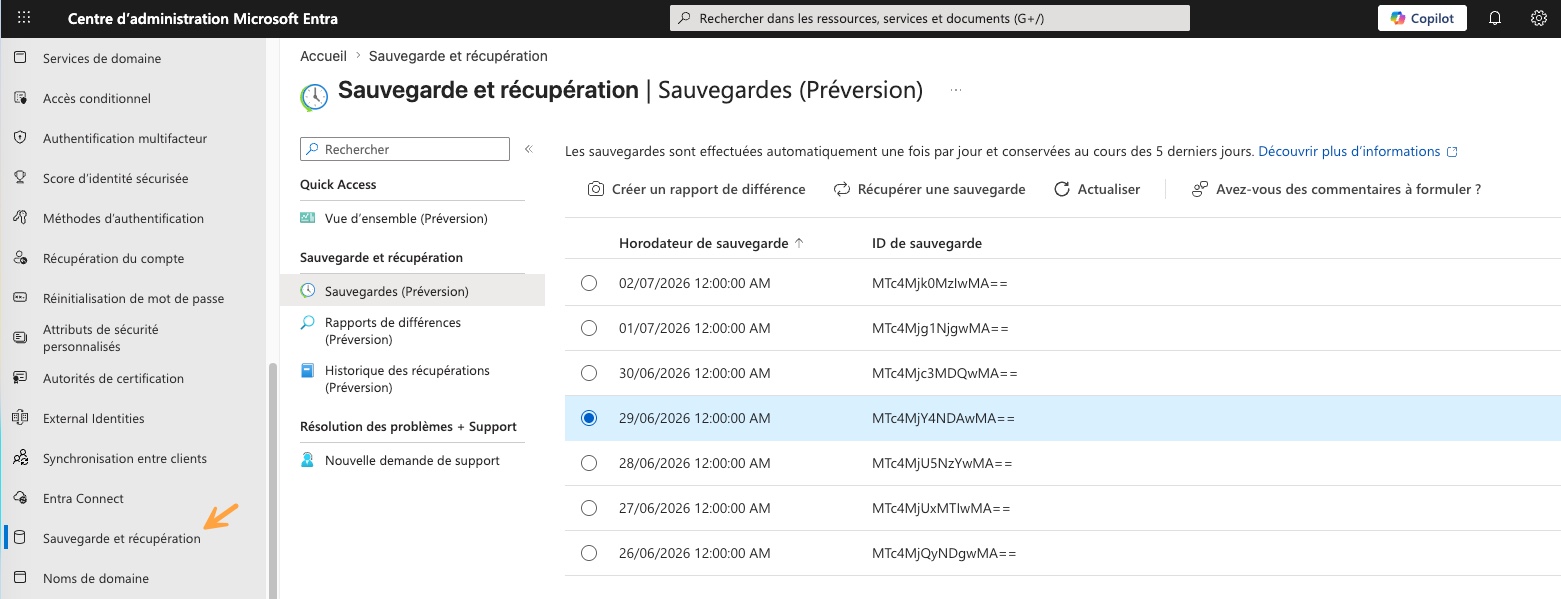
According to Microsoft, the backups are protected so that they are immutable: it is not possible to alter or delete the backups, or even disable the feature. This also applies if you act from a privileged account, especially if it has been compromised.
For restoration, Microsoft recommends a three-step workflow:
- Review the available backups in the Microsoft Entra admin center,
- Generate a difference report, which compares the tenant’s current state with a backup and details the modified attributes and links,
- Launch a targeted restore: all objects, only certain object types, or specific identities.
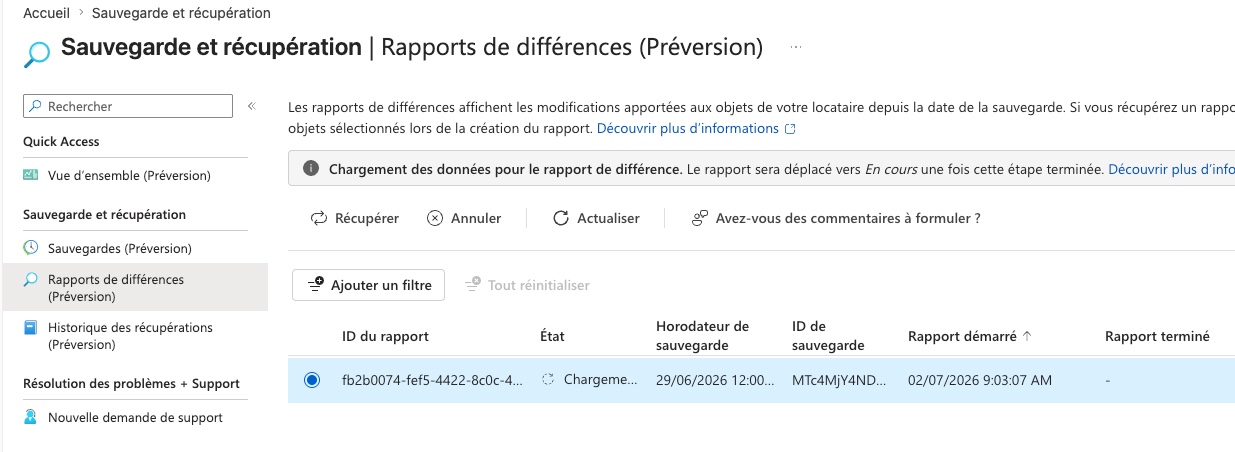
The duration of the operation mainly depends on the volume of changes to process. The more changes there are, the longer the restore will take.
This announcement is part of a series of additions designed to strengthen recovery capabilities in Entra ID. At the beginning of June, Microsoft already introduced soft delete for devices in Entra ID, with a 30-day restoration window.
What the solution backs up… and its blind spots
As of today, Entra Backup and Recovery supports:
- Users (core attributes such as
DisplayName,Department,UserPrincipalNameorUserType), - Groups, including their memberships,
- Applications and service principals,
- Conditional Access policies and named locations,
- Authentication methods policy and authorization policy,
- Agent ID, as well as managed identities.
But you need to be aware of the tool’s limitations, because there are some:
- Passwords are not backed up. After restoring users or authentication methods, you may need to set a new password and re-register authentication methods.
- Permanently deleted objects cannot be recovered. Only objects in soft delete state (the soft delete state) or objects whose attributes were modified can be restored.
- Objects synchronized from an on-premises Active Directory remain managed by AD. These objects do appear in difference reports (except for group memberships), but they are excluded from restoration. To make them recoverable through Entra, you must switch their authority source to the cloud. Otherwise, they must be protected separately at the AD DS level (a good opportunity to remember our procedure for restoring an Active Directory domain controller).
Licenses, roles, and prerequisites
Many organizations will be able to take advantage of this new feature without spending a cent. It is included with Entra ID P1 and P2 licenses, with no additional module to purchase. If you are still undecided between the different offers, our dedicated article on Entra ID licensing in 2026 reviews the Free, P1, P2, and Entra Suite plans.
Microsoft is also introducing two new roles to apply the principle of least privilege to managing this feature, namely:
- Microsoft Entra Backup Reader, which allows you to view backups, comparisons, and restore history,
- Microsoft Entra Backup Administrator, which adds difference report generation and restore initiation.
If you are a Global Admin, you have these permissions. This feature is accessible from the Entra admin center, via the "Backup and recovery" entry located in the side menu.
To learn more, check out these links:
- GA post - Microsoft Entra Blog
- Microsoft Security Blog - What's new in Microsoft Security: June 2026
- Microsoft Learn - Backup and Recovery overview
What do you think?