www.it-connect.fr


Gemini Nano: Google Chrome Quietly Installs a 4 GB AI Model
If you use Google Chrome, there’s a good chance the browser has already downloaded an artificial intelligence model: Gemini Nano, a 4 GB file. A researcher uncovered the behavior. Here’s what we know.
A silent download performed by Chrome
Alexander Hanff, a privacy-focused researcher known under the pseudonym That Privacy Guy, published a new post highlighting Google’s latest surprise for Chrome users. On his Mac, he discovered that Google Chrome had downloaded a massive 4 GB file in the background, without asking him anything.
The file in question, named weights.bin, contains the weights for the Gemini Nano AI model. It is designed to enable local AI features without relying on Google’s Cloud. The installation, which took 14 minutes and 28 seconds on his machine, created the file in a folder called OptGuideOnDeviceModel inside the user profile.
With Gemini Nano, Google aims to run several AI-powered features locally, similar to what it plans to do on mobile. In practice, this could be used for the following features:
- Writing assistance,
- Scam detection,
- Smart copy and paste,
- Web page summarization.
It appears that the browser enables an internal flag called OnDeviceModelBackgroundDownload long before offering AI settings to users. "Chrome doesn’t ask. Chrome doesn’t highlight it. If the user deletes it, Chrome downloads it again," That Privacy Guy noted.
Although this researcher observed the behavior on macOS, it seems to be the same on Windows and Linux as soon as Google Chrome is installed. So how can you get rid of it?
How can you block Gemini Nano from deploying on your machine?
As mentioned earlier, there is no point in manually deleting the weights.bin file: it will come back. You need to disable the mechanism behind this download if you want to block these features.
For users of Chrome 137 and later, here is the procedure to permanently block the installation:
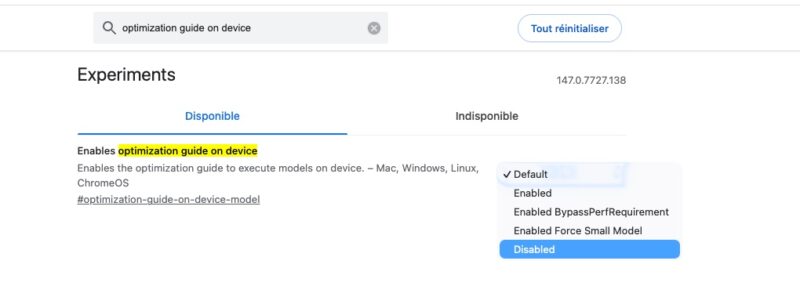
- Type
chrome://flagsin your address bar. - Search for the optimization guide on device option.
- Set the option to Disabled.
- Restart the browser.
Even though this is making waves now, this behavior does not appear to be new. After a bit of searching, you can find Google posts or social media messages dating back to late 2024 (such as this page).
If you manage a Windows fleet, you can push a Group Policy to block this feature directly in the Registry on your machines. Under HKEY_LOCAL_MACHINE\SOFTWARE\Policies\Google\Chrome, create a DWORD value named OptimizationGuideModelDownloading set to 0.
Once the feature is disabled, make sure to delete the relevant folder (OptGuideOnDeviceModel) since Google does not seem to clean it up. Here are the different locations depending on the OS in use:
- Windows:
%LOCALAPPDATA%\Google\Chrome\User Data\ - Linux and macOS:
~/.config/google-chrome/
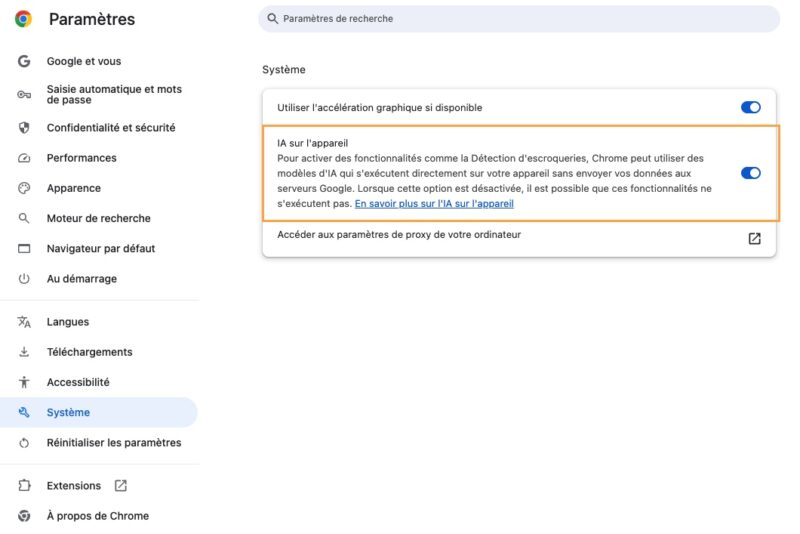
In its documentation, Google also mentions disabling the On-device AI option in Google Chrome settings. This option is enabled by default. Disabling it would also free up disk space: "Free up space: you free up storage space on your device.", it says.
A GDPR compliance issue
In his article, Alexander Hanff rightly points out that this forced download could violate GDPR, especially Articles 5 and 25. Indeed, this silent installation is a direct breach of GDPR and the ePrivacy Directive, undermining the fundamental principles of transparency, consent, and data protection by design (Privacy by Design).
On the one hand, if you want to use AI, it may be better for it to consume 4 GB of disk space and process data locally rather than in Google’s Cloud. But still, it would be nice to have a choice and not have to deal with this kind of decision...