www.it-connect.fr

Windows 11 KB5095093 Supercharges PC Restore with Point-in-time Restore
Microsoft has recently released KB5095093, the optional June 2026 update for Windows 11 24H2 and 25H2. It introduces a new recovery feature dubbed Point-in-time Restore, a new schedule for pausing Windows Update, and several other improvements. Here’s what you need to know about this update.
Released on June 23, 2026, this update moves Windows 11 25H2 to build 26200.8737 and Windows 11 24H2 to build 26100.8737. It is an optional, non-security cumulative update: it does not install automatically and is intended to preview fixes and features expected for the July 2026 Patch Tuesday.
Point-in-time restore and update pausing: the two headline features
The big new addition in KB5095093 is the arrival of Point-in-time restore. This recovery feature allows you to roll a PC back to an earlier state, including applications, settings, and personal files, from an automatically created restore point. The created restore points are stored locally on the computer and captured through the VSS service. For reference, I have prepared a full tutorial about this new feature, as well as a YouTube video. These resources will be published in the coming days.
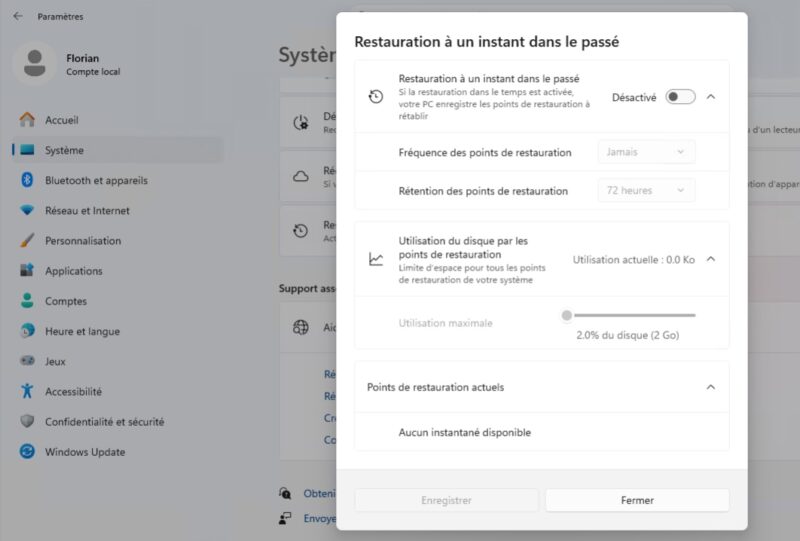
As a reminder, Microsoft unveiled this feature during Ignite 2025. We covered it in a dedicated article about the new Point-in-time Restore feature in Windows 11. It now complements the long-standing Windows 11 restore point mechanism, which has been part of Windows for a very long time.
The second notable addition is improved control over Windows Update pausing. Until now, you could pause updates for a maximum of four weeks, without being able to choose a specific end date. KB5095093 adds more flexibility by introducing a calendar view in Settings > Windows Update: you can now select a precise end date, up to 35 days, and then start a new pause when it expires.
File Explorer, Widgets, accessibility: the other improvements
Beyond these two additions, Microsoft used this update to roll out a series of enhancements:
- File Explorer: when hovering over a file from the home page, quick actions such as Open file location or Ask Copilot are now also available for work and school accounts (Entra ID). Microsoft also reports better startup performance for File Explorer and several address bar fixes.
- Accessibility: a Screen tint feature applies a colored tint to reduce eye strain, with adjustable intensity. Magnifier also becomes more precise with direct percentage-based zoom input.
- Widgets: the dashboard no longer opens simply by hovering over the icon, MSN content has been streamlined, and rendering is faster.
- Printing: Microsoft is expanding Windows Ready Print and now installs compatible printers by default using the
IPPprotocol.
This update also fixes an issue we recently reported: June's KB5094126 had broken OneDrive access in File Explorer. That is now history! In addition, the Redmond company says it has fixed File Explorer slowdowns related to OneDrive integration, as well as a bug where OneDrive files could appear duplicated in the Favorites section.
Fixes, Secure Boot, and end-of-support on the horizon
This update also includes several fixes and notifications worth watching:
- Recycle Bin: Microsoft fixes a bug introduced after KB5094126 where the confirmation dialog displayed an internal file name instead of the original name during permanent deletion. This is a known bug already mentioned in a previous article.
- Emoji Panel: the GIF engine switches from Google’s Tenor API to GIPHY. Note that you will need to have installed a recent update before June 30, 2026 to keep using GIFs in the panel (
Windows key + .). - Secure Boot: the update expands targeting for eligible devices for automatic certificate renewal. Microsoft reminds users that Secure Boot certificates on most machines start expiring from June 2026 onward. In fact, the "Microsoft Corporation KEK CA 2011" certificate expired on June 24, 2026. We covered this topic in the article about anticipating the Secure Boot certificate update.
What’s new for admins
For IT pros and administrators, KB5095093 introduces several changes to take into account:
- Start menu: Microsoft introduces two new personalization policies for administrators:
HideCategoryViewandConfigureStartPins, configurable through theStartCSP. This applies to devices managed by an MDM, such as Microsoft Intune. - WSL (Windows Subsystem for Linux): a bug has been fixed in mirrored networking mode when a VPN is active.
- Authentication: Microsoft improves Netlogon secure channel connections between domain controllers, making it easier for member servers to connect to controllers deployed before 2025. The description of this change is not very clear on Microsoft’s site...
- Network: access to shared network resources is now more reliable, including for unauthenticated connections used by some legacy applications, through functions such as
NetUseAdd. - Local AI workloads: the Windows graphics kernel adopts a new memory management policy designed for AI. PCs with more than 32 GB of RAM could therefore run larger AI models more efficiently.
Finally, Microsoft uses this release to remind users of an important deadline: Windows 11 24H2 Home and Pro editions will reach end of updates on October 13, 2026, while Enterprise and Education editions will remain supported until October 12, 2027. Recently, Microsoft also unveiled Windows 11 26H2.
For more details, you can consult the official KB5095093 release notes on Microsoft’s website. To get the update right away, go to Settings > Windows Update, then click Check for updates (but first you must enable Receive the latest updates as soon as they’re available). Feature rollout happens in phases: some features will not appear immediately on every machine after installing this KB.