www.it-connect.fr

PixelSmash: FFmpeg Flaw Exposes Jellyfin to Remote Code Execution
A 50 KB video file is enough to exploit PixelSmash (CVE-2026-8461), a critical flaw discovered in FFmpeg! Under certain conditions, it can enable remote code execution on a Jellyfin server and crash dozens of other applications that rely on this software component. Here’s what we know.
50 KB to trap a Jellyfin server
This security flaw was brought to light in a new report published by researchers at JFrog. It affects the MagicYUV decoder in libavcodec, the decoding library used by FFmpeg. For those unfamiliar with FFmpeg, it is the reference open-source library for audio and video processing, embedded in a huge number of solutions. This weakness is an out-of-bounds heap write and carries a CVSS score of 8.8 out of 10, which is considered high.
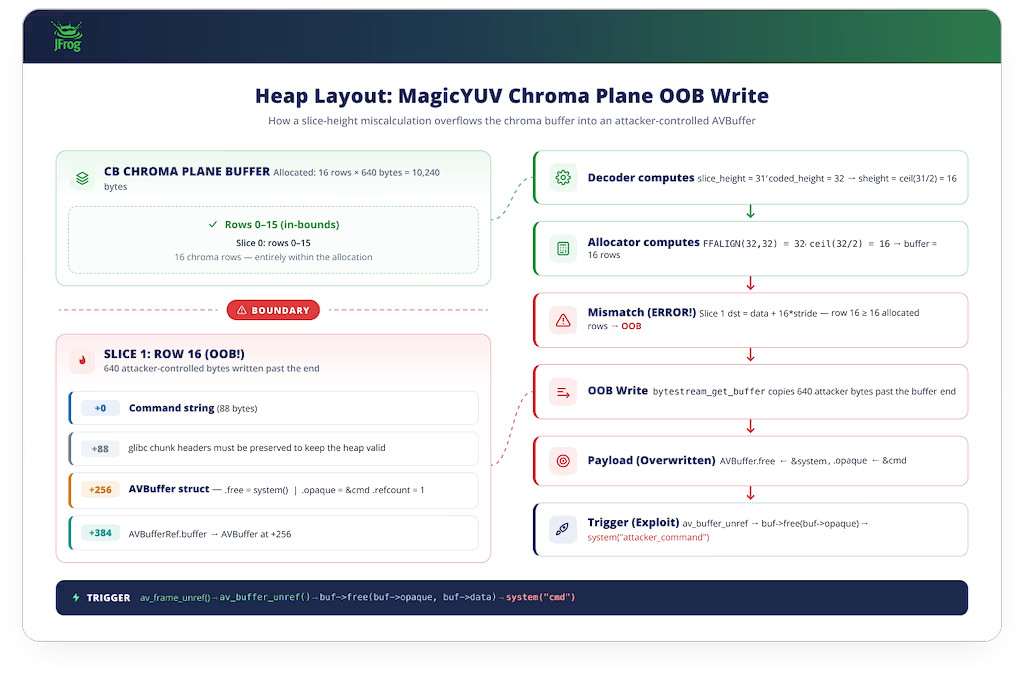
Without going too deep into the technical details (you can find more in JFrog’s report), this flaw is caused by a mismatch between how the image allocator and the decoder calculate the height of the chroma planes. This then causes a line of pixels to overflow beyond the allocated buffer.
By exploiting this vulnerability, the researchers were able to achieve remote code execution (RCE) on a Jellyfin server running version 10.11.9, via the automatic media library scan feature.
A flaw that spreads across an entire ecosystem
That is where the issue goes beyond Jellyfin. FFmpeg is embedded in a multitude of software packages, and the MagicYUV decoder is enabled by default in upstream builds. As a result, a single bug in a single decoder spreads to hundreds of projects that inherit this code vulnerable to the PixelSmash flaw.
JFrog confirmed crashes across many applications, including:
- mpv and Kodi media players,
- Emby, Immich, and PhotoPrism media servers,
- the OBS Studio streaming software,
- the ffmpegthumbnailer thumbnail generators used by GNOME, KDE, and XFCE,
- the vLLM AI framework.
Among the vulnerable applications, Nextcloud is also worth mentioning when video preview generation is enabled. For Plex users, you are in luck: it is an exception and is not affected by PixelSmash. Why? Plex compiles its own version of FFmpeg with a whitelist of decoders.
For self-hosting enthusiasts, here is how you could get caught out... A booby-trapped video file distributed via torrent or NZB, automatically fetched by Sonarr or Radarr, then placed into a media library scanned by Jellyfin: the exploit triggers with no user interaction at all.
As JFrog sums it up, this flaw illustrates a software supply chain problem: "Your attack surface includes every line of code in every dependency you ship, whether you have read it or not."
How can you protect yourself from PixelSmash?
Let’s start with an important clarification: remote code execution was only demonstrated with ASLR disabled on the Jellyfin server. This is a memory protection feature enabled by default on most Linux systems. Without it, the flaw can only cause a denial of service by crashing the targeted application.
A fix for the PixelSmash flaw is available: FFmpeg released version 8.1.2 on June 17, 2026. The recommended action is therefore to update FFmpeg (or the embedded jellyfin-ffmpeg build) to the patched version. For those compiling this library themselves, disable the vulnerable decoder with --disable-decoder=magicyuv, or apply the patch provided by the developers.
As for the timeline, JFrog says it reported the flaw to the FFmpeg security team on May 13, 2026, a fix was delivered on June 17, and the technical report was published a few days later (June 22, 2026).
Not to be confused with the Jellyfin flaws from April 2026
PixelSmash is located in FFmpeg, not Jellyfin. So do not confuse it with the batch of vulnerabilities patched in Jellyfin 10.11.7 earlier this year. Among them was CVE-2026-35033, discovered by Sonar: an FFmpeg argument injection via the StreamOptions parameter that allowed an unauthenticated attacker to read arbitrary files on the server (and could potentially lead to arbitrary code execution).
Two separate flaws, two different fixes: to stay safe, you need both a recent version of Jellyfin and a patched version of FFmpeg. There you go — now you know everything.
Finally, I’d also like to take this opportunity to remind you that IT-Connect offers a step-by-step guide to install Jellyfin on a Synology NAS with Docker.