www.it-connect.fr

SignDrop: Zero-Day Flaw Hijacks Windows CLFS Protection to Gain SYSTEM Rights
A protection designed by Microsoft to stop attacks against the Windows CLFS driver can now be abused to obtain SYSTEM privileges. That is the core idea behind SignDrop, the new zero-day disclosed by Nightmare Eclipse. He is back! Here is what we know about this vulnerability.
On November 10, 2026, Patch Tuesday day, researcher Abdelhamid Naceri, aka Nightmare Eclipse (or MSNightmare on GitHub), struck again. He published a new exploit called SignDrop, corresponding to a zero-day flaw that enables local privilege escalation on Windows. The GitHub repository indicates that the flaw lies in the authentication mechanism of the Common Log File System (CLFS). As of this writing, no CVE has been assigned, no patch is available, and Microsoft has not confirmed the issue.
This researcher is no stranger to this kind of release. Since April 2026, he has been publishing exploit after exploit targeting Windows, amid an ongoing dispute with Microsoft, his former employer. I previously covered the story of Nightmare Eclipse, from his dismissal by Microsoft to the reveal of his identity. The most recent episode involving attacks on Windows came in September with BigDiskBuster, a zero-day that prevented Microsoft Defender from updating. This time, the root of the problem is in clfs.sys, the CLFS kernel driver.
CLFS: when protection becomes the entry point
As a reminder, CLFS is a logging subsystem used by both applications and kernel components. Because it parses log files in kernel mode, it has been affected by many privilege escalation flaws, some of which have been exploited by ransomware groups (CVE-2025-29824).
To prevent this and strengthen CLFS security, Microsoft added an authentication mechanism: each log file receives an HMAC code, computed from a system-specific key. This protection arrived with the Windows 11 25H2 and Windows Server 2025 updates released starting October 28, 2025. That means a log whose code is missing or invalid is no longer opened.
This protection comes with a .cnpf file, created alongside the log with the same security attributes as the log itself. And it is precisely the creation of this file that SignDrop exploits. According to the researcher's explanation, here is how this zero-day is exploited:
- Initial control: CLFS correctly checks permissions when a standard user creates a log.
- Opening by a privileged process: if another process with elevated privileges then opens that log, it triggers creation of the missing
.cnpffile. - Defender intervention: the exploit forces Microsoft Defender to open the log. The
.cnpffile is then created with SYSTEM privileges, but with the permissions of the original file, meaning it can be modified by the standard user. - Redirection: using symbolic links in the object manager, this creation is redirected to a location chosen by the attacker. In the published PoC, this file is created under the name
hid.dllin a Windows folder from which this DLL will be loaded. The attacker replaces its contents with their own code, then triggers a UAC prompt.consent.exe, the process that displays these prompts and runs as SYSTEM, then loads the booby-trapped DLL: the attacker's code runs on Windows with SYSTEM privileges.
"Everything is done correctly by Microsoft here, but the logic allows abuse.", the researcher sums up. In other words, the cryptography is not being broken. The problem lies in the chain of operations.
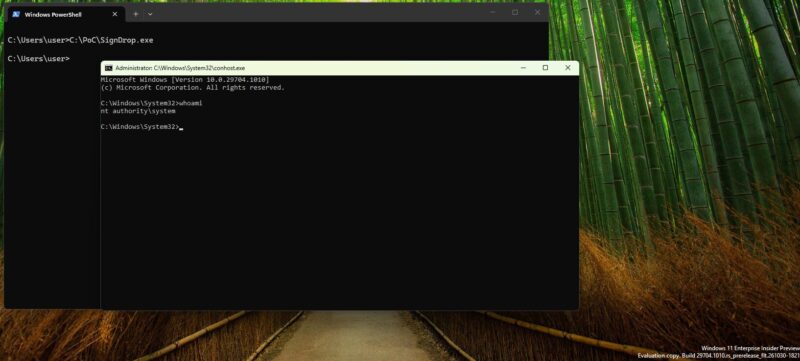
The researcher says he tested his exploit on Windows 11 26H2 and on experimental builds of Windows Server 2025. He also claims that 80% of Windows installations are exposed, and especially that the technique could be transferable to other antivirus tools and EDRs (though that still needs verification). In any case, the PoC works. Indeed, researchers at Cyderes compiled and ran the PoC, and obtained a SYSTEM shell.
How can you tell if your machine is exposed?
There is no patch for now, but exploitation still depends on the state of the CLFS authentication mechanism. The researcher recommends checking the Mode value of the Registry key associated with CLFS authentication:
Get-ItemProperty -Path "HKLM:\SYSTEM\CurrentControlSet\Services\CLFS\Authentication" -Name ModeAccording to the Microsoft documentation, value 0 corresponds to application mode, value 1 to learning mode, and value 2 to an administrator-disabled state. So that means values 0 and 1 place the machine within SignDrop's scope.
The question then becomes: should you disable the protection while waiting for a patch? It is better not to, otherwise you close one hole but open another. CLFS would then once again be able to analyze potentially malicious log files. And this older flaw is already well known to attackers, unlike SignDrop.