www.it-connect.fr

Windows 11 KB5132061 Won’t Install on Some PCs — Microsoft Promises a Fix
Is your Windows 11 PC repeatedly trying to install the November 2026 update without ever succeeding? You’re not alone. Microsoft has confirmed an installation issue with KB5132061 on some machines, with error codes 0x80070306, 0x800f0989, and 0x800f0993 involved. Here’s what we know.
On Tuesday, November 10, 2026, Microsoft released the KB5132061 cumulative update for Windows 11 26H2, 25H2, and 24H2 (for the latter version, only the Enterprise and Education editions) as part of Patch Tuesday. I also published an article to review the new features and fixes in the Windows 11 KB5132061 update.
Unfortunately, the installation does not seem to be going smoothly for all users (see here, for example). Microsoft has acknowledged the issue and added it to the known issues list (see this page). Affected machines "may repeatedly attempt to install the update or display error code 0x80070306, 0x800f0989, or 0x800f0993", the Redmond company says.
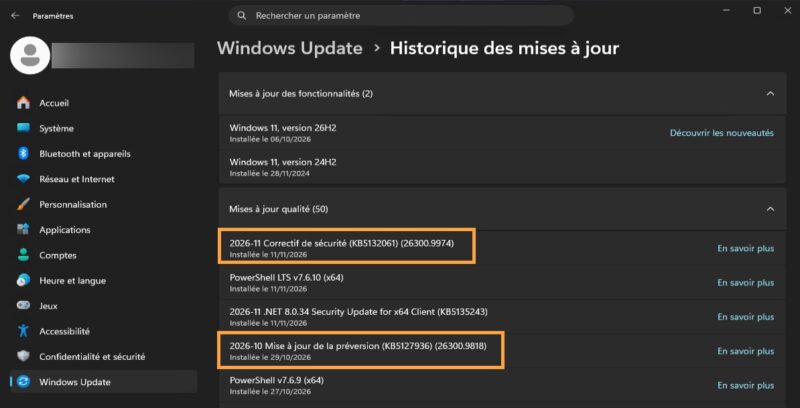
Do we know which machines are affected? Yes. Only PCs on which the optional October update, KB5127936, was installed are impacted. This preview update, released on October 28, does not include any security fixes: it provides a preview of the changes introduced by the next mandatory update. "This issue affects a limited number of devices", Microsoft says (incident WI1549693), without giving a figure. That said, it is reasonable to assume that many people installed the optional update, especially on personal computers.
To check whether you’re affected, open Settings > Windows Update > Update history. If KB5127936 appears in the list and KB5132061 fails or keeps reinstalling in a loop, your PC is one of the impacted devices. There must still be another criterion for being affected, since one of my machines received both updates without any issues.
A Microsoft-Side Fix, No Action Required on Your Part
The good news is that Microsoft has already deployed a fix. It applies automatically to Internet-connected PCs that install their updates through Windows Update. These devices "should be repaired within 24 to 48 hours from November 11, 2026, 10:00 a.m. Pacific Time.", Microsoft says. That is 7:00 p.m. Paris time. In other words, everything should be back to normal by the end of the day on Friday, November 13, Paris time.
Once repaired, the machines "will automatically download and install the November 2026 security update via Windows Update", Microsoft adds. Users do not need to do anything except wait and try again. This looks like an issue in the differentiation mechanism between the two patches involved in this incident. I still find it unbelievable that this scenario was not tested beforehand.
As always, the IT-Connect community would appreciate feedback if you have already tried to install this update.