 www.it-connect.fr

Euro-Office: The Open-Source Alternative to Microsoft Office
Euro-Office positions itself as Europe’s “sovereign” office suite, an open-source alternative to Microsoft Office and Google backed by a European consortium. But behind the European banner lies a paradox: the software is a fork of OnlyOffice, a solution with Russian roots, and its launch sparked a licensing conflict that truly shook the open-source world.
Between public administrations looking to reduce their dependence on American giants and companies determined to keep control over their data, Euro-Office is drawing attention. In this article, I’ll help you understand what Euro-Office really is, retrace the conflict that led to its creation, and then see how to install it by attaching it to a platform such as Nextcloud or Sync-in.
To answer the main question right away: Euro-Office is an open-source online office suite (documents, spreadsheets, presentations), derived from OnlyOffice Document Server, that does not work on its own but is attached to a host platform such as Nextcloud or Sync-in to provide collaborative document editing directly in the browser.
Euro-Office, an open-source online office suite
Euro-Office is an online office suite: it lets you create and edit text documents, spreadsheets, and presentations directly from a web browser, with real-time co-editing. It supports Microsoft formats (.docx, .xlsx, .pptx) and OpenDocument formats (.odt, .ods, .odp), making it an alternative to Microsoft Office and Microsoft 365 for organizations that want to keep control of their data.
The project was unveiled in March 2026 by a consortium of European players, including IONOS and Nextcloud, based on a simple observation: according to them, there was a missing suite combining Microsoft format compatibility, a familiar user experience, and European governance. Technically, Euro-Office was not built from scratch: it is a fork of OnlyOffice Document Server, with the code reused (because OnlyOffice is really good!).
On the licensing side, Euro-Office is distributed under AGPLv3, just as OnlyOffice was. The model is that of free software: free of charge, self-hostable, with no paid edition specific to the project. The technical stack is as follows: Document Server includes Node.js, PostgreSQL, RabbitMQ, Redis, and nginx.
What is AGPLv3? The GNU Affero General Public License v3 is a copyleft free-software license: anyone distributing the software (including via an online service) must publish the source code, including modifications. It is precisely the interpretation of this license that is at the heart of the Euro-Office / OnlyOffice conflict.
With Euro-Office, there is something paradoxical: this suite presented as “sovereign” and European relies on the code of OnlyOffice, published by Ascensio System SIA (based in Latvia), with Russian origins openly acknowledged by the publisher itself (it is no secret). It is this gap between the European branding and the Russian heritage that fueled part of the controversy.
For the source material, here are the project’s official resources:
- Official documentation: euro-office.github.io/documentation
- Project GitHub organization: github.com/Euro-Office
The origins of Euro-Office: an open-source licensing conflict
It is difficult to talk about Euro-Office without telling the story of the conflict that accompanied it, because it sheds light on both its technical choices and its positioning.
It all started at the end of March 2026: the consortium unveiled Euro-Office as a “sovereign” suite, forked from OnlyOffice, with the brand and logo removed from the code. A few days later, OnlyOffice accused the project of violating AGPLv3, on the grounds that its license required the OnlyOffice logo and brand attributions to be preserved (a clause added to its license file in 2021). Shortly afterward, OnlyOffice ended its eight-year partnership with Nextcloud, which had previously allowed OnlyOffice documents to be edited directly in Nextcloud.
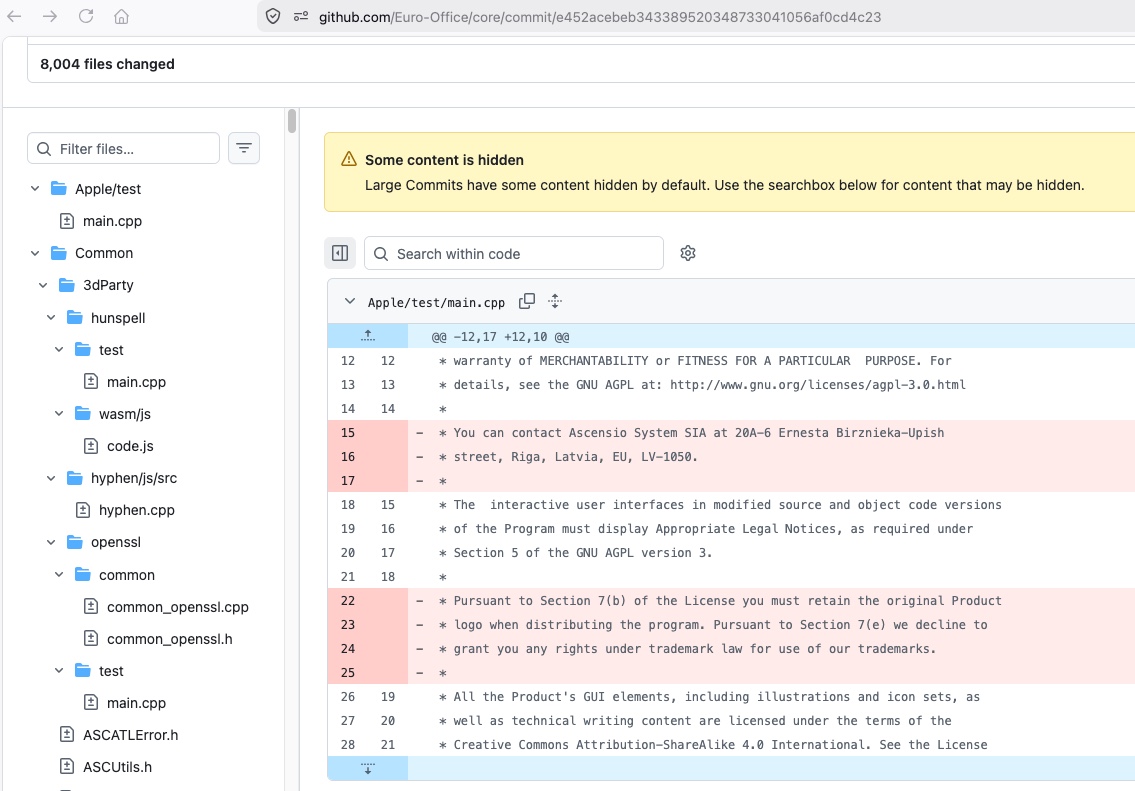
The debate then moved to legal ground. Nextcloud published an analysis defending the fork, supported by Bradley M. Kuhn (from the Software Freedom Conservancy, one of the authors of the AGPL) and by a specialized lawyer. Most importantly, the Free Software Foundation ruled publicly: in its view, the obligation to keep the logo does not fall under the “copyright attributions” allowed by Section 7(b) of the AGPLv3, but constitutes an additional restriction that any licensee is entitled to remove. In other words, the FSF sided with Euro-Office on the pure licensing issue.
OnlyOffice responded with an open letter, describing the FSF’s position as a “late interpretation” and arguing that only the text of AGPLv3 from 2007 should prevail. The publisher also said it had contacted the FSF itself, without receiving a direct reply. Then, in May 2026, OnlyOffice rewrote its terms with version 9.4 of its Document Server: the logo display requirement was replaced by a simple attribution on an “About” page, and the trademark question was moved to a dedicated policy. Euro-Office, meanwhile, continued on its path and released its first version in June 2026.
Note: at this stage, no court decision has been issued in this dispute.
Euro-Office plugs into a platform: Nextcloud, Sync-in, and more
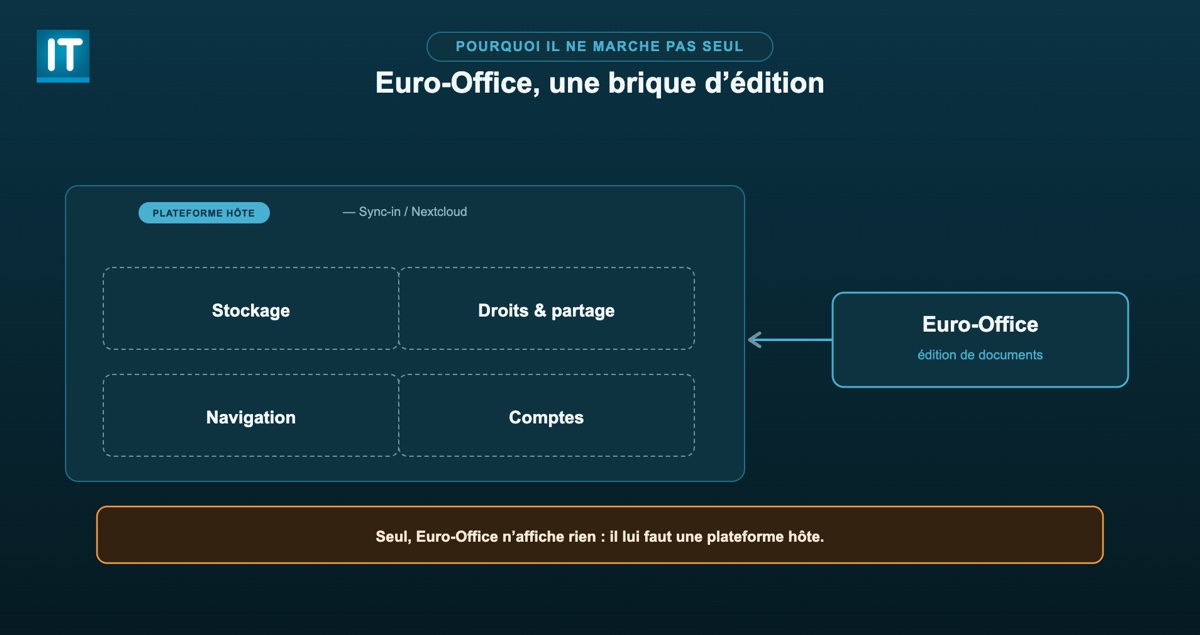
This is the point that is not obvious at first glance: Euro-Office is not installed as a standalone application. On its own, it is useless. In reality, it is a solution that needs a host platform, especially a file and document management system, for storage and user management. Euro-Office provides the online document editing engine, while the platform provides everything else. Euro-Office is only one building block within a complete collaborative platform.
The principle: a Document Server and a connector
The architecture is always the same. On one side, you deploy the Euro-Office Document Server (often via Docker), on its own machine or in its own container. On the other, your host platform is equipped with a connector that points to this Document Server. The two components must be able to reach each other, and a shared JWT secret secures the exchanges.
Note: I am not detailing the full Docker implementation of the Document Server and the platform here. That part is already covered step by step in our dedicated Sync-in tutorial (see below). The goal here is rather to show the integration logic common to all platforms.
With Sync-in
If you want a lightweight, self-hosted platform to host Euro-Office, Sync-in is an excellent candidate: this French alternative to Nextcloud is able to connect a Document Server (OnlyOffice, and therefore Euro-Office) for online editing. Rather than re-explaining everything, I’ll point you to the full guide: installing Sync-in with Docker (alternative to Nextcloud). There you’ll find the Document Server configuration, the JWT secret, and the reverse proxy setup.
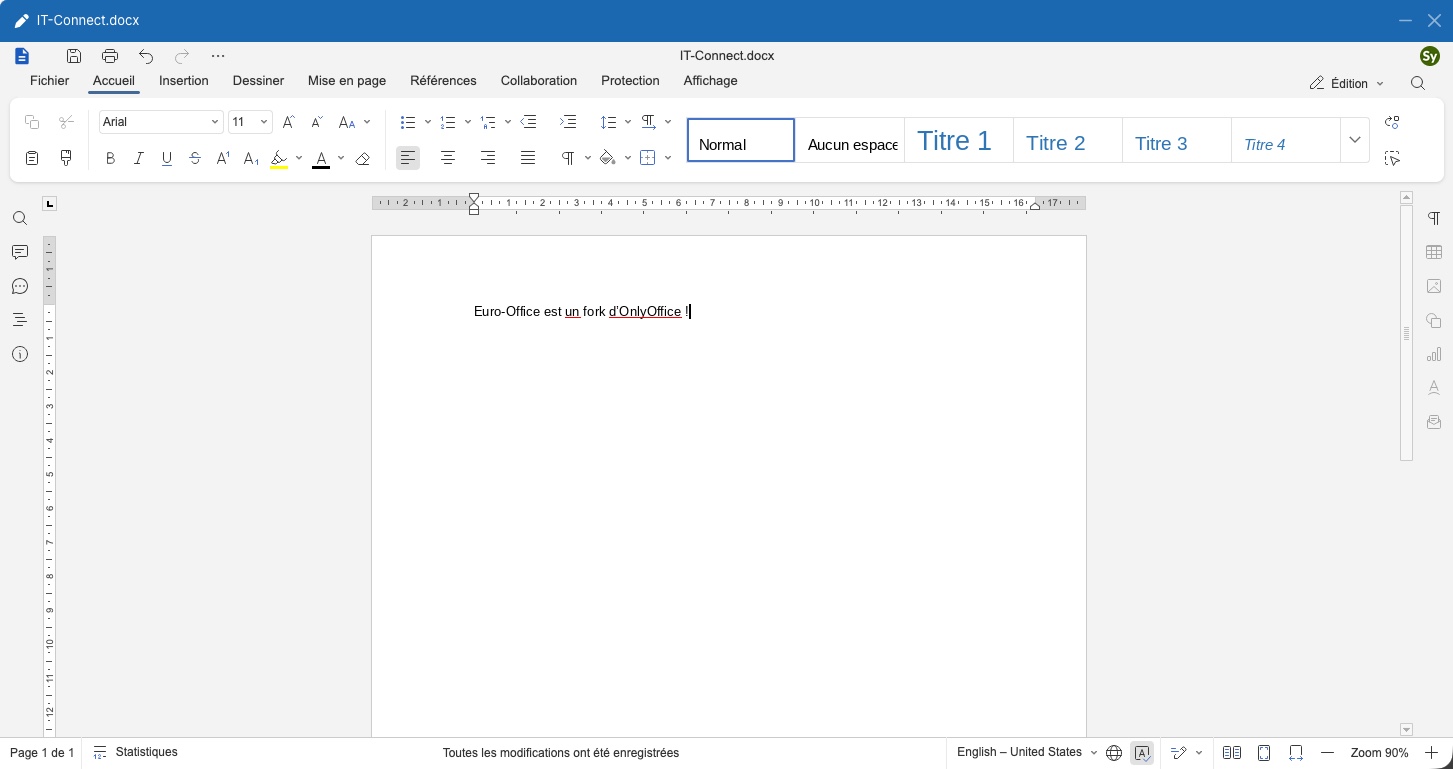
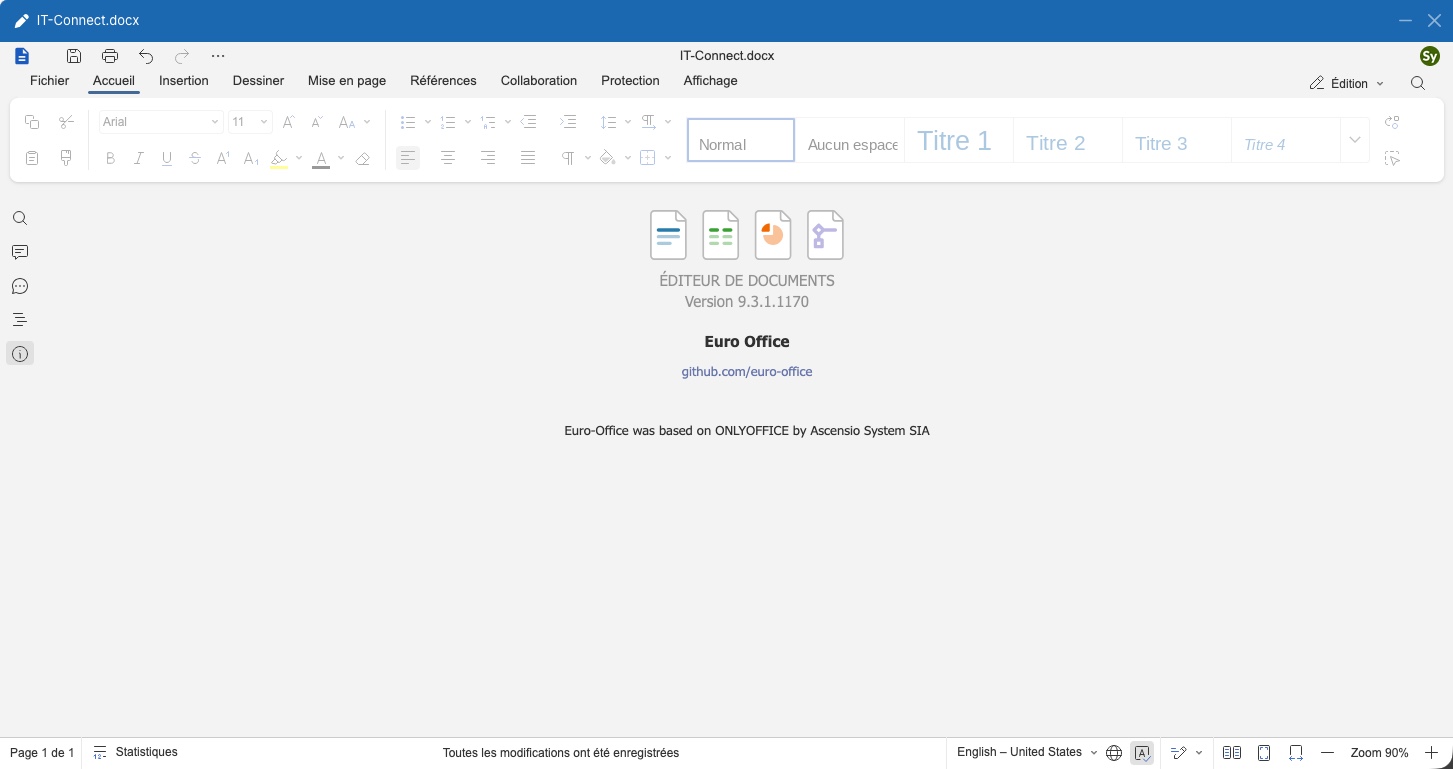
The Euro-Office interface is the same as OnlyOffice’s.
With Nextcloud
Euro-Office comes with turnkey integration for Nextcloud, via a dedicated application (a fork of the OnlyOffice app for Nextcloud). This is not surprising since Nextcloud is involved in the project.
Starting with Nextcloud 34, setup is done as follows:
- In Nextcloud, go to Apps > Office & text, find Euro-Office integration, then click Download and enable to install and activate the app.
- Then go to Settings > Administration > Euro-Office.
- Enter the URL of your Euro-Office Document Server, including protocol and port (for example
https://eurooffice.example.com). - Enter the JWT secret configured on the Document Server side. It must be at least 32 characters long. As usual, you can generate one with
openssl rand -hex 32. - Confirm with Save.
The Document Server must be reachable both from the Nextcloud server and from users’ browsers, and it must be able to send POST requests to Nextcloud (the callbacks that save changes). Since version 7.2, JWT is enabled by default: remember to use the same secret on both sides.
Note: if you are starting from a recent Nextcloud instance (Nextcloud Hub), Euro-Office may be offered natively as an office suite. In that case, setup comes down to connecting your Document Server.
The Euro-Office app for Nextcloud also has its own GitHub repository and the integration is described in the Euro-Office documentation.
And other platforms
The official documentation mentions connecting Euro-Office “to Nextcloud and other EDM platforms.” In practice, because it is derived from OnlyOffice Document Server, Euro-Office can interface with solutions that already knew how to communicate with OnlyOffice, provided the appropriate connector is available. I’m not a specialist in developing this integration, but there probably isn’t much change to expect.
Nextcloud and Sync-in are the two best documented cases to date. For the rest, I invite you to check the availability of a Euro-Office connector on a case-by-case basis.
Sources and resources
For those who want to verify everything themselves, here are the many articles published about this affair. These sources made the analysis possible and helped produce this article (and the YouTube video).
| Resource | Source |
|---|---|
| Euro-Office launch announcement | Nextcloud |
| The licensing violation accusation | OnlyOffice |
| The interview with Lev Bannov (OnlyOffice CEO) | OnlyOffice |
| The FSF’s official position | Free Software Foundation |
| The legal analysis of the dispute | Nextcloud |
| The open letter to the Euro-Office team | OnlyOffice |
| The rewritten terms (Docs 9.4) | OnlyOffice |
| The release of Euro-Office 1.0 | Nextcloud |
| “The facts about ONLYOFFICE” | OnlyOffice |
| OnlyOffice entry | Wikipédia |
| Euro-Office GitHub organization | GitHub |
| The commit removing the logo clause | GitHub |
| Official Euro-Office documentation | Euro-Office |
| Integrating a Document Server with Sync-in | Sync-in |
Docker image of the Document Server: ghcr.io/euro-office/documentserver | GitHub Container Registry |
Conclusion
Euro-Office is a project worth following: an open-source office suite, compatible with Microsoft formats, backed by European players, and now available in a stable version. Its value is real for anyone who wants to reduce dependence on Microsoft 365 while keeping control over their data. However, I think this project is questionable in terms of the blow it dealt to OnlyOffice: in my view, there is a real ethical issue at stake.
Can Microsoft 365 be replaced by Euro-Office? For many office use cases, yes: Euro-Office edits text documents, spreadsheets, and presentations in the browser, handles Microsoft and OpenDocument formats, and offers real-time co-editing. For very advanced needs (complex macros, Excel-specific features), testing with your own documents is still recommended. On the other hand, Euro-Office only covers document editing: it does not by itself replace the full Microsoft 365 suite (email, Teams, SharePoint, identity management), for which the host platform such as Nextcloud will take over (as far as possible).
To go further, if you want to get hands-on, the simplest approach is to start by deploying a host platform, then connect the Euro-Office Document Server to it:
- Install Sync-in with Docker
- Install Docker on Debian
- Official Euro-Office documentation: euro-office.github.io/documentation











Euro-Office does not offer a technically superior alternative to OnlyOffice in terms of compatibility or engine quality — it simply makes use of it. A switch from the Microsoft world is only justified if the sovereignty/compliance advantages (European governance, license transparency) are weighted higher than the proven long-term competence of a single, focused manufacturer.
Those who primarily seek technical stability, format fidelity, and maintenance competence are currently better served with OnlyOffice itself. Euro-Office is attractive for integration scenarios with a strong sovereignty focus, but it carries the risk that core competence continues to depend on the original OnlyOffice development, without the fork project having independently demonstrated this so far.